
How to Copy the URL on YouTube Video
You need to send someone a video, embed it in a product, or feed it into an API. The obvious move is to copy the address and move on. That works for a quick share, but it breaks down when the link is unlisted, carries unnecessary parameters, starts at the wrong moment, fails inside an iframe, or gets stored as an unstructured string in a data pipeline.
A URL on a YouTube video is better treated as a structured data object. It identifies a video, may encode playback behavior, can expose privacy boundaries, and may lead to descriptions or comments containing other outbound references. The right workflow depends on whether you're sharing, embedding, citing, or extracting data.
Table of Contents
- Finding and Copying Links Across Devices
- Understanding YouTube URL Anatomy and Parameters
- Navigating Privacy and Visibility Restrictions
- Mastering Timestamps and Privacy-Enhanced Embeds
- Extracting and Normalizing Links at Scale
- Operational Checklist for Video Link Management
Finding and Copying Links Across Devices
On a desktop browser, open the video and copy the address from the browser bar. You can also select Share, then choose Copy. The browser address commonly uses a watch format such as youtube.com/watch?v=VIDEO_ID, while YouTube's sharing dialog may provide a shorter youtu.be/VIDEO_ID version.
Both can identify the same video, but they serve different operational needs. The short format is convenient for messages, printed material, and environments with limited space. The standard watch URL is often easier for developers and analysts to parse because the video ID appears as the value of the v parameter. For a practical overview of retrieving video URLs, see this guide to getting YouTube video URLs.
On iOS or Android, open the video in the YouTube app, tap Share, and select Copy link. For a Short, the process is similar, but don't assume the resulting link behaves like a long-form video link in every context. YouTube's link guidance distinguishes between clickable links in long-form descriptions and comments and placements where links may not be clickable, including certain Shorts surfaces.
Choose the format for the job
- Quick conversation: Use the copied share link. It preserves the intended destination and is easy for another person to open.
- Data ingestion: Parse the URL and store the video ID separately from the original string.
- Short messages: A
youtu.belink is compact, but validate it before treating it as your canonical record. - Browser copying: Inspect the address bar if you need to remove unwanted tracking parameters before saving the link.
Don't remove every query parameter blindly. Some parameters affect playback, playlists, or attribution. Copy the original URL into a raw field, then create a normalized version for matching and reporting. That gives you an audit trail without allowing tracking noise to create duplicate records.
A copied link also doesn't tell you whether the recipient can view the video. Visibility, embedding permissions, age restrictions, and regional access can change the result after the URL leaves your device.
Understanding YouTube URL Anatomy and Parameters
A YouTube URL has several layers, but the video ID is the part your system usually needs to identify the asset. In a standard watch URL, it follows v=. In a short URL, it follows the domain and slash. The surrounding protocol, host, path, and query string determine how the platform interprets the request.
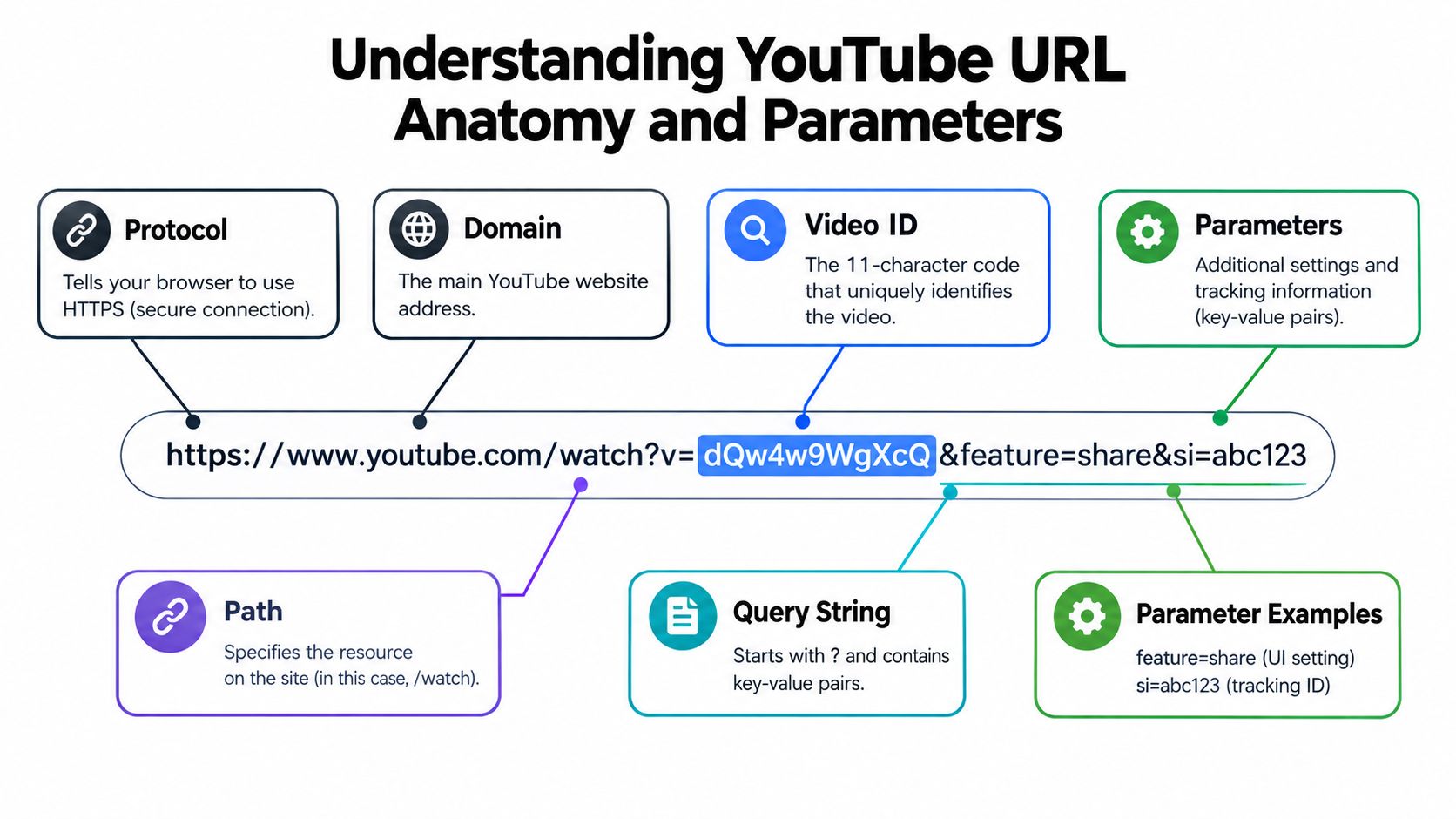
Consider these conceptual forms:
- `
- `
- `
- `
The first two are ordinary viewing links. The embed form targets a player intended for a website or application. The timestamped form adds playback behavior. A playlist parameter can preserve or establish playlist context, while other parameters may come from sharing flows or campaign tracking.
Store identity and behavior separately
A reliable schema shouldn't use the full URL as the primary key. Keep at least these fields:
| Field | Purpose |
|---|---|
video_id |
Stable identifier extracted from the supported URL form |
original_url |
Exact input received from a user or source |
canonical_url |
Clean viewing URL used for deduplication |
timestamp |
Optional playback offset |
playlist_id |
Optional collection context |
visibility |
Known access state, when available |
retrieved_at |
Time the system observed the link |
This separation prevents a timestamped citation from becoming a different video record and stops tracking parameters from producing false duplicates. It also lets you preserve attribution parameters separately while comparing destination identity without them.
A URL parser should reject unrelated hosts, handle both watch and short formats, decode percent-encoding where appropriate, and avoid assuming every path segment is a video ID. Channel URLs, playlist URLs, Shorts URLs, live URLs, and video URLs have different structures. If your product needs channel-level data rather than a single asset, use a dedicated YouTube channel URL reference instead of forcing every address through a video parser.
Treat the query string as configuration, not decoration. A parameter can alter the player, preserve context, or add tracking. Stripping values without classifying them first can unintentionally change the user experience.
Navigating Privacy and Visibility Restrictions
A link can be syntactically valid and still be unsuitable for distribution. YouTube distinguishes public, unlisted, and private videos. Private videos are limited to the owner and explicitly selected viewers, while unlisted videos can be accessed by anyone who possesses the link, as described in YouTube's privacy settings documentation.
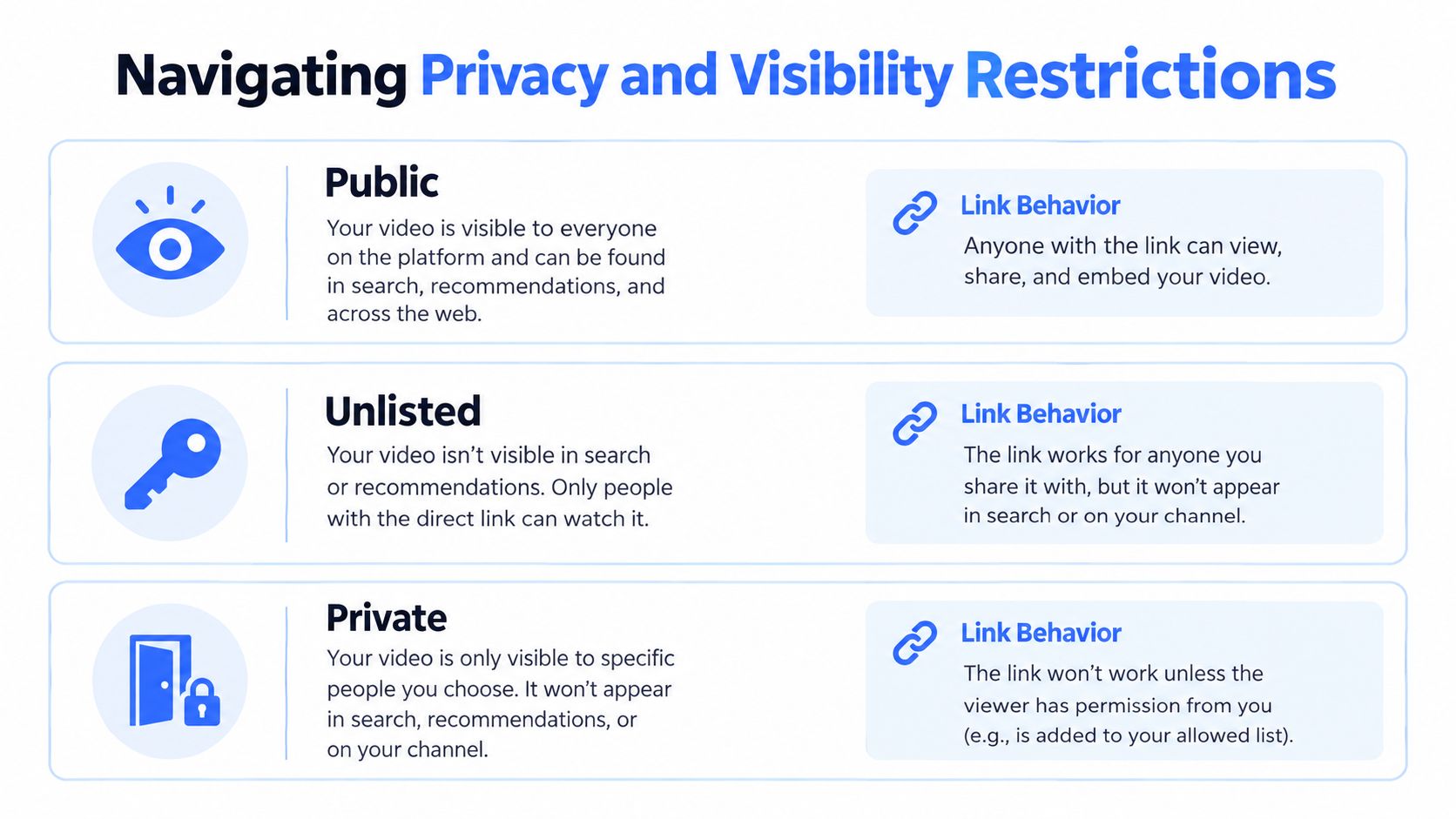
That makes an unlisted URL a bearer credential in practical terms. Anyone who receives it may be able to open the video, so posting it in a public issue, exposing it in a client-side application, or forwarding it outside the intended group can defeat the privacy boundary. Unlisted doesn't mean encrypted, authenticated, or confined to the original recipient.
Use a simple distribution decision
Ask these questions before sending a link:
- Should anyone discover the video? Use public visibility when open discovery is intended.
- Should access depend on possession of the URL? Unlisted can fit previews and controlled sharing, but treat the link as sensitive.
- Should access depend on named viewers? Private is the appropriate boundary when YouTube account selection is part of the workflow.
- Will the video appear on another site? Test embedding separately. A video may open on YouTube while refusing playback inside an iframe.
- Could the link already be exposed? Change visibility or replace the asset when the existing URL has circulated beyond its intended audience.
Embedding restrictions create a second failure mode. A website can have correct markup and still display an error because the creator has disabled embedding or because the viewer's environment can't access the video. Test the actual destination page, not just the watch URL in a browser tab.
Teams building live or event workflows should also separate ordinary video visibility from streaming prerequisites. A current overview of live stream requirements for 2026 can help with planning, but it shouldn't replace testing the resulting viewing and embed paths.
For internal reviews, client previews, and training material, record the visibility state alongside the URL. The data privacy best practices for developers are useful context when deciding where raw unlisted links may be logged, cached, or displayed.
Mastering Timestamps and Privacy-Enhanced Embeds
A timestamp solves one problem: it tells the player where to begin. It doesn't prove what the speaker said, preserve surrounding context, or guarantee that another person will see the same evidence later.
For a watch URL, a timestamp can be represented with a parameter such as t=1m30s, or with an equivalent seconds value. An embed URL can use a start parameter measured in seconds, for example:
`
The player starts at the requested position, but the URL alone doesn't identify the relevant claim. For research, fact-checking, or an AI evaluation set, store the video ID, title, upload date, timestamp, transcript excerpt or chapter label, and retrieval date. The YouTube transcript viewer can support the transcript side of that workflow.
Evidence rule: A timestamp is a playback instruction, not a complete citation.
Make embeds privacy-conscious
YouTube's privacy-enhanced embedded mode uses the youtube-nocookie.com domain and is intended to prevent embedded views from influencing the viewer's YouTube personalization, according to YouTube's embedded player guidance. A typical privacy-enhanced embed uses this host:
`
You can combine it with a start offset when the use case requires both privacy-conscious embedding and targeted playback. Keep the video ID and start value in separate application fields rather than concatenating strings throughout your code.
Playback reproducibility still has limits. Edited or removed videos, age restrictions, regional availability, changed captions, and disabled embeds can all undermine a previously collected reference. A production evidence record should therefore preserve the metadata available at retrieval time and should distinguish between “opens,” “plays,” and “supports the intended embedded experience.”
The practical trade-off is straightforward. A normal watch URL is best for human navigation. A timestamped URL is better for directing attention. An embed URL is for controlled player placement. A privacy-enhanced embed is appropriate when the page should avoid using the ordinary YouTube host for embedded playback behavior.
Extracting and Normalizing Links at Scale
Manual copying doesn't scale when a system needs to inspect descriptions, comments, or references across many videos. The correct unit of work is not “download a string.” It's extract, classify, normalize, and preserve provenance.
A large-scale academic study of approximately 137 million videos identified 570,996,385 individual links across 93,186,712 descriptions containing links. In the sampled data, 68% of descriptions included at least one URL, with an average of 4.17 URLs per video, according to the published study of linking on YouTube. Those figures show why description parsing deserves its own pipeline rather than an occasional manual export.
A resilient extraction pipeline
Start with the raw description and comments where your collection method permits access. Extract candidate URLs, decode HTML entities, normalize scheme and host casing, and canonicalize equivalent forms. Remove tracking parameters only in the field used to measure unique destinations. Preserve those parameters separately when attribution matters.
Then classify each result:
- YouTube internal: Video, channel, playlist, Shorts, or other YouTube destinations.
- External destination: Product page, campaign page, documentation, research source, or another domain.
- Malformed candidate: Text that resembles a URL but fails parsing or resolution.
- Redirecting URL: A link whose final destination differs from its original form.
Descriptions can contain repeated links, redirectors, deleted videos, malformed text, and links that no longer resolve. Your records should include the source video ID, field location, original URL, normalized URL, collection timestamp, and resolution status. Don't overwrite the original value during cleanup.
A study of this scale doesn't imply that any current endpoint exposes a complete historical inventory. Platform surfaces change, descriptions can be edited, and some links may exist only in comments or spoken content. For implementation decisions, compare APIs versus headless browsers based on access requirements, stability, rendering needs, and compliance constraints.
For a product team, a video-details endpoint can supply the starting metadata before downstream processing. For example, the Captapi YouTube Video Details API accepts a public video URL and returns video metadata and key statistics as JSON. The surrounding pipeline should still retain the submitted URL, extracted ID, retrieval time, and access result so a later failure doesn't erase what the system originally observed.
Operational Checklist for Video Link Management
A growth manager sharing a public announcement has a different requirement from an engineer feeding videos into a retrieval system. The first needs a link that opens cleanly. The second needs identity, provenance, access state, and predictable parsing.
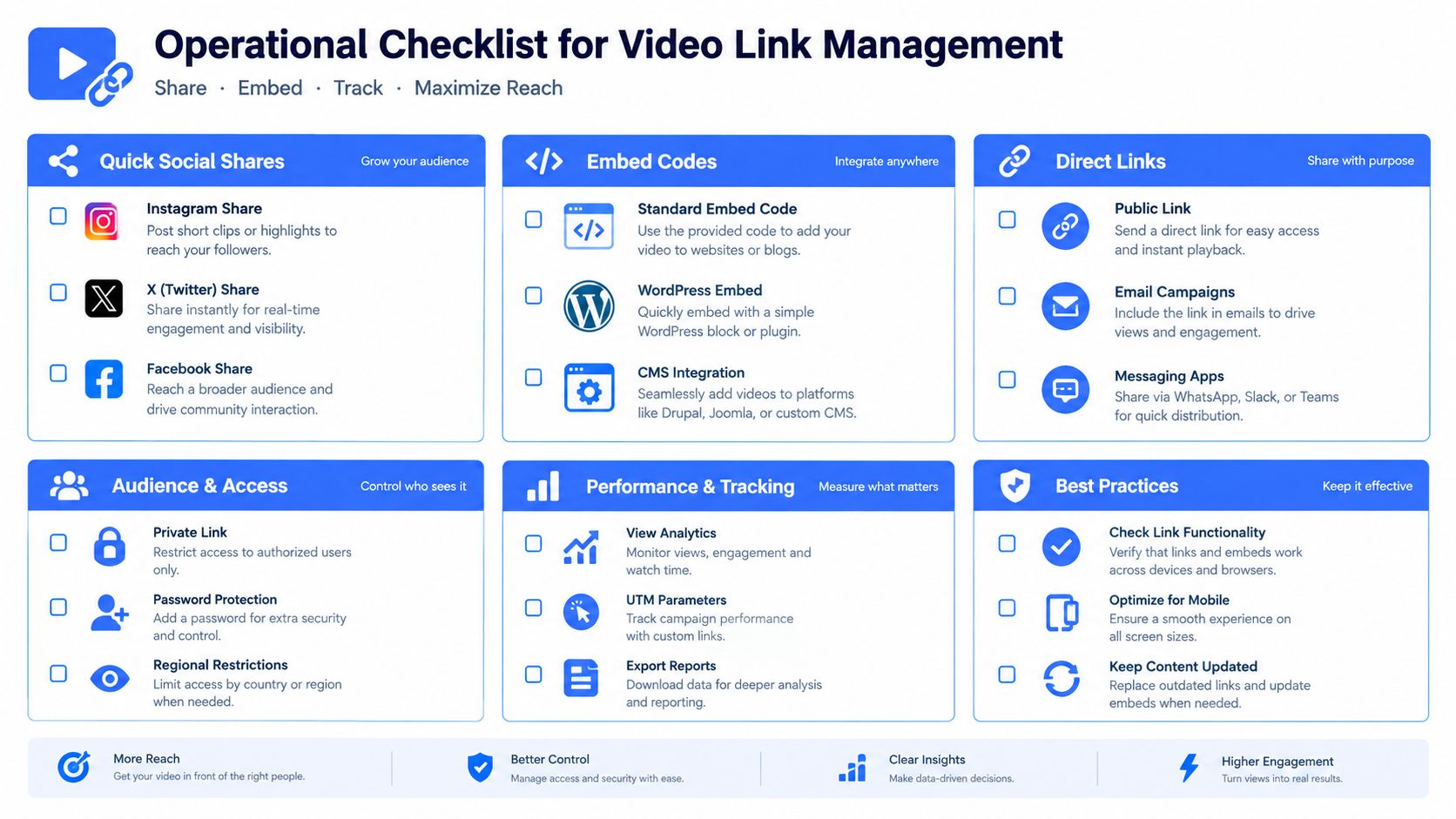
Use this operational checklist:
- Quick social shares: Copy from YouTube's Share control, open the result in a separate session, and confirm that the intended video loads.
- Clean records: Preserve the original URL, extract the video ID, and create a canonical value for deduplication.
- Timestamped evidence: Store the offset with a transcript excerpt, chapter label, retrieval date, and video metadata.
- Secure delivery: Treat unlisted URLs as sensitive. Don't place them in public tickets, source code, analytics dashboards, or unsecured pages.
- Professional embeds: Test the actual iframe, confirm that embedding is allowed, and use the privacy-enhanced host when it fits your privacy requirements.
- Automated extraction: Decode entities, normalize hosts, separate YouTube from external destinations, preserve tracking data independently, and log redirects or failures.
- Ongoing monitoring: Keep collection timestamps because descriptions, comments, visibility, and availability can change.
A reliable system also records what a URL did, not only what it looked like. “Parsed successfully,” “resolved,” “viewed,” and “embedded” are separate states. Modeling them separately makes debugging faster and prevents a successful HTTP response from being mistaken for a usable video experience.
Captapi can help product teams turn public YouTube URLs into structured video metadata, transcripts, comments, and related API outputs for analytics, RAG, content operations, or research workflows. Visit Captapi to review the available endpoints and connect URL handling to a repeatable data pipeline.