
Scraping Linkedin Python
Scraping LinkedIn with Python is generally prohibited by LinkedIn's terms; the safest routes are the official API, user-authorized exports, or a compliant third-party API whose collection rights you've verified. Don't start with a Selenium script and assume a publicly visible profile gives you permission to automate access.
The popular advice gets the order backward: install packages, imitate a browser, rotate proxies, then worry about policy. My recommendation is the opposite. Choose an authorized data source first, define the fields you need, and only then choose the Python tools.
Table of Contents
- Why Python LinkedIn Scraping Starts with Policy
- Choosing the Right Data Path Before You Code
- Requests and BeautifulSoup for Authorized Endpoints
- Selenium and Playwright for Dynamic Authorized Pages
- Rate Limits, Retries, and Defensive Patterns
- A Realistic Workforce Research Workflow
- When the Answer Is Not to Scrape
Why Python LinkedIn Scraping Starts with Policy
Treating LinkedIn scraping as a normal parsing exercise is a scope mistake. Before a developer chooses selectors, the project owner needs to establish whether the collection method and intended reuse are permitted.
LinkedIn's robots.txt notice on automated access explicitly prohibits robots and other automated means of accessing the service without express permission. Its Help documentation on prohibited software separately bars third-party tools that scrape or automate activity and warns about account restrictions or shutdowns.
A successful HTTP response isn't a permission grant. Neither is an account login, a browser-visible profile, or a stakeholder's assurance that everyone else collects the same data.
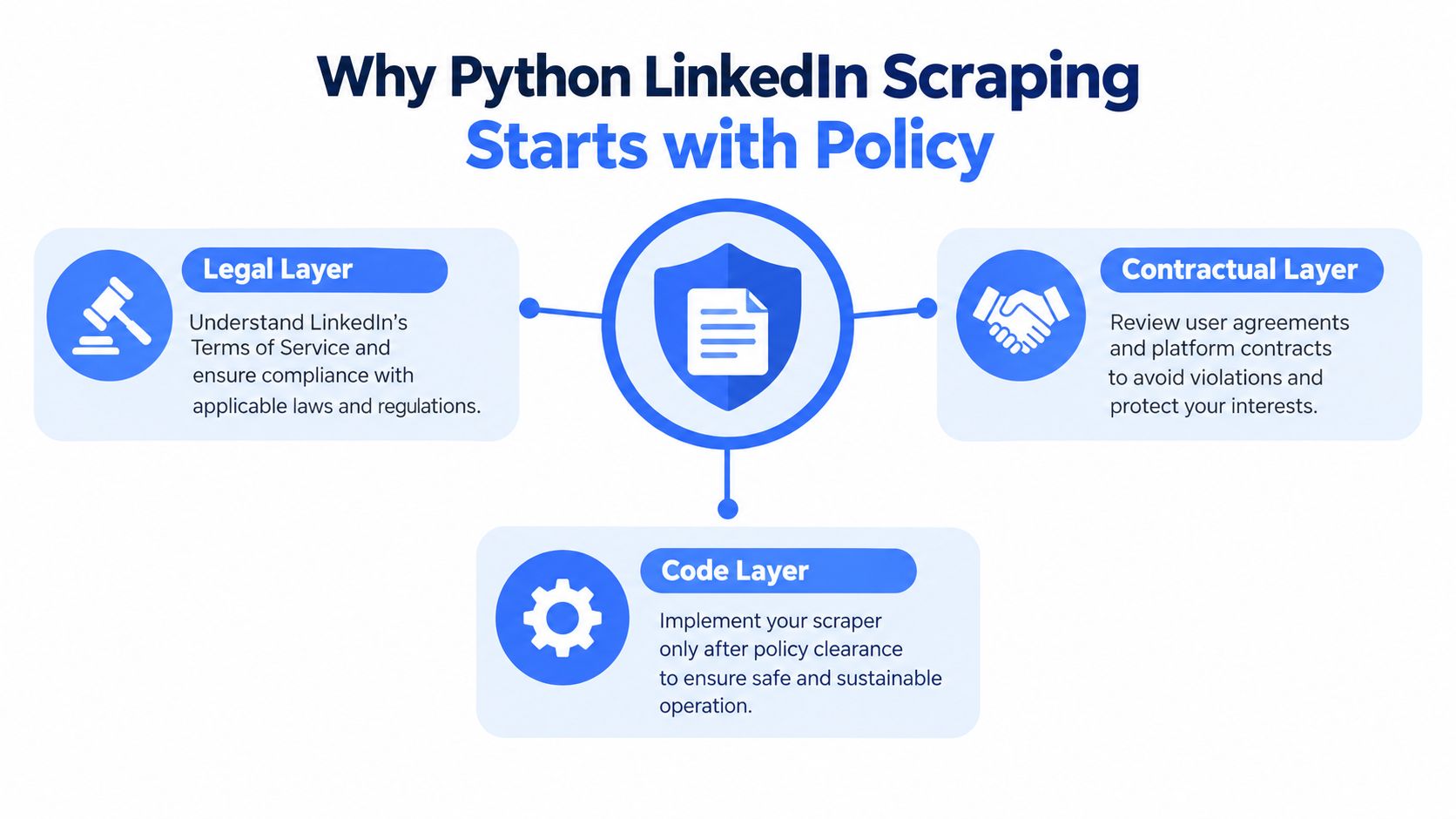
Separate the approval questions
Keep legal review, contractual review, and implementation review distinct. A lawyer's conclusion about a particular statute doesn't automatically settle platform terms, privacy obligations, or downstream reuse.
- Legal basis: Ask counsel to assess the collection purpose, applicable jurisdiction, and personal-data obligations.
- Contractual authority: Identify the agreement or written permission covering the proposed access method.
- Implementation scope: Translate that approval into allowed sources, fields, recipients, and stopping conditions.
The policy layers should be explicit before implementation begins.
For stakeholder discussions, Yalc's LinkedIn automation limits overview is a useful supplementary resource to review alongside the platform's own rules. Use the website scraping legality guide to frame broader questions for counsel, not as a substitute for project-specific approval.
Make authorization operational
Store the approval with the pipeline configuration. Record who approved access, what they approved, and what changes require another review. A new collection purpose or a switch from exports to browser automation should trigger that review.
Practical rule: If your authorization document can't describe the collection method, your engineering ticket isn't ready.
Also assign someone ownership of retention, deletion, and access control. Developers shouldn't have to infer those requirements from a vague request to collect professional profiles. The deliverable starts with a defensible scope, not a repository full of working selectors.
Choosing the Right Data Path Before You Code
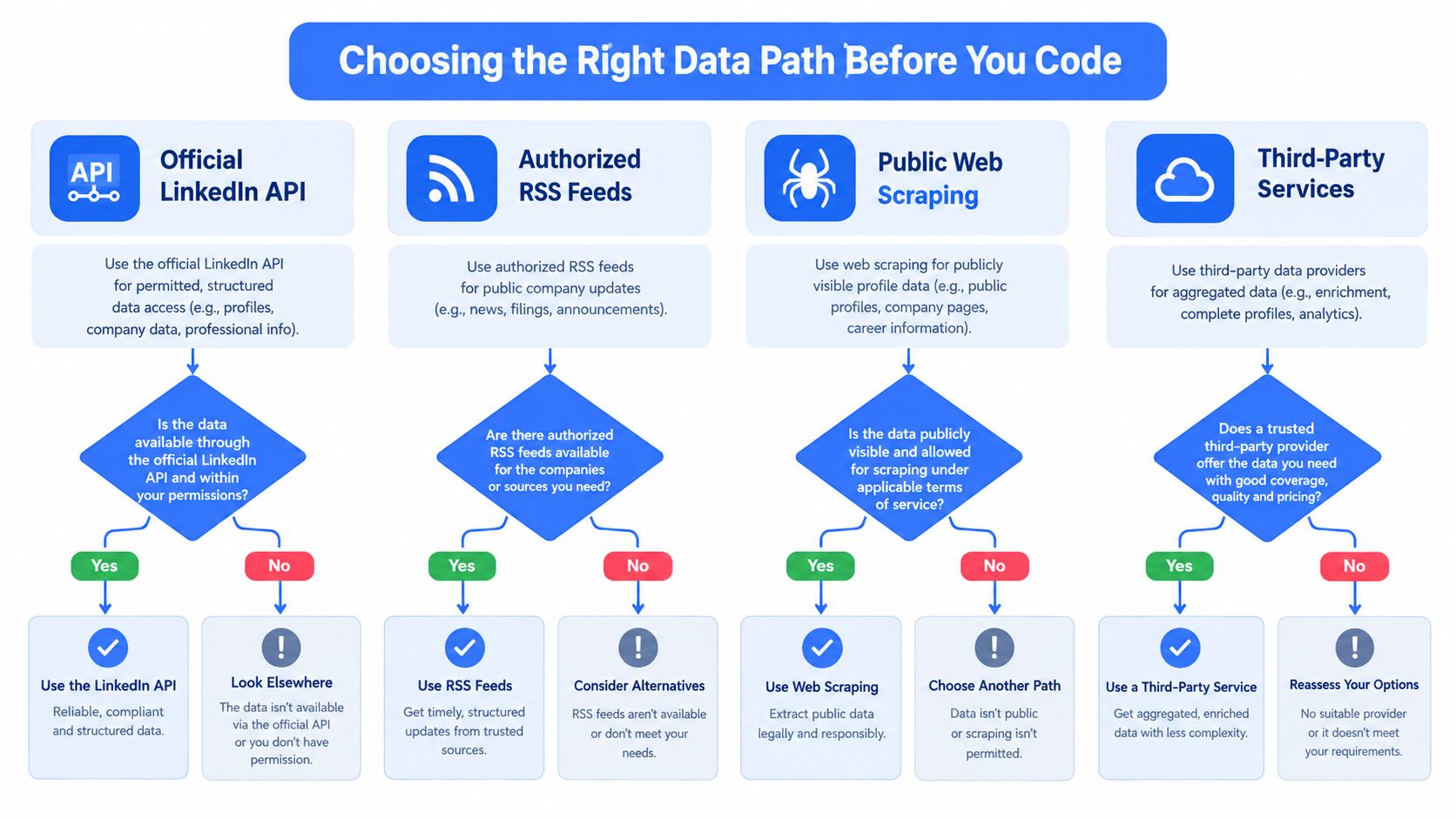
Choose the source by required fields and permitted use, not by which tutorial looks easiest. A workforce study, a recruiting integration, and a company-content dashboard don't necessarily need the same access path.
Start with LinkedIn's documented API where the integration and fields are authorized. Check eligibility and scope before designing your database around assumed access; the LinkedIn API guide provides a starting point for that investigation.
If an API doesn't fit, inspect an approved export or an authorized partner endpoint. For recruitment-system integration planning, erecruit API documentation is another resource to evaluate against your actual requirements, not evidence that a separate service grants LinkedIn collection rights.
Compare the source contracts
| Data path | Appropriate fit | What to verify |
|---|---|---|
| Official API | A permitted integration requiring structured responses | Granted scopes, available fields, reuse restrictions |
| User-authorized export | Analysis of data the user can legitimately provide | Export provenance, purpose, third-party data obligations |
| Permitted public-page research | A specifically authorized research scope | Written permission, lawful basis, collection boundaries |
| Third-party API | Outsourced data delivery | Collection rights, provenance, retention and deletion terms |
Evaluate cost as engineering effort as well as vendor fees. Ask who maintains the adapter, resolves missing fields, handles deletion requests, and investigates source changes. Don't accept a provider's marketing label of compliant without examining its collection model.
Use the decision flow as an intake aid, not as proof that every illustrated source exists or is available to your project. An RSS feed belongs in the workflow only when an authorized feed exists.
Don't turn litigation into an access policy
On April 18, 2022, the Ninth Circuit upheld the preliminary injunction preventing LinkedIn from technically blocking hiQ's public-profile access, but LinkedIn obtained a permanent injunction against hiQ on December 6, 2022; the hiQ litigation history did not create general permission to scrape.
Complete the intake record with purpose, source authority, necessary fields, retention, deletion triggers, and approved recipients. If none of the data paths meets those requirements, reduce the scope or decline the collection. Don't invent an unauthorized fallback.
Requests and BeautifulSoup for Authorized Endpoints
Use requests plus BeautifulSoup when an authorized source returns static HTML. For an authorized JSON API, use the response's JSON parser instead; HTML selectors add no value there.
The programming environment may look familiar, but distinguish data ingestion from automated posting. Permission to read a feed doesn't grant permission to automate LinkedIn activity.

Keep the client small and explicit
The following script accepts an endpoint you've independently approved. It expects a controlled HTML fixture or source contract containing article[data-record], .title, and .company. These are example schema selectors, not promised LinkedIn selectors.
Install requests and beautifulsoup4 in your project environment. Set the endpoint and timeout through environment variables, then run the script.
import json
import os

import requests
from bs4 import BeautifulSoup

def collect():
    endpoint = os.environ["AUTHORIZED_HTML_URL"]
    timeout = float(os.environ["REQUEST_TIMEOUT_SECONDS"])

    with requests.Session() as session:
        session.headers["User-Agent"] = "AuthorizedResearchClient"
        response = session.get(
            endpoint,
            timeout=timeout,
            allow_redirects=False,
        )

        if response.status_code != requests.codes.ok:
            raise SystemExit(
                f"Collection stopped: HTTP {response.status_code}"
            )

        if "text/html" not in response.headers.get(
            "Content-Type", ""
        ).lower():
            raise ValueError("Expected an HTML response")

        soup = BeautifulSoup(response.content, "html.parser")
        cards = soup.select("article[data-record]")
        if not cards:
            raise ValueError("Expected records are missing")

        records = []
        for card in cards:
            title = card.select_one(".title")
            company = card.select_one(".company")
            if title is None or company is None:
                raise ValueError("Required selector is missing")

            record = {
                "title": title.get_text(" ", strip=True),
                "company": company.get_text(" ", strip=True),
            }
            if not all(record.values()):
                raise ValueError("Required field is empty")
            records.append(record)

        return records

if __name__ == "__main__":
    print(json.dumps(collect(), ensure_ascii=False))
This client deliberately avoids automatic redirect following, pagination discovery, and credential handling. Review any redirect destination before adding it to the approved scope. Identify the client rather than copying browser headers to disguise automation.
For a visual Python walkthrough, the embedded video is supplementary material, not authorization for its collection techniques.
Debug the response before the selector
When text is corrupted, inspect the declared encoding and saved response bytes. When a field is missing, check whether it exists in the original HTML rather than assuming your selector is wrong.
Replay representative fixtures after layout changes. If JavaScript supplies the required field, decide whether an authorized structured endpoint can provide it before introducing a browser. Don't convert a parsing failure into permission to inspect access-controlled endpoints.
Selenium and Playwright for Dynamic Authorized Pages
A browser is justified when an approved workflow requires rendered content. It isn't the default upgrade for a blocked request.
For implementation planning, I'd retain Selenium in an existing Selenium-based test suite and consider Playwright for a new browser adapter. That's an engineering preference, not a claim that either tool makes LinkedIn collection permissible.
Selenium vs Playwright for authorized LinkedIn-adjacent browser work
| Dimension | Selenium | Playwright |
|---|---|---|
| Integration choice | Sensible when the team already uses WebDriver | Sensible for a new Playwright-based adapter |
| Waiting style | Make explicit waits part of the extraction flow | Use locator waiting deliberately |
| Extraction approach | Find elements, then read their text | Use locators to read rendered fields |
| Session ownership | Configure and close the driver explicitly | Configure and close the browser context explicitly |
| Authorization boundary | No permission follows from using Selenium | No permission follows from using Playwright |
Avoid framework migration unless it solves a measured problem. Keeping an existing, tested Selenium adapter may be cheaper to maintain than rewriting it for a different API.
Keep browser ownership visible
This Playwright example visits only a supplied, approved page. Install Playwright and its browser runtime separately, and configure the timeout for your own environment.
import os
from playwright.sync_api import sync_playwright

def collect_rendered():
    endpoint = os.environ["AUTHORIZED_BROWSER_URL"]
    timeout = float(os.environ["BROWSER_TIMEOUT_MS"])

    with sync_playwright() as runtime:
        browser = runtime.chromium.launch()
        try:
            page = browser.new_page()
            response = page.goto(
                endpoint,
                wait_until="domcontentloaded",
                timeout=timeout,
            )
            if response is None or not response.ok:
                raise RuntimeError("Navigation failed")

            title = page.locator("[data-record-title]")
            title.wait_for(state="visible", timeout=timeout)
            value = title.inner_text().strip()
            if not value:
                raise ValueError("Rendered title is empty")
            return {"title": value}
        finally:
            browser.close()

if __name__ == "__main__":
    print(collect_rendered())
The Selenium equivalent follows the same ownership pattern: create the driver, go to the approved target, wait explicitly for the contracted selector, extract and validate text, and call driver.quit() in finally. Keep either adapter behind the same output schema so downstream code doesn't care which renderer produced a record.
Browser sessions require additional review when redirects or new pages leave the approved target. Don't let a successful navigation expand the collection scope.
Diagnose failures without disguising automation
The LinkedIn scraping reliability discussion identifies request frequency, scroll behavior, session duration, IP reputation, and inconsistent device signals among automation indicators. Use those observations to diagnose and stop a failing workflow, not to assemble a stealth configuration.
A browser challenge is a reason to review access, not a backlog item for a CAPTCHA workaround.
Reserve browser automation for explicitly permitted workflows, including approved testing or internal tools. For broader queue and adapter design, consult the Python web crawler guide. Neither Selenium nor Playwright belongs in a workflow whose success depends on bypassing controls.
Rate Limits, Retries, and Defensive Patterns
Build the failure policy before scheduling collection. An authorized job still needs bounded requests, predictable shutdown, and enough evidence to explain incomplete output.
A published academic collection methodology recommends a 3 to 10 second inter-request delay and collection outside peak hours. Treat that as a historical low-impact research benchmark, not a universal rate limit or evidence of permission.
Configure behavior from the source agreement
Keep delay bounds, timeout, retry budget, and pagination boundaries in reviewed configuration. The approved source's documented limits take precedence over a generic tutorial.
collection_policy = {
    "delay_min": approved_policy["delay_min"],
    "delay_max": approved_policy["delay_max"],
    "timeout": approved_policy["timeout"],
    "retry_budget": approved_policy["retry_budget"],
    "page_limit": approved_policy["page_limit"],
    "follow_redirects": False,
}
Use a session for connection management, but isolate credentials by source and project. Never borrow someone's personal browser cookies as a convenient authentication mechanism.
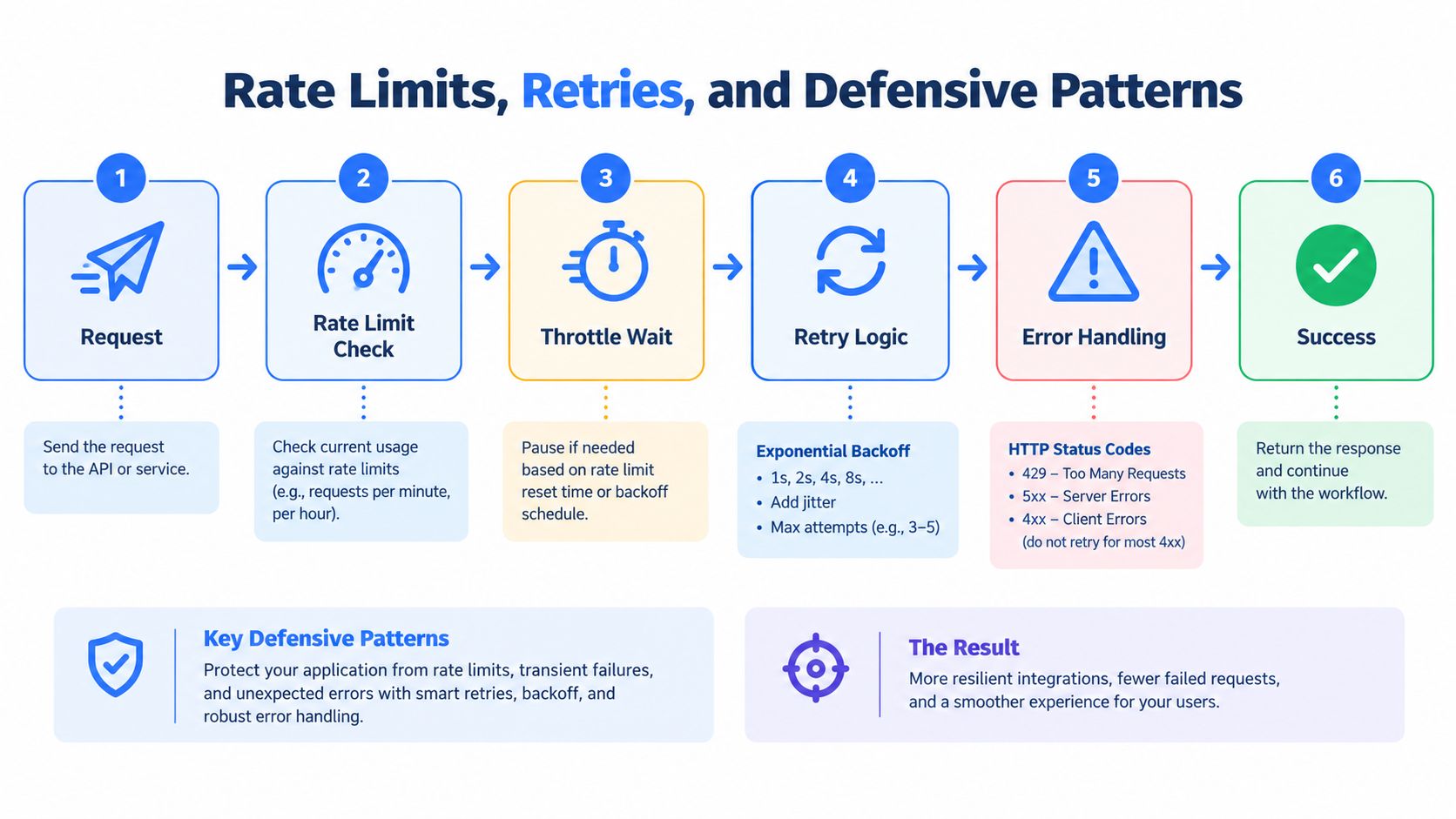
The request lifecycle should distinguish temporary delivery failures from access refusals.
Fail according to the signal
- Access refusal: Stop on HTTP 403, CAPTCHA, or checkpoint responses. Require review before resuming.
- Rate limit: Pause on HTTP 429. Retry only when the authorized source's contract permits it, and stop on repeated responses.
- Transient failure: Apply bounded exponential backoff with jitter to eligible timeouts or server errors.
- Schema failure: Quarantine the response rather than emitting an apparently complete record.
Don't retry every exception. A missing required field won't become valid because the worker asks for it repeatedly.
Log source identity, sanitized URL, status, latency, request ID, parser version, and outcome. Exclude tokens and unnecessary personal data from logs. Preserve permitted raw responses with access restrictions and retention controls, then replay a small labeled sample in CI before releasing parser changes.
Measure data quality separately from delivery. Track completeness, duplicates, errors, checkpoints, and freshness rather than treating output volume as success. Use Scrapy when queueing, item pipelines, and resumability justify it.
A corporate proxy can serve approved networking requirements; proxy rotation shouldn't be a retry strategy for denied access. The API rate-limit guide offers additional context for designing this plumbing.
A Realistic Workforce Research Workflow
Consider a hypothetical workforce trends study, not a reported customer case. An analytics team wants to compare job families and broad regions using an authorized export and a separately permitted dataset.
The analyst writes the purpose before the engineer builds ingestion. The study needs role category, region, organization category, and observation date. Names, contact details, and free-text biographies don't belong in the working dataset unless the team can justify them.
Follow a record through the pipeline
At intake, the engineer checks the export's provenance and permitted use. The team stores the original file in restricted storage, records its checksum, and links it to the approval record.
The ingestion adapter normalizes the export into the agreed schema. If the permitted dataset includes static HTML, the requests adapter handles that portion; a browser adapter is reserved for an approved dynamic source that cannot supply the required content statically.
- Normalization: Keep original category values alongside mapped values so analysts can inspect classification decisions.
- Validation: Quarantine missing required fields and review duplicate candidates before merging records.
- Provenance: Attach source identity, observation time, approval reference, and parser version to each accepted record.
- Publication: Deliver aggregated tables with a methods note explaining coverage and exclusions.
Keep inference within the dataset
The analyst shouldn't describe the result as representative of the entire workforce just because the records originated from professional profiles. Source coverage, missing fields, and sampling decisions must shape the conclusion.
Use the market research techniques guide to plan the research question and deliverable before adding more sources. More records won't fix a poorly defined comparison.
Delivery test: Another analyst should be able to trace a published result back to its authorized inputs without accessing unnecessary personal data.
Set the retention window and deletion triggers before the run. Hashing identifiers can reduce direct exposure, but it isn't a declaration that the records are anonymous. Keep restricted mappings separate, and make deletion propagate through raw storage, normalized tables, caches, and derived outputs where required.
The finished product is an auditable analysis, not merely a folder of scraped pages.
When the Answer Is Not to Scrape
Stop building a scraper when the approved source can already answer the question. Your job is to deliver dependable data, not prove that Python can reproduce a browser session.
Evaluate alternatives against the actual output contract. An export may fit a periodic study; an authorized API may fit an application; a licensed dataset may fit historical analysis. Compare field coverage, provenance, update expectations, and deletion support before committing to a custom collector.
Recognize a project that needs a different source
- Unresolved authority: Nobody can produce a clear approval covering the proposed collection method.
- Account dependence: The pipeline requires an employee's personal account or exposes that account to restrictions.
- Evasion maintenance: Engineers spend their time changing fingerprints, rotating identities, or trying to defeat checkpoints.
- Unverifiable provenance: The provider can deliver records but can't explain collection rights or downstream obligations.
- Poor research fit: The available fields don't support the conclusion stakeholders want to publish.
These aren't parser defects. They're reasons to change the acquisition plan.
A third-party API can move collection maintenance outside your codebase, but it doesn't remove your responsibility for purpose, storage, access, and reuse. Validate the provider's documentation and contract before treating structured output as an approved input.
Approve the next run deliberately
Before every LinkedIn data project, confirm that the source approval still applies, the requested fields remain necessary, the output recipients are authorized, and the deletion process works. Check that the operator knows when to stop and who can approve a restart.
Keep the adapter replaceable. A stable internal schema lets you switch from an export to an authorized endpoint without rebuilding your analysis or application.
The best Python implementation is sometimes an import job, not a scraper. Choose that route when it meets the requirement. It's a more defensible engineering decision than maintaining an increasingly elaborate workaround for access you were never granted.
Captapi offers a developer-first Social Media Data API with a consistent REST interface for supported social-platform data. Visit Captapi to review its documented source coverage and access model, then verify that any endpoint you select meets your project's authorization, provenance, and data-handling requirements.