
How to Post Comments on Instagram the Right Way

You posted the Reel, refreshed twice, and got silence. Then a customer question appeared, you replied from a second account to test it, and that reply never showed up for anyone else. Learning to post comments on Instagram in 2026 isn't just typing into a box. It's knowing why a comment lands, hides, or vanishes, and how to handle the same action responsibly at scale.
Table of Contents
- What Posting a Comment on Instagram Really Means in 2026
- Posting a Comment from the Instagram App
- Why Your Instagram Comment Disappeared or Looks Different
- Posting Comments Programmatically with the Instagram API
- Choosing Between the Official API, Third-Party APIs, and Automation
- Moderating Comments Without Over-Removing
- Compliance, Best Practices, and a 30-Day Rollout
What Posting a Comment on Instagram Really Means in 2026
A brand manager I worked with kept treating an empty comment section as a reach problem. The posts were polished announcements. Nobody had been given a reason to answer. That's the first distinction most guides miss, because post comments on Instagram covers three different jobs that look identical in the app.
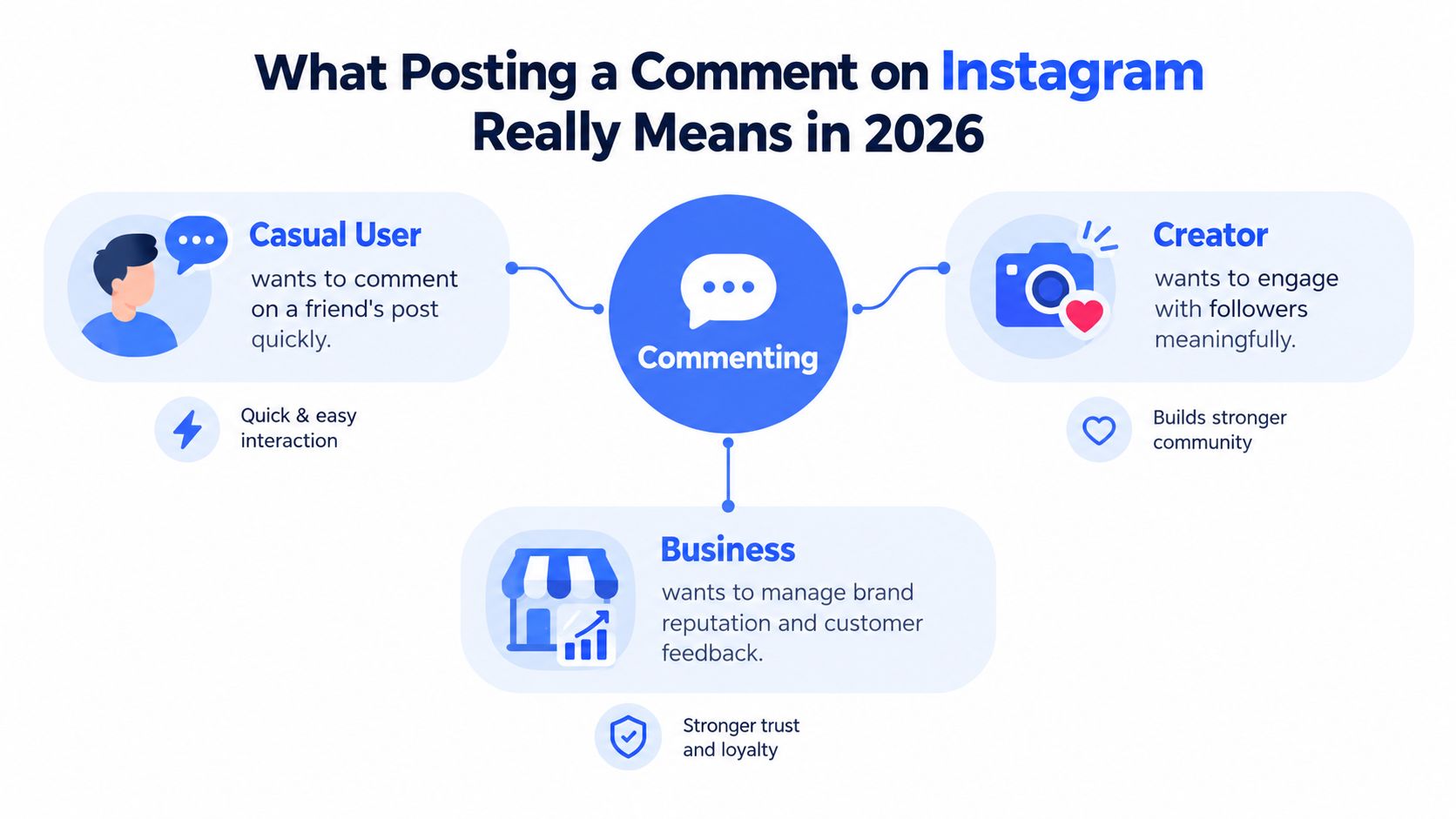
Three Jobs Behind One Text Box
- Casual user: You want to react to a friend's post quickly and move on.
- Creator or brand: You're trying to start a conversation, answer support questions, and protect reputation.
- Developer or analyst: You need to read, reply to, and measure comments across many posts without manual tapping.
Content design drives which outcome you get. In a study of academic library accounts, 78.9% of crowdsourcing posts generated at least one comment, compared with far lower rates for showcase and orienting posts, as detailed in the academic library Instagram content analysis. Asking for recommendations or opinions outperformed informing people.
That changes how you plan. Before you post, research audiences and plan pillars so each post has a clear conversational job, then measure results with Instagram engagement metrics that separate active response from passive reach. Comments are public, but visibility isn't fully under your control, and automation is possible only within tight platform limits.
Posting a Comment from the Instagram App
Start in the app even if you'll later automate. Understanding the manual flow tells you what the API should reproduce and where it can't.

On a feed post or Reel, tap the speech bubble icon under the media, or tap the comment field at the bottom of the post detail view. Type your text and tap Post. On iOS and Android the placement shifts slightly between updates, but the bubble and the field at the bottom are the stable cues.
Replies Mentions and Your Own Posts
A top-level comment speaks to the post. Tap Reply under an existing comment and you're in a thread, with that username prefilled so the person gets notified. Don't delete the mention if you want the notification to fire.
@mentions notify specific accounts and link to their profiles. #hashtags in comments are searchable text, but they rarely help discovery the way caption hashtags once did, and stuffing them into comments reads as spam. Use mentions for people who need to act. Skip hashtag blocks.
Commenting on your own post works the same way, and it's useful for pinning context. You can pin a comment on your post to surface a correction, a link prompt, or a common answer.
Practical rule: If a comment matters, screenshot it right after posting with the timestamp visible. You'll thank yourself if visibility later becomes disputed.
If a comment fails to post, check connectivity first, then check whether the account has restricted you, turned off comments, or filtered a word you used. Drafts aren't reliably preserved if you leave the screen, so copy long replies before sending. You can't edit a published comment in place the way you'd edit a caption. The clean fix is to delete and repost a corrected version, accepting that you'll lose likes and thread position.
Why Your Instagram Comment Disappeared or Looks Different
The reflex is to assume deletion or censorship. That assumption is often wrong. A comment can be removed by its author, removed by the post owner, caught by automated spam or keyword filters, hidden for specific viewers, or ranked lower so you don't see it where you expect.
The flow below maps those paths before you start guessing.
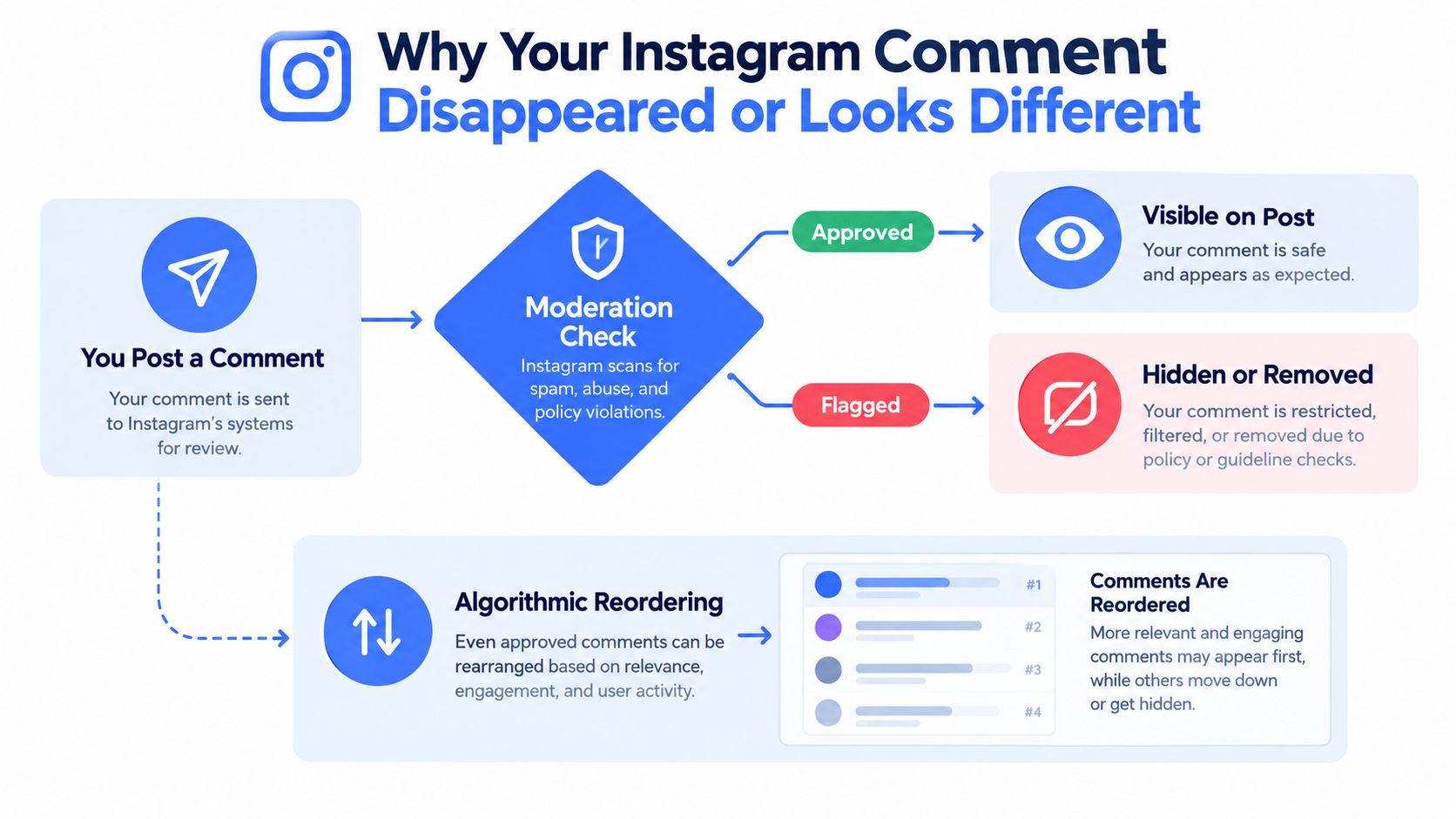
Comment ordering isn't neutral display. Work on comment governance describes ordering and accessibility as forms of platform control, and research with professional moderators found automated tools struggle with context-heavy gray-area cases, as discussed in research on comment moderation and algorithmic ordering. Clear violations get handled automatically. Ambiguous ones depend on context systems often miss.
A Short Triage Workflow
- Check the commenter's view: Does the author still see it on the post?
- Compare views: Check logged in as a different account and, where possible, logged out.
- Look for replies: If replies to the comment still render, the parent likely still exists somewhere.
- Preserve evidence: Capture timestamps, screenshots, exact text, and the post URL.
This short walkthrough shows the visibility differences in practice.
Document whether the outcome is deleted, hidden, or deprioritized. Those are different problems with different fixes, and reposting blindly can trigger spam filters that make the second attempt disappear too.
Posting Comments Programmatically with the Instagram API
For data teams, tapping is irrelevant. The official route is Meta's Instagram Graph API for Business and Creator accounts linked to a Facebook Page, alongside the newer Instagram API with Instagram Login for eligible professional accounts. Both are gated. Neither gives you unrestricted write access to other people's posts.
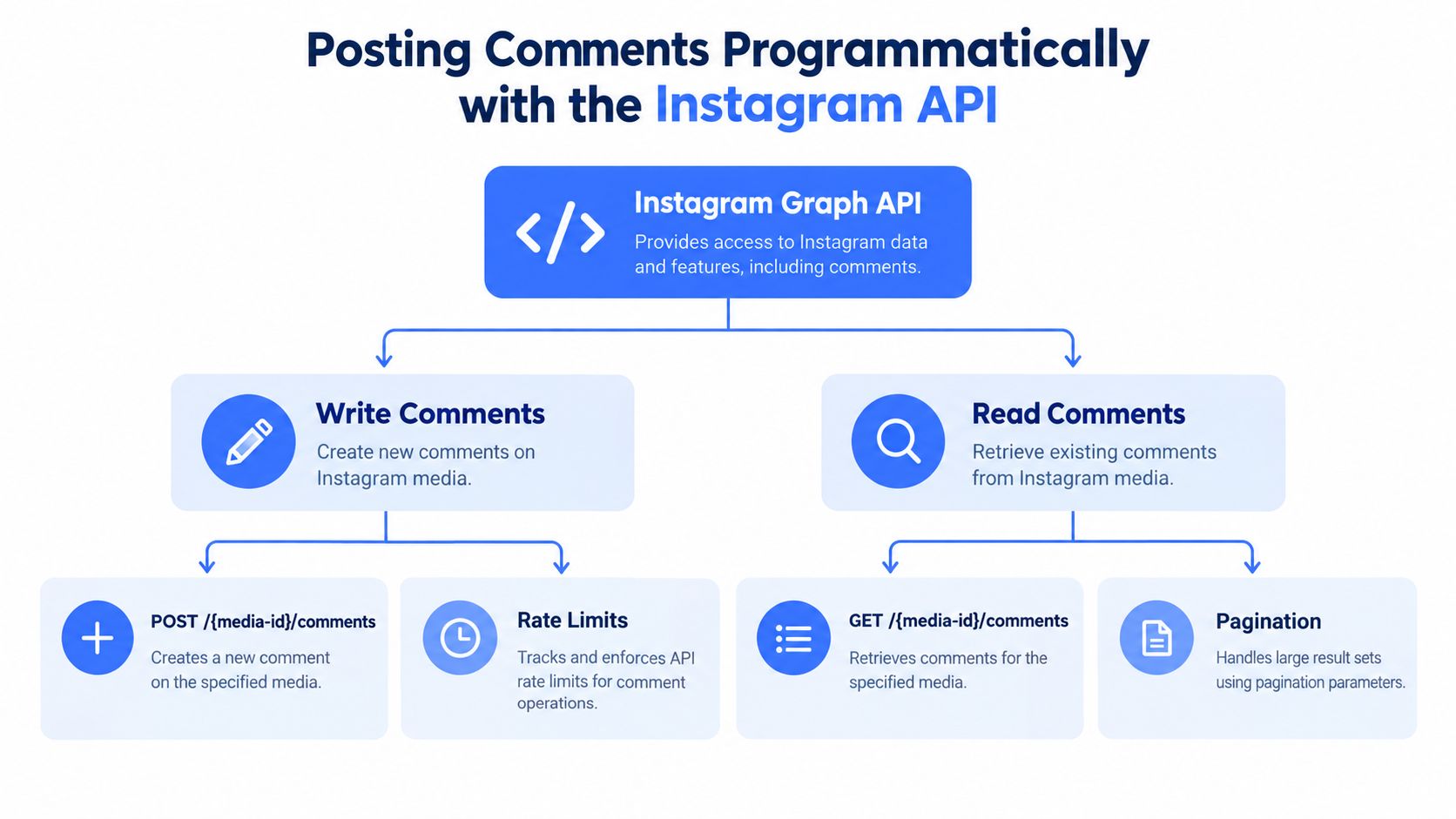
What the Official Path Actually Allows
You can read comments on media your authorized account owns, reply to those comments, hide or unhide them, and delete comments on your own media, subject to permissions and app review. Expect to request permissions for managing comments and to justify the use case in review before write actions work outside development mode. Plan review time into your roadmap. It's not a same-day toggle.
Typical fields returned for a comment include:
- id and text: The stable identifier and the comment body.
- timestamp and from: When it was posted and which account posted it.
- like_count and replies: Engagement and thread structure, fetched with pagination.
Store reply relationships and post category alongside raw text. Without that context, you can't tell a support thread from a pile-on, and you can't compare calls to action across campaigns. Our Instagram API guide for developers building comment pipelines covers endpoint shapes in more depth.
Rate limits shape realistic design. Paginate, cache media IDs, back off on errors, and never build a pipeline that assumes you can burst write replies. The hard constraint is account linkage. If the account isn't a professional account properly connected for API access, your integration stops before the first call. That single limit pushes many public-data projects toward alternatives.
Choosing Between the Official API, Third-Party APIs, and Automation
No route wins on every axis. Match the approach to the job, the risk you can defend, and who owns the account.
Comment Posting and Reading Approaches at a Glance
| Approach | ToS Risk | Setup Effort | Best Fit |
|---|---|---|---|
| Official Meta APIs | Lowest when approved | High, includes app review | Replying and moderating on accounts you own |
| Third-party unified APIs | Lower for public data reading | Low, API key based | Reading public comments across platforms for analysis |
| Browser automation and unofficial scrapers | Highest | Medium to build, high to maintain | Rare cases with no API path, accepted fragility |
The official API is the only defensible choice for writing replies as a brand on your own posts. It's compliant and stable, but slow to approve and narrow in scope. You won't use it to collect comments from competitor accounts you don't administer.
Third-party unified APIs flip that trade-off. They focus on reading public data across Instagram, YouTube, TikTok, and Facebook through one interface, which suits social listening, research ingestion, and competitive analysis. Integration is faster because there's no Meta app review for your app, and pricing is usually credit based. They aren't a loophole for posting as someone else, and you shouldn't treat them as one.
Browser automation that drives a logged-in session to post comments is the fragile option. Selectors break, accounts get challenged, and the compliance exposure is yours. Teams exploring AI tools for Instagram comments should separate draft generation, which is low risk, from automated posting, which is where accounts get restricted. For guardrails on that boundary, see practical guidance on Instagram automation limits.
If you would be embarrassed to explain the method to Meta, a client, or a regulator, don't ship it.
Decision rule: own the account and need to reply, go official. Need public comments for analysis at scale, use a third-party API. Tempted to automate a browser to post growth comments, stop and redesign.
Moderating Comments Without Over-Removing
Posting is half the loop. What you remove, and what you wrongly remove, defines trust.
Blunt keyword filtering causes real collateral damage. A 2025 study of Instagram's banned-hashtag moderation found only 6% precision, with roughly 20% of the dataset containing prosocial or recovery-related material, according to the University of Illinois summary of Instagram moderation research. In plain terms, aggressive automation silenced supportive content alongside harmful content.
A Layered Review Setup
- Automatic action for clear cases: Spam patterns, slurs with no plausible benign reading, and known scam links can be hidden immediately.
- Human queue for gray areas: Sarcasm, reclaimed language, coded harassment, and mental-health discussion go to a reviewer with thread context.
- Reversible actions and audit logs: Prefer hide over delete, log who acted and why, and make every decision undoable.
- Appeals path: Give users a way to contest a removal and review those contests separately.
Language breaks naive filters. Slang and reclaimed terms vary by culture, and a word that's abusive in one thread is supportive in a recovery community. Test filters against real multilingual samples before launch, not after complaints.
Sentiment tooling helps prioritize the queue, but it shouldn't make final calls alone. Use comment sentiment analysis to route and prioritize review rather than to auto-delete. Stronger moderation doesn't mean more automatic deletion. It means obvious cases move fast and ambiguous cases get human judgment you can defend.
Compliance, Best Practices, and a 30-Day Rollout
Compliance isn't a legal footnote. It's what keeps the account, the API app, and the dataset usable.
Internalize a few essentials. Don't mass-post automated comments, don't use engagement bait that misleads users, don't collect private data, and keep a clear line between public data you read and user data you're authorized to manage. A documented compliance checklist for enterprise teams helps translate those principles into reviewable controls, and social media compliance practices for data teams covers retention and access decisions.
History warns against reading comments in isolation. In a California adolescent health campaign, Instagram recorded 19 comments in total against 806 total likes and comments, yet 43% of Instagram-using respondents said the account influenced their decision to continue attending study visits, as reported in the pilot campaign study on Instagram and study participation. Small comment volume can still sit inside a presence that changes behavior. Measure comments alongside reach, saves, and real outcomes.
The 30-Day Rollout
- Week 1: Map every comment surface you own and run the visibility diagnostic on recent posts.
- Week 2: Choose the API path and prototype a read-only pipeline with pagination and error handling.
- Week 3: Stand up layered moderation with a human queue, audit log, and appeals route.
- Week 4: Instrument outcomes by post type and call to action, then review false positives.
Common edge cases: you can't cleanly edit a comment, so correct by replying or reposting; cross-posting to Threads is a separate surface with separate visibility; and unexpected API fields should be logged, not crashed on. Build tolerant parsers from day one.
Captapi gives developers one REST interface for reading public comments and engagement data across Instagram, YouTube, TikTok, and Facebook, so you can build the analysis side of this workflow without juggling separate SDKs or OAuth for every platform. If your next step is collecting public Instagram comments for social listening, research, or a RAG pipeline, visit Captapi to get an API key and test your first calls.