
API vs SDK: Choosing the Right Integration Path
The wrong way to choose between an API and an SDK is to ask which one is easier on day one. The better question is which one leaves you with less regret when the provider changes auth, adds endpoints, breaks pagination, or forces you to unwind a bad dependency choice two years later. That's the part most comparisons skip, and it's the part teams ultimately pay for.
| Dimension | API | SDK |
|---|---|---|
| Scope | The contract the service exposes | The client toolkit built around that contract |
| Language coverage | Works from almost any environment | Limited to the languages the maintainer supports |
| Maintenance | You own the request logic | The provider or library maintainer owns the wrapper |
| Included pieces | Endpoints, methods, schemas, transport | Auth helpers, typed models, pagination, retries, docs |
| Best fit | Portability, control, reversibility | Faster onboarding, reduced boilerplate |
Table of Contents
- The Quiet Trade-Off Most Comparisons Get Wrong
- What an API and an SDK Actually Are
- Four Criteria That Differentiate Them
- Where Latency Actually Comes From
- Why a Unified REST Surface Changes the Calculation
- Security, Supply Chain, and Exit Cost
- Choosing the Right Path for Your Team
The Quiet Trade-Off Most Comparisons Get Wrong
An SDK is not automatically faster, safer, or more complete than calling the API directly. It's a convenience layer, and convenience often hides work instead of removing it. If the SDK is thin and well maintained, you win. If it's bloated, stale, or opaque, you've just added another thing to debug.
The common “convenience versus control” framing is too shallow. What matters is whether you want to optimize for day-one speed or for long-term reversibility, especially when your integration has to survive vendor churn, team turnover, and changing platform rules. That's why the API versus SDK decision should be treated like an exit-cost decision, not a feature checklist.
Practical rule: if your team expects to keep the integration for years, judge the client by how easy it will be to replace, not by how pleasant it feels in a demo.
When you're integrating data platforms, social sources, or AI pipelines, the cost of a bad abstraction compounds fast. Multiple providers mean multiple release schedules, inconsistent naming, and different error shapes. A direct API path keeps the transport visible, which makes it easier to audit, benchmark, and swap later.
If you want a companion piece that stays close to the mechanics of choosing an interface over a browser-based workaround, this practical comparison of web scraping versus API access is worth reading.
What an API and an SDK Actually Are
An API is the contract. It defines what a client can ask for, what methods exist, and what rules govern the exchange. A SDK is the packaged toolkit that sits on top of that contract, usually with auth helpers, typed models, pagination support, examples, and documentation.
A simple REST call and a typed client library illustrate the difference well. The REST endpoint is the durable surface, while the SDK is the convenience wrapper a provider ships for one or more languages. If the provider changes the underlying service, the API should remain the source of truth, while the SDK may need to catch up.
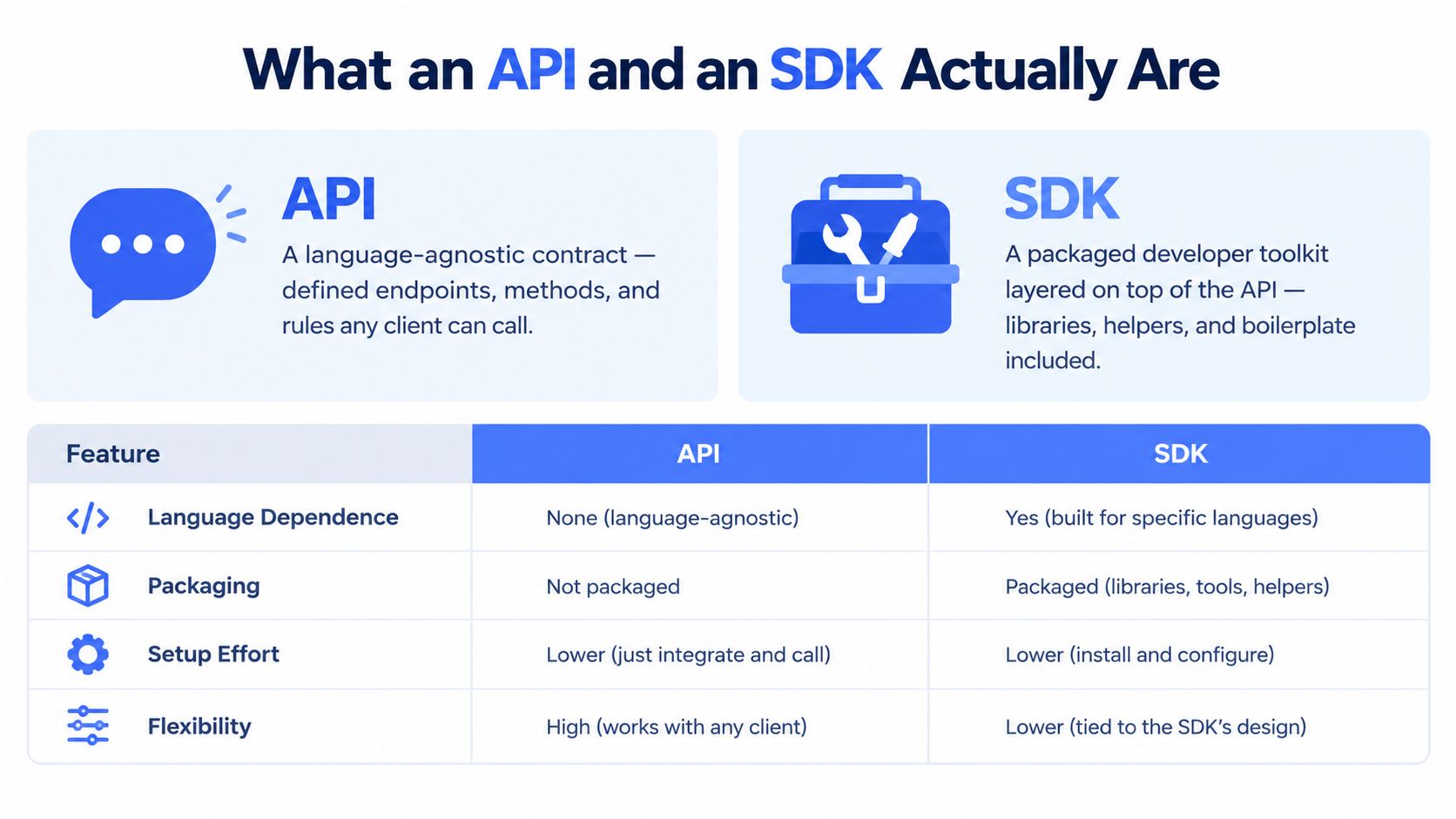
API versus SDK at a Glance
| Dimension | API | SDK |
|---|---|---|
| Language dependence | Language-agnostic | Usually language-specific |
| Packaging | Exposed interface | Packaged client toolkit |
| Setup effort | More manual work | Less boilerplate |
| Flexibility | Higher control | Higher convenience |
That mental model matters because it keeps you from over-crediting the wrapper. A good SDK can hide auth, retries, and model mapping. A bad SDK can also hide what it's doing badly, which makes failures harder to trace.
The strongest reason developers still prefer these interfaces is clarity. The 2024 Stack Overflow Developer Survey found that 90% of developers considered API and SDK documentation their preferred learning source, and 75% were more likely to endorse a technology that provided API access. Those numbers line up with how real teams evaluate integration work, they want a clear contract first, then a wrapper only if it earns its keep (Stack Overflow Developer Survey 2024).
If you want a more beginner-friendly framing of the same distinction, this guide to APIs for dummies is a clean companion read.
Four Criteria That Differentiate Them
Teams waste time arguing that SDKs are better. They are better on some criteria and weaker on others. A useful comparison starts with four lenses, developer experience, performance characteristics, security surface, and maintenance ownership.
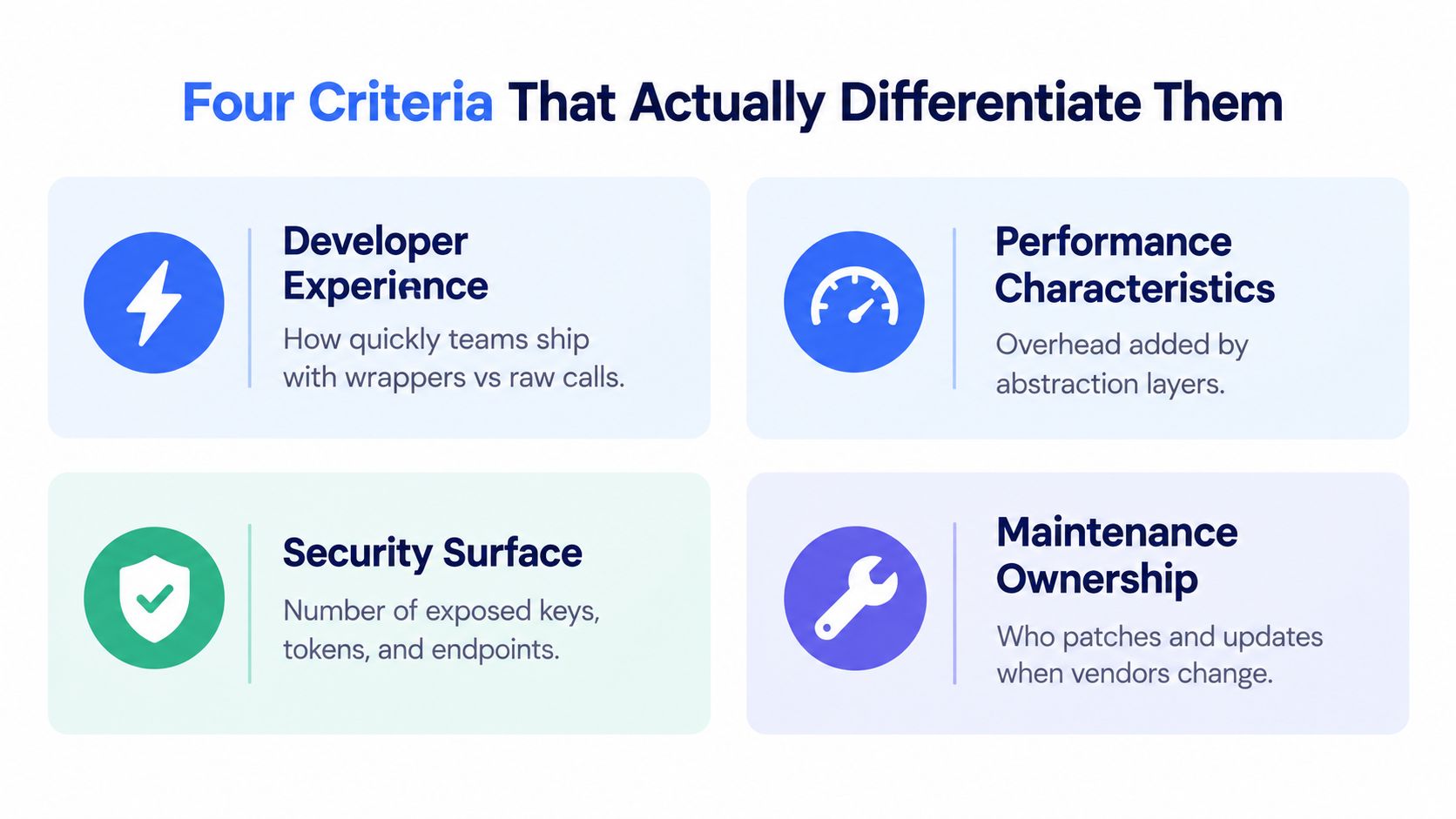
Developer experience and onboarding
SDKs usually win here because they reduce the boilerplate around auth, pagination, and typed request construction. That matters for teams that need junior developers productive fast or want a narrow path through a complex API surface. The downside is obvious. The easy path can become the only path people know.
Performance characteristics
APIs win by default because they expose the transport directly. You get control over retries, batching, cache invalidation, and request shape. SDKs can still perform well, but only when the wrapper's defaults are designed and measured properly.
Security surface
APIs and SDKs both require disciplined secrets handling, authorization, and response validation. The difference is that an SDK adds more code to trust and more packages to audit. A raw client is easier to inspect, which matters when your governance team wants to know exactly what is being shipped.
Maintenance ownership
APIs make you own more implementation work, but they also keep the integration path simpler. SDKs shift some maintenance to the provider, which sounds nice until the provider falls behind the API or changes its release cadence. That is where teams get trapped between the client they wrote and the library they cannot replace quickly.
A clean way to frame the split is this, APIs are durable infrastructure, SDKs are productivity software. Durability matters because integrations outlive individual projects and even vendor relationships. Productivity matters too, but only if the library does not create a bigger exit bill later.
Where Latency Actually Comes From
Latency arguments get sloppy because people collapse server time and client time into one number. That's a mistake. An SDK can make a request look slow even when the remote API is fine, because the wrapper may be spending time on serialization, connection setup, retries, or parsing before and after the network hop.
A poorly implemented SDK that skips HTTP keep-alive or serializes requests inefficiently can add approximately 50 to 200 ms per request, and teams often blame the API for that delay (performance.qa). That's why performance reviews should measure the full client path, not just the server response in isolation.
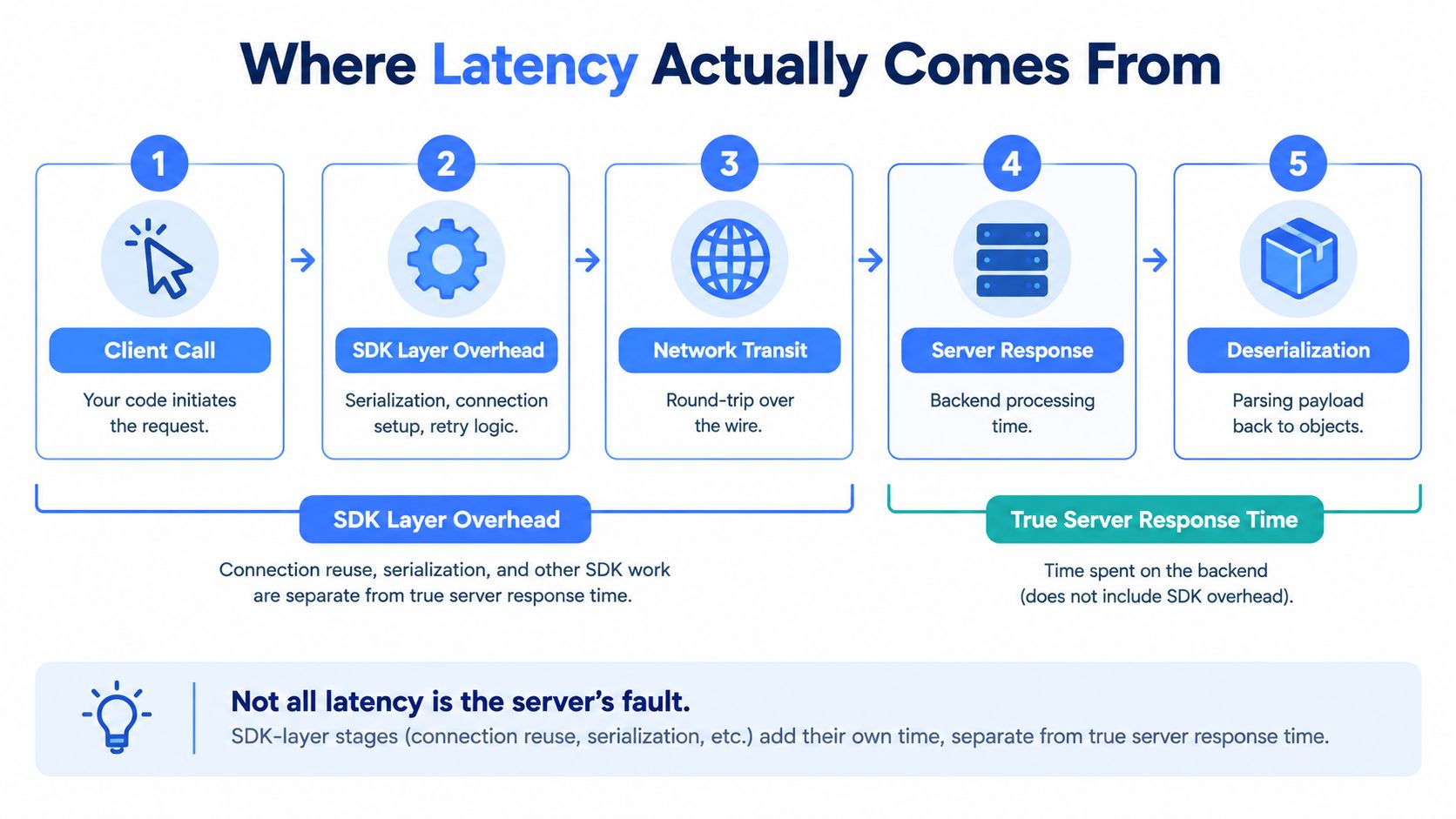
Benchmark the whole path
Use the same payloads, the same concurrency, the same timeout, and the same retry policy on both paths. If you don't hold those constant, you're not comparing integration styles, you're comparing configuration drift. That's especially important for RAG ingestion, bulk extraction, and multi-platform data collection, where tiny wrapper costs become pipeline costs.
Pick the client style based on control
Raw REST is the better choice when you need precise control over backoff, batching, payload projection, cache invalidation, or transport settings. An SDK only wins when its defaults are measurable and useful, not when it merely looks cleaner in sample code. In practice, that means you should benchmark before you commit, not after users feel the lag.
If you're building media-heavy tooling, the practical guide to video generation APIs is a good example of why direct interface control matters when request shape and transport behavior affect throughput.
For a more operational take on how to measure this kind of client path properly, the performance benchmarking guide is the right internal companion.
Why a Unified REST Surface Changes the Calculation
The biggest headache in multi-provider systems isn't the first integration, it's the third and fourth. Separate vendor SDKs start multiplying differences in naming, pagination, error shapes, and release timing. At that point, your team isn't integrating providers anymore, it's maintaining a small compatibility layer for each one.
A unified REST surface cuts through that sprawl. One contract can serve Python pipelines, JavaScript apps, JVM services, and command-line workflows without forcing you to wait on a vendor-maintained library for every ecosystem (RudderStack). That's the key advantage, because it keeps the transport stable while letting you decide whether to call directly or wrap it internally.
The operational payoff
When one REST surface covers multiple backends, you can standardize retries, logging, timeouts, and cache policy in your own code instead of inheriting them from unrelated SDKs. That makes adapter logic thinner and easier to replace. It also means your engineering team can add SDK-style conveniences only where they help, instead of accepting whatever each vendor ships.
That matters in policy-sensitive integrations too. If your team needs structured access checks or reviewable developer workflows, the developer docs for policy checks show the kind of clarity that a direct API surface makes possible.
What this changes for platform teams
A unified REST layer doesn't forbid SDKs. It just stops SDKs from becoming the default architecture. You can still build a thin wrapper for a single language, or generate one internally if it helps developer productivity, but you're not trapped by a vendor's release schedule or naming choices.
For teams working with public data pipelines or social sources, Captapi is an example of this pattern in practice, it exposes a consistent REST interface and also provides SDKs when teams want them. The point isn't that every team should use a wrapper, it's that the wrapper should sit on top of a stable contract, not define the contract.
Security, Supply Chain, and Exit Cost
SDKs can make teams feel safer because they hide transport details, but they also expand the trusted surface and add transitive dependencies. That matters because the client library is part of your execution path, not a separate security layer.
Exit cost is the part teams underestimate. If you adopt a library and later need to replace it, how much of your app depends on that client's quirks, models, and helper methods? SDKs get expensive fast when the maintainer lags the API or changes behavior your team was not expecting.
ISACA reported that leaked developer secrets, including hard-coded credentials and API or encryption keys, increased 12% year over year, and tied the trend to AI-assisted coding and open-source dependency risk (ISACA). That makes client-library governance a live operational concern. Review maintainer activity, update cadence, package age, and whether the SDK can be pinned, inspected, or replaced without a rewrite.
A small HTTP client you can audit is often easier to defend than a glossy SDK nobody on the team fully trusts.
Before you adopt any SDK, ask four blunt questions. Is it open source or at least inspectable? Does its release cadence track the API? Can you reproduce requests without it if you need to? How painful would migration be if the maintainer disappears? Those answers tell you more than the first-request demo ever will.
If your team already works with authenticated sessions and token handling, the guide to protecting authenticated API sessions is a useful reminder that the client layer does not remove your security responsibilities. It only moves where those responsibilities live.
For the defensive side of the review, use the best practices for API security resource as an internal checkpoint when you evaluate request signing, access control, and client behavior.
Choosing the Right Path for Your Team
If you're shipping a prototype in one or two languages, pick the SDK when it removes boilerplate and the provider keeps it current. If you're building a multi-platform pipeline, start from the API and add thin wrappers only where the ergonomics justify the extra layer. That's the cleanest way to avoid SDK sprawl and keep your exit cost low.
For latency-sensitive ingestion or RAG workloads, choose direct API access unless you've benchmarked an SDK and proven it doesn't add avoidable overhead. For regulated enterprise environments, favor the path you can audit, pin, and replace quickly, which usually means the raw contract first and the wrapper second.
The simplest rule is this, use SDKs for productivity, use APIs for control, and use a unified REST surface when you need both across multiple systems. That's the pattern that survives vendor changes without locking your team into a brittle dependency stack.
If you're building a social data pipeline, Captapi gives you one REST interface for YouTube, TikTok, Instagram, and Facebook, plus SDKs where they fit. If you want to reduce vendor-specific client sprawl and keep control over your integration path, visit Captapi and evaluate the REST-first approach against your current stack.