
YouTube Comment Scraper: A Developer's Practical Guide
You're usually not looking for a YouTube comment scraper because you want a spreadsheet. You're looking for one because a product, model, dashboard, or research pipeline suddenly depends on comment data, and the quick script you wrote for one video falls apart the moment someone asks for a channel, a topic cluster, or a nightly refresh.
That's the line between hobby scraping and production ingestion. A one-off script can pull a page or two and dump JSON. A production system has to survive pagination, retries, empty videos, disabled comments, schema drift, and the uncomfortable fact that public text still carries compliance baggage once you store it.
I've seen this most often in RAG and analytics work. A team wants video transcripts plus audience feedback in the same retrieval layer, then discovers that comments behave nothing like static documents. They arrive over time, replies can be awkward to fetch completely, and the data quality is messy enough that raw exports often make downstream search worse before they make it better.
Table of Contents
- Why You Need a YouTube Comment Scraper in 2026
- API vs Custom Scraper vs Unified REST Layer
- Building Your First Comment Pull Step by Step
- Rate Limits, Retries, and Caching Without Burning Quota
- Export Formats, Fields That Matter, and Cleaning the Data
- Privacy, ToS, and GDPR Boundaries You Can't Ignore
- Real Pipelines, Troubleshooting, and FAQs
Why You Need a YouTube Comment Scraper in 2026
A typical failure case shows up after launch, not during the demo. The first version pulls a few top-level comments from one video, everyone sees JSON in a dashboard, and the project looks done. A week later, product wants nightly refreshes across a channel, support wants complaint tracking after a release, and the retrieval team wants comments indexed beside transcripts. That is where comment collection turns into data engineering.
The hard part is not getting one response back from YouTube. The hard part is keeping comment data consistent and cheap to collect once multiple systems depend on it. In production, comments are late-arriving records with messy text, partial reply trees, deleted authors, and edge cases like disabled comments or empty threads. If that data feeds RAG, analytics, or OSINT workflows, bad ingestion decisions show up later as poor retrieval quality, duplicate records, and quota waste.
Research scale makes the point clearly. A 2025 paper describes YTCommentVerse as a multilingual corpus with over 32 million YouTube comments collected from roughly 178,000 videos and more than 20 million users across 15 content categories in the YTCommentVerse paper. The exact numbers matter less than the operational implication. Comment data is large enough, messy enough, and dynamic enough that collection strategy affects the usefulness of the dataset.
That changes how to frame the problem. A YouTube comment scraper is not only for quick sentiment checks on a single video. It is part of an ingestion layer that has to preserve timestamps, thread structure, video IDs, author metadata, and enough provenance to reprocess records later without guessing what changed.
Practical rule: if another job will read the comments again, store them like pipeline data, not throwaway scrape output.
Teams usually end up choosing between two implementation paths:
- YouTube Data API v3. Best fit when documented resources, stable auth, and predictable schemas matter more than raw flexibility. The price is quota management, pagination handling, and more careful retry policy than many tutorials admit.
- A unified REST layer. Useful when application teams want a simpler HTTP contract and do not want every service to carry YouTube-specific plumbing.
Raw HTML scraping still exists. I only recommend it when a team has a clear reason to accept parser maintenance, anti-bot breakage, and extra legal review. For long-running systems, the scraper is rarely the expensive part. The expensive part is the machinery around it: scheduling, deduplication, shared caching, replayability, and a compliance posture that can survive an internal review after someone notices author identifiers sitting in the warehouse.
API vs Custom Scraper vs Unified REST Layer
A comment pipeline that looks cheap in a notebook can get expensive in production. The first version usually pulls a few threads, writes JSON, and seems done. Then quota runs out, reply coverage is incomplete, two services fetch the same video twice, and someone asks whether storing author identifiers was approved.
Those problems are usually a result of the ingestion model, not the HTTP client.
The three implementation models
The custom HTML scraper gives full control over what gets extracted and when. It also makes your team responsible for dynamic page behavior, parser breakage, consent screens, anti-bot friction, and a legal review that is harder to defend than an official interface. I only use this route when the API cannot expose the needed data shape or when a research workflow accepts higher maintenance.
The YouTube Data API v3 is the first option to evaluate for any long-running system. It has a documented schema, stable auth, and clearer failure modes than browser-driven scraping. The trade-off is operational, not conceptual. You have to manage quota, page tokens, retries, and partial thread retrieval carefully. The GESIS YouTube research guide is still useful background because it reflects the shift from ad hoc collection toward repeatable, API-based workflows.
The unified REST layer sits between those two. It gives application teams a simpler contract and keeps YouTube-specific pagination, normalization, and retry behavior in one place. That is often the right choice when comments feed several internal consumers, such as analytics, moderation review, and RAG indexing, and you do not want each service to reimplement the same collector.
YouTube Comment Scraping Approaches Compared
| Dimension | Custom HTML Scraper | YouTube Data API v3 | Unified REST (Captapi) |
|---|---|---|---|
| Auth friction | Low at first, then high once anti-bot countermeasures start | Requires API setup and credential management | Usually simple API key auth |
| Maintenance burden | High. Front-end changes and parser drift break runs | Lower. Contract is documented | Lower for app teams. Provider owns translation work |
| Pagination handling | You implement request flow and state yourself | Native page token model | Usually returned in-band |
| Reply handling | Often awkward and tied to page state | Structured, but still needs thread logic | Usually normalized into one response shape |
| Failure modes | Consent screens, blocked sessions, HTML changes | Quota limits, token handling, retry policy | Provider dependency and abstraction gaps |
| Compliance posture | Weakest unless counsel has reviewed collection and storage | Strongest starting point | Better than raw scraping, but storage policy still matters |
| Best fit | Edge cases, one-off collection, controlled research setups | Internal tools, official integrations, durable pipelines | Product teams that want one endpoint for many downstream uses |
Where each model breaks first
Custom scrapers usually fail at maintenance. A selector change, a delayed client-side request, or a new consent path can turn a healthy job into silent data loss.
API-based collectors usually fail at operations. The common mistakes are wasting quota on duplicate pulls, stopping at top-level comments, and retrying too aggressively during transient errors. Teams building on the official interface should read this breakdown of YouTube Data API trade-offs before they lock in request patterns.
Unified layers usually fail at abstraction boundaries. If the provider hides too much, debugging becomes harder when analysts ask why reply counts do not match or why a field disappeared. The fix is simple. Keep provenance fields, preserve raw IDs, and log enough request context to replay a pull without guessing.
For production systems, the winning option is usually the one your team can operate for a year, not the one that gets the first 500 comments fastest.
Building Your First Comment Pull Step by Step
A first pull usually fails in a boring place. The HTTP call works, then the job writes half-shaped records, loses the pagination cursor, or mixes top-level comments and replies without telling downstream consumers which is which. The fix is to keep the first version narrow and observable.
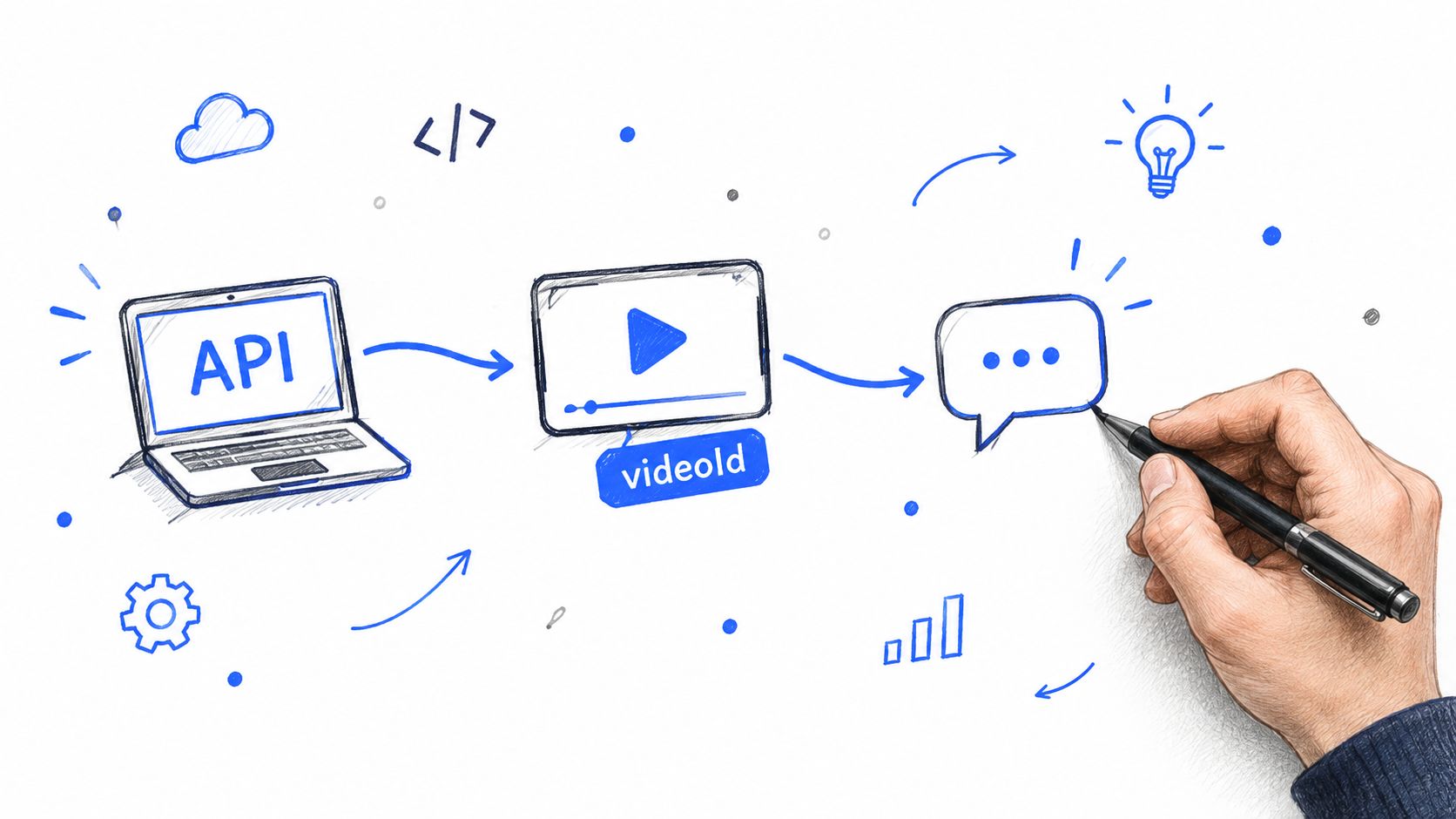
Start with one request shape, one pagination field, and one record schema you can inspect before anything lands in storage. If this feed is headed for RAG, sentiment analysis, or OSINT review later, provenance matters from the first request. Store the video ID, comment ID, parent ID, fetched_at timestamp, and source name even in your smoke test.
Start with a minimal request contract
A usable comment endpoint only needs a few inputs:
- A video identifier
- An authorization header
- An optional continuation or page token
- An optional cap for smoke tests
That cap saves real money and debugging time. During schema validation, the goal is to confirm field shape, not to ingest an entire thread and find out later that your text field contains formatted HTML or your parent IDs are missing.
Here's a simple Python pattern using requests and a generator so your caller doesn't manage pagination manually:
import os
import requests

BASE_URL = "https://api.example.com/v1/youtube/comments"
API_KEY = os.environ["API_KEY"]

def iter_comments(video_id, max_comments=None):
    token = None
    yielded = 0

    while True:
        params = {}
        if token:
            params["pageToken"] = token
        if max_comments is not None:
            params["maxComments"] = max_comments

        resp = requests.get(
            f"{BASE_URL}/{video_id}",
            headers={"Authorization": f"Bearer {API_KEY}"},
            params=params,
            timeout=30,
        )
        resp.raise_for_status()
        payload = resp.json()

        for item in payload.get("items", []):
            yield item
            yielded += 1
            if max_comments is not None and yielded >= max_comments:
                return

        token = payload.get("nextPageToken")
        if not token:
            return
This is intentionally plain code. Plain code is easier to replay at 2 a.m. when an analyst asks why one video has 37 comments today and 412 tomorrow.
Inspect the first page before you automate anything
Print one page and verify the fields you will depend on later:
- Text fields: confirm whether you receive normalized text, rich text, or both.
- Identity fields: verify comment IDs, parent IDs, author channel IDs, and thread IDs if exposed.
- Time fields: parse timestamps once and decide whether storage keeps raw strings, UTC datetimes, or both.
- Thread shape: check whether replies are embedded inside a thread object, flattened into the same list, or available only through a follow-up request.
- Moderation gaps: note whether deleted, held, or unavailable comments disappear entirely or come back as partial records.
If you want a concrete request example before wiring this into your own worker, this YouTube comments API walkthrough shows the basic flow.
A minimal dump script can be as small as this:
import json

if __name__ == "__main__":
    video_id = "VIDEO_ID"
    for comment in iter_comments(video_id, max_comments=20):
        print(json.dumps(comment, ensure_ascii=False))
That is enough to test one real video against your schema, your parser, and your assumptions.
Treat pagination as part of the contract
Pagination is not cleanup work. It is part of correctness.
The first production bug I see in comment collectors is simple. Teams validate on a video with a short thread, then deploy code that has never exercised multi-page pulls, missing cursors, duplicate records across reruns, or reply expansion. The HTTP request was fine. The ingestion design was not.
For the first implementation, decide three things up front:
- What counts as a unique record. Usually
comment_idis the primary key, withvideo_idretained for lineage. - Where the cursor lives. Keep the raw
nextPageTokenor equivalent in logs or checkpoint storage so you can replay a failed page. - How replies enter the dataset. Use one normalized schema whether replies arrive inline or through a second pass.
A short demo helps if you want to see the mechanics visually before wiring it into a job runner:
Once the first page works, resist the urge to add filters and enrichment immediately. Add invariants first. Every stored record should have a stable video ID, a stable comment ID, a parseable timestamp, and an explicit source label. Those fields are what let you deduplicate reruns, explain gaps to stakeholders, and rebuild embeddings or analytics tables without guessing what the original collector saw.
Rate Limits, Retries, and Caching Without Burning Quota
Quota planning decides whether a YouTube comment scraper behaves like a production collector or a script that dies halfway through a backfill.
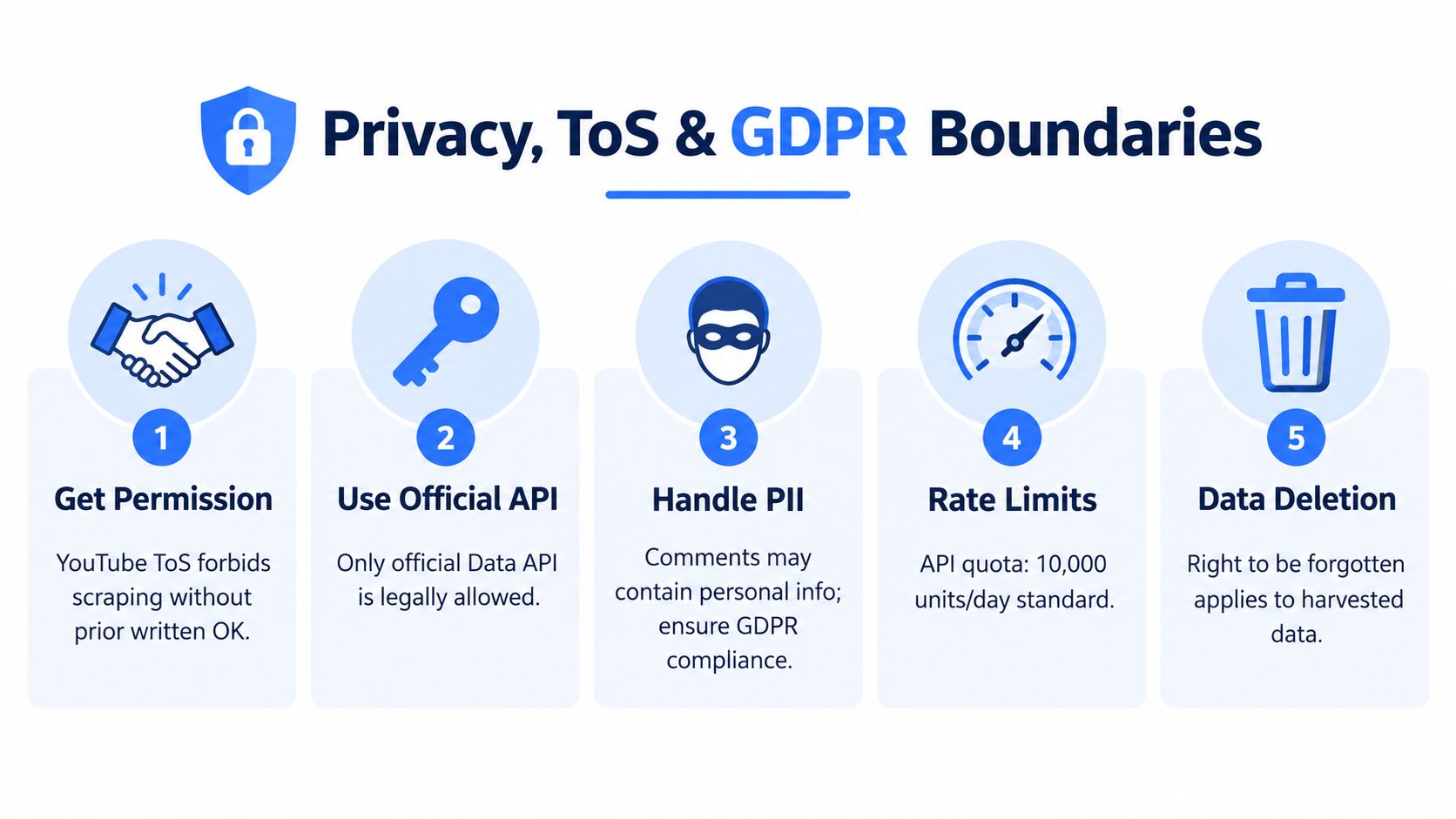
The YouTube Data API charges comments.list at 1 unit per call, and the default daily project quota is 10,000 units, as documented in Google's quota cost documentation. On paper, that sounds generous. In a real ingestion job, it disappears fast once multiple workers, reruns, and analyst-triggered refreshes start hitting the same videos.
I treat quota as a shared budget, not a per-request concern. If one team is pulling comments for embeddings, another is sampling for moderation review, and a scheduled refresh is catching new replies, they are all spending from the same pool unless you isolate projects and keys. That is why page caps, concurrency limits, and cache hit rate belong in the design doc before the first job lands in production.
Retry logic that won't stampede
Retries should recover from temporary failure, not multiply it. A worker farm that blindly retries 429s can burn through remaining quota, fill queues with duplicate work, and hide the actual problem until the whole pipeline falls behind.
Use decorrelated jitter. Retry transient failures. Stop on terminal ones.
import random
import time
import requests

def get_with_retry(session, url, headers=None, params=None, max_attempts=8):
    sleep = 1.0
    cap = 30.0

    for attempt in range(1, max_attempts + 1):
        resp = session.get(url, headers=headers, params=params, timeout=30)

        if resp.status_code < 400:
            return resp

        if resp.status_code in (429, 500, 502, 503, 504):
            time.sleep(sleep)
            sleep = min(cap, random.uniform(1.0, sleep * 3))
            continue

        if resp.status_code == 403:
            raise RuntimeError("Permanent 403. Check revoked key, permissions, or comments-disabled state.")

        resp.raise_for_status()

    raise RuntimeError("Retry budget exhausted")
One production detail gets missed in many examples. Retrying in process is not enough. Store retry count, last status, and next eligible attempt time in your queue or job state, so a pod restart does not reset the backoff window and hammer the same page again.
Response codes and how your scraper should react
| Status code | Meaning | Recommended action | Backoff (s) |
|---|---|---|---|
| 200 | Success | Parse, persist, advance pagination | 0 |
| 429 | Rate limited or quota pressure | Retry with jitter, reduce concurrency | 1 to 30 |
| 500 | Transient server error | Retry | 1 to 30 |
| 502 | Upstream gateway issue | Retry | 1 to 30 |
| 503 | Temporary service unavailable | Retry | 1 to 30 |
| 504 | Timeout upstream | Retry | 1 to 30 |
| 403 | Forbidden, revoked key, or inaccessible resource | Stop and inspect cause | 0 |
| 404 | Video missing or unavailable | Mark terminal and skip | 0 |
A 403 needs inspection, not guesswork. It can mean exhausted quota, a bad key, missing access, or a video state your collector cannot read. Treating every 403 as retriable is one of the fastest ways to waste a day.
Shared caching saves real money and time
Cache at the page level, not just at the video level. videoId + pageToken + sortOrder is usually the minimum safe key. If your job can request different part values or filters, include those too, or you will return the wrong payload from cache and create hard-to-debug data drift.
A Redis cache with a 24-hour TTL works for many teams, but the right TTL depends on the use case. For RAG over recent creator sentiment, a few hours may be safer. For OSINT snapshots or historical analytics, a day or longer is often fine because repeat reads are pure waste.
The bigger win is shared caching across workloads. If dashboards, notebooks, and scheduled jobs all call the API independently, quota disappears into duplicate reads. Centralizing fetches behind one service, with cache and request coalescing, usually saves more than tuning the HTTP client.
A simple operating policy works well:
- Skip immediately when a video is known to have comments disabled.
- Throttle when repeated 429s appear.
- Cache page responses for the current working day.
- Track calls per minute and abort before budget exhaustion.
For a broader engineering view on defensive API consumption, patterns for handling API rate limits across services are worth standardizing instead of solving this separately in every collector.
Export Formats, Fields That Matter, and Cleaning the Data
Over-collecting and under-structuring is common. The result is a blob of comment JSON that nobody wants to touch six weeks later.
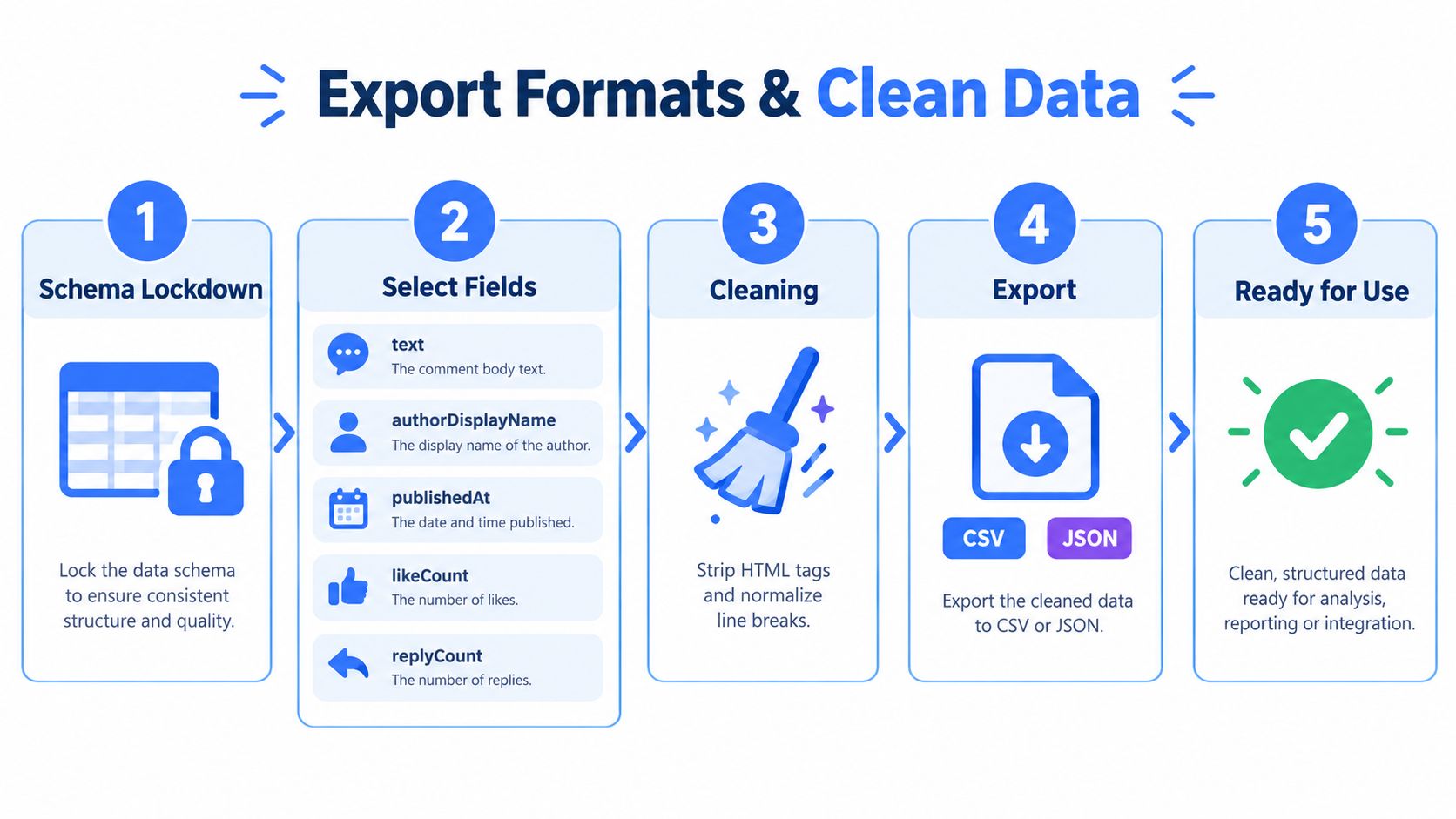
Lock the schema before you store anything
For downstream search, analytics, or moderation review, these are the fields I'd treat as core:
textfor retrieval, embedding, and qualitative reviewauthorDisplayNameonly if the use case needs itpublishedAtfor chronology and incremental refreshlikeCountas weak engagement contextreplyCountto estimate thread weightcommentId,videoId,parentIdfor deduplication and lineage
Everything else is optional until a concrete consumer asks for it.
Pick the export format based on the consumer
JSONL is the best default for streaming ingestion and append-only pipelines. One line per record means partial jobs are still usable, and reprocessing is simpler.
Parquet is the right handoff for analytics teams once the schema stabilizes. Columnar storage pays off when people start slicing by date, video, language, or moderation flags.
CSV is mostly a debugging and ad hoc review format. It's fine for sampling, not ideal for nested reply data.
If you're choosing between flat files for developer workflows, this JSON vs CSV comparison is a useful shortcut.
Clean the text before it poisons your index
A raw comment export is noisy. Independent coverage of the space points out that large-scale users care about quota exhaustion, pagination depth, and spam or toxicity filtering, and that raw platform comments often remain noisy without moderation or filtering in this practical overview of YouTube comment collection issues.
A lightweight Pandas pass goes a long way:
import pandas as pd
import re

def clean_comments(df):
    df = df.copy()

    df["text"] = df["text"].fillna("").str.replace(r"\s+", " ", regex=True).str.strip()
    df = df[df["text"] != ""]

    df["repeated_link_flag"] = df["text"].str.count(r"http[s]?://") > 1
    df["emoji_density_flag"] = df["text"].str.count(r"[^\w\s,.;!?]") > df["text"].str.len().fillna(0) * 0.3

    return df
Then add a second pass for moderation signals:
- Drop empty or whitespace-only text
- Normalize line breaks and spacing
- Flag repeated-link spam
- Flag abnormal symbol or emoji density
- Run toxicity scoring only on borderline content
That last point matters. Running every comment through a separate moderation service is usually wasteful. Triage first. Score the messy middle.
Privacy, ToS, and GDPR Boundaries You Can't Ignore
The most common bad assumption in this space is simple: the comments are public, so storing and processing them must be fine. That doesn't hold up.
Independent guidance notes that YouTube's terms restrict automated access, and that personal data in comments can still be regulated even when publicly visible, as discussed in this review of YouTube comment scraping and legal issues.
Public visibility is not blanket permission
A public comment is visible to a viewer. That is not the same as unrestricted license for bulk collection, indefinite retention, redistribution, or profiling.
The official API exists partly to gate how access happens. If you bypass that with raw scraping, your legal and operational posture gets weaker fast. Even when collection is technically possible, your team still owns the consequences of storing names, text, and behavioral traces.
The compliance checklist I'd want before production
- Prefer official access paths: if the API can provide what you need, start there.
- Minimize identity fields: drop
authorDisplayNameunless it serves a documented purpose. - Document lawful basis: especially if EU data subjects may be included.
- Key deletion by comment ID: if you need to remove a record later, vague deletion processes won't help.
- Avoid redistributing raw dumps: internal analysis is one thing, publishing comment archives is another.
A broader ethics lens helps too. Evoproxy scraping ethics is a useful resource because it frames scraping as a responsibility problem, not just a tooling problem.
Compliance work gets much easier when you can explain why each field exists and when it should be deleted.
If your legal review is still immature, this guide to website scraping legal boundaries is a practical starting point for engineers who need to translate legal concerns into implementation decisions.
A simple go or no-go decision test
Push pause if any of these are true:
- You can't explain why you need author names.
- You plan to keep raw dumps indefinitely.
- You don't have a deletion path tied to a stable identifier.
- You intend to republish comment text outside internal analysis.
- You're collecting through methods your organization can't defend.
That's not over-caution. That's normal hygiene when public content becomes stored user data in your systems.
Real Pipelines, Troubleshooting, and FAQs
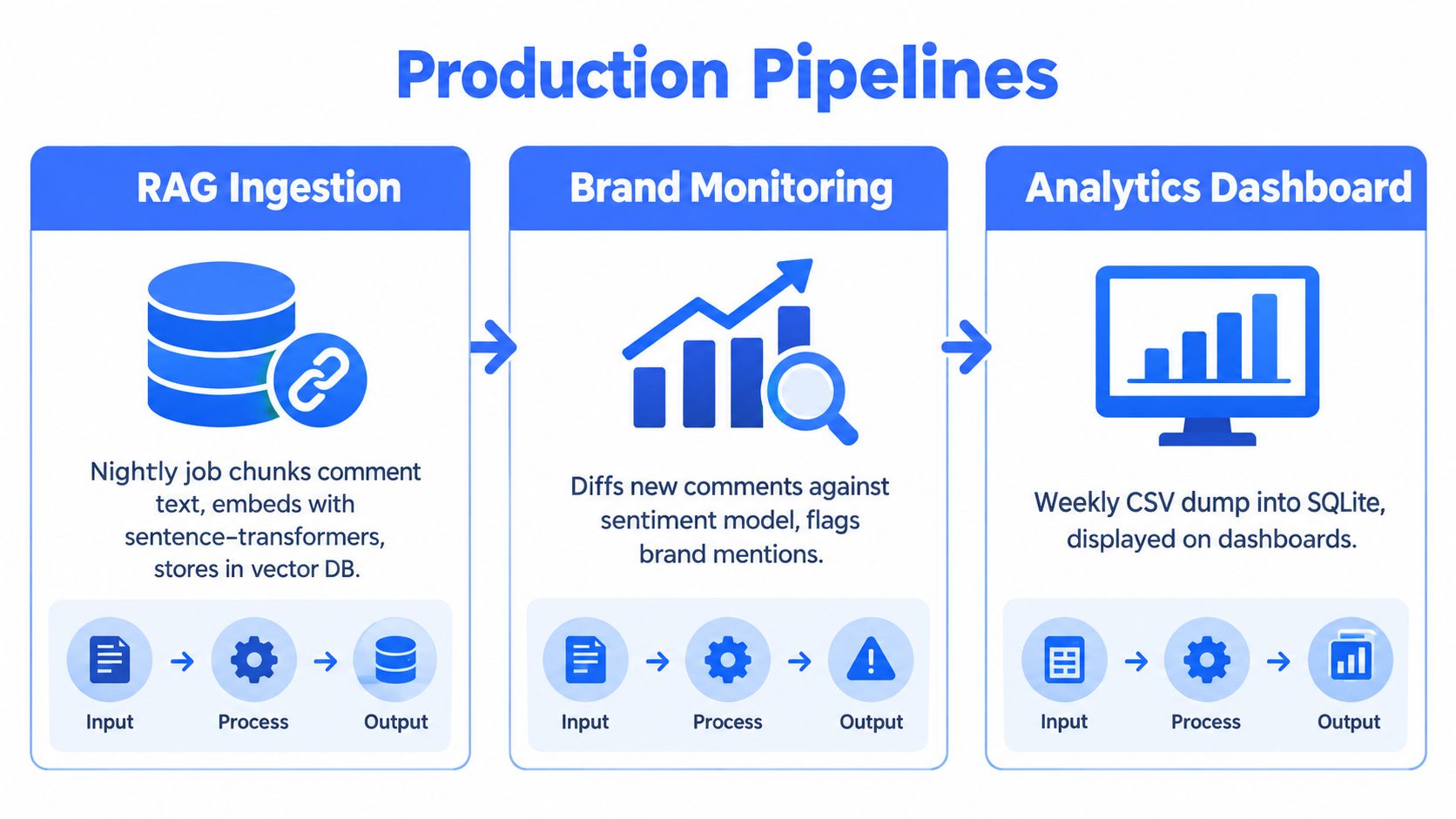
The scraper matters less than the pipeline it feeds. I usually see three stable production patterns.
Three deployments that justify doing this properly
RAG ingestion. A nightly job pulls fresh comments, chunks useful text, embeds it, and stores it beside transcripts. This works best when comments are cleaned first and deduplicated by commentId.
Brand or OSINT monitoring. A scheduled pull compares newly seen comments against a classifier or rule set, then posts suspicious spikes or repeated complaints into Slack or a ticket queue.
Academic or trend analysis. Researchers aggregate comments across many videos, then slice by date, topic, or language. Stable timestamps and repeatable exports matter more than app latency.
What breaks most often
The empty-result bug usually isn't a bug. It's often one of these:
- Comments are disabled
- The video is region-restricted or unavailable from your collection path
- The resource key or credentials are wrong
- You hit a pagination edge and stopped too early
- You re-used a stale page token
For product teams that want one REST contract across YouTube and other social platforms, Captapi exposes a YouTube comments endpoint that returns structured JSON with comments, replies, and pagination data. That's one reasonable option when you want to avoid provider-specific SDK work and keep ingestion code uniform across sources.
Quick troubleshooting notes
Pagination loops that never terminate usually come from trusting item count instead of the next-page token lifecycle.
A few practical checks save hours:
- 403 responses: inspect whether the key was revoked, the resource is inaccessible, or your upstream access path changed.
- Deleted comments: don't try to reconstruct them. Treat each pull as a snapshot.
- Non-English content: preserve Unicode end to end and defer language handling to a separate enrichment step.
- Failed job replay: replay from the last successful page token or from the last persisted comment timestamp, not from scratch unless you have to.
- Deduplication: key on comment ID first. Use
(videoId, parentId)only as support metadata. - Refresh interval: match it to the use case. Monitoring wants tighter loops than archival analysis.
FAQs
Should I choose the official API or a unified layer?
Choose the official API when compliance posture and documented resources matter most. Choose a unified layer when engineering speed, cross-platform consistency, and simpler app integration matter more.
How should I handle deleted or moderated comments?
Don't assume permanence. Store collection timestamps and treat every dataset as a time-bound snapshot.
What about replies?
Decide early whether you need full thread fidelity or only top-level signal. That one requirement changes your cost and complexity profile more than expected.
How do I replay failed jobs safely?
Persist checkpoints. A page token, last-seen timestamp, or last successful page boundary is much safer than restarting broad jobs blindly.
What's the right deduplication strategy?
Use stable source IDs whenever available. Text-based deduplication is useful for cleanup, not for primary identity.
How often should I refresh?
As rarely as your use case allows. RAG refreshes, alerting pipelines, and research snapshots have different tolerances. Don't collect more often than someone can usefully act on the output.
If you need a cleaner path than hand-rolling YouTube comment ingestion from scratch, Captapi gives you a developer-first REST interface for public social data, including YouTube comments, with pagination, retries, and a shared cache model that fits the production patterns in this guide. It's a practical option when you want comment data flowing into RAG, analytics, or monitoring systems without spending your sprint on provider-specific plumbing.