
Public Data Api Guide for Developers

A public data API is essentially a structured doorway that lets developers pull openly available information straight from an organization's systems. Rather than manually scraping or copying records, an application fires off a request and gets back organized results it can search through, display, or run analysis on.
Table of Contents
- What Makes a Public Data API Useful
- Core Components of a Public Data Api
- What a Public Data API Actually Does
What Makes a Public Data API Useful
Picture a massive library. You wouldn't wander through every aisle hunting for a single title—you'd tell the librarian what you need, and they'd hand it over in a consistent format. A public data API works the same way for datasets.
Private APIs are locked down to internal teams or approved partners. Public ones, as the name suggests, are published for anyone to use. That said, "public" doesn't always mean wide open. You might still need an API key, a registered account, proper attribution, or adherence to usage limits.
Organizations put these interfaces out there to encourage transparency, research, and reuse—and often to spark new services built on top of their data. The UK Ministry of Housing, Communities and Local Government puts it well in their Open Data Communities update, noting that open data serves decision-makers, analysts, journalists, and service developers alike.
A public data API converts a static dataset into a live service that software can query whenever it needs fresh information.
If you're curious about the broader foundation, learn more about what a data API is before diving into specific providers or access rules.
Core Components of a Public Data Api
Every public data API relies on a handful of technical pieces working together. Understanding these components helps you evaluate whether an API fits your project before you write a single line of code.
| Component | Description | Role in Data Access |
|---|---|---|
| Endpoint | A specific URL path tied to a resource like records, locations, or statistics | Directs the request to the right dataset |
| Parameter | A filter such as date range, keyword, or category ID | Narrows results to exactly what you need |
| Schema | The defined structure of fields in the response | Lets applications parse and use the data correctly |
| Documentation | Usage guides, examples, and reference material | Cuts down on trial-and-error during integration |
These elements work in concert. You hit the right endpoint, pass the right parameters, interpret the response using the schema, and rely on documentation to keep everything on track.

Beyond these technical building blocks, public data APIs typically involve:
- A base URL that anchors all requests
- Response formats like JSON, CSV, or XML—JSON being the most common these days
- Authentication rules ranging from completely open to key-based access
- Usage policies that spell out attribution requirements, commercial restrictions, rate limits, and privacy obligations
The practical upside is real. A researcher might pull energy-efficiency records for a city-wide study. A product team could pipe social-media data into a live dashboard. In both cases, the API handles the grunt work of data collection, leaving humans to focus on the interesting part—making sense of the numbers.
Once you understand what an API does, its endpoint structure starts to make intuitive sense. Picture an endpoint as a labeled drawer in a filing cabinet. Each path points to a specific resource, while parameters tell the API exactly which records to pull back.
Map the Main Endpoint Patterns
Most public data APIs follow a handful of predictable patterns. Here is what you will typically encounter:
- Resource lists, like
/v1/records, let you browse collections with pagination built in. - Detail views, like
/v1/records/123, grab a single item by its unique identifier. - Search endpoints, like
/v1/search?q=climate, handle keyword or category lookups. - Filtered requests, like
/v1/records?city=Leeds&year=2025, narrow results down to exactly what you need. - Bulk exports, often available as downloadable CSV, JSON, or XML files, serve larger analytical workloads.
A list response usually returns a batch of records alongside metadata fields like page, limit, total, and next. That metadata acts like a roadmap, showing your application how to fetch the next batch rather than loading the entire dataset in one go.
For a deeper walkthrough of how endpoint paths are structured, read this guide to API endpoint meanings.
Common Public API Endpoint Patterns
Not every API labels its endpoints the same way, but the underlying patterns are remarkably consistent. Here is a quick reference:
| Endpoint Type | Typical Use Case | Example Structure |
|---|---|---|
| List | Browse a collection of records | /v1/items |
| Detail | Retrieve a single record by ID | /v1/items/{id} |
| Search | Find records matching a query | /v1/search?q=term |
| Export | Download a full dataset | /v1/items/export |
Once you recognize these four patterns, you can navigate most public data APIs without needing to study the documentation line by line.
Choose the Right Data Model
The vast majority of modern APIs return JSON. It is readable enough for a human to skim and structured enough for applications to parse without friction. A typical record might include nested objects, arrays, timestamps, identifiers, and links to related resources, all in a single response.
XML still shows up frequently in government portals, financial systems, and older statistical platforms. It relies on named tags, which can make documents verbose, but the established schemas often make the structure self-explanatory.
Some statistical APIs use SDMX, a standard built for exchanging multidimensional data. Rather than treating a figure as a standalone number, SDMX attaches dimensions like country, indicator, period, and unit, so the meaning behind the value travels with it.
The format is just the container. The schema is what explains what each field means and how everything fits together.
Handle Requests That Take Time
A synchronous endpoint returns data immediately. That works perfectly for a small search or a single detail request where the result set is modest.
An asynchronous endpoint takes a different approach. It starts a job, hands back a job ID, and lets you poll for status before downloading the finished result. This pattern becomes essential when an export spans millions of rows or requires heavy server-side filtering.
Before you start building your client, spend a few minutes inspecting the API documentation. Check field names, data types, pagination rules, date formats, and whether filters accept single or multiple values. That small upfront investment saves a surprising amount of debugging later.
Everyone can access a public data API without paying a cent, but that doesn't mean you own what comes back. Before firing off a single request, dig into the provider's terms of service, license, documentation, and any usage notices. Those documents spell out whether you can store, modify, republish, or sell the data you receive.
Think of a dataset license as a permission slip. One open license might let you reuse the data commercially as long as you give credit. Another might demand share-alike terms or flat-out ban resale. Public-sector publishers are increasingly leaning toward machine-readable formats and open standards, as the UK government's Open Data Communities update demonstrates.
Publicly visible data can still carry conditions. Check the rules before building the product.
Check Licenses and Attribution
Scrutinize the fine print for requirements around:
- Attribution, including the exact credit line, license link, and publication date
- Commercial use, especially if the data feeds a paid dashboard or client report
- Redistribution, which might cap copied records or require passing along the original license
- Modification, including whether transformed outputs need a disclosure
- Update frequency, because stale data quietly produces misleading results
Maintain a lightweight compliance log with the source URL, license version, retrieval date, and permitted uses. When an API updates its terms, that log lets you audit affected workflows in minutes rather than hours. For a deeper dive, learn more about data compliance requirements.
This diagram illustrates how public data API endpoints connect resources, filters, exports, and schema standards.
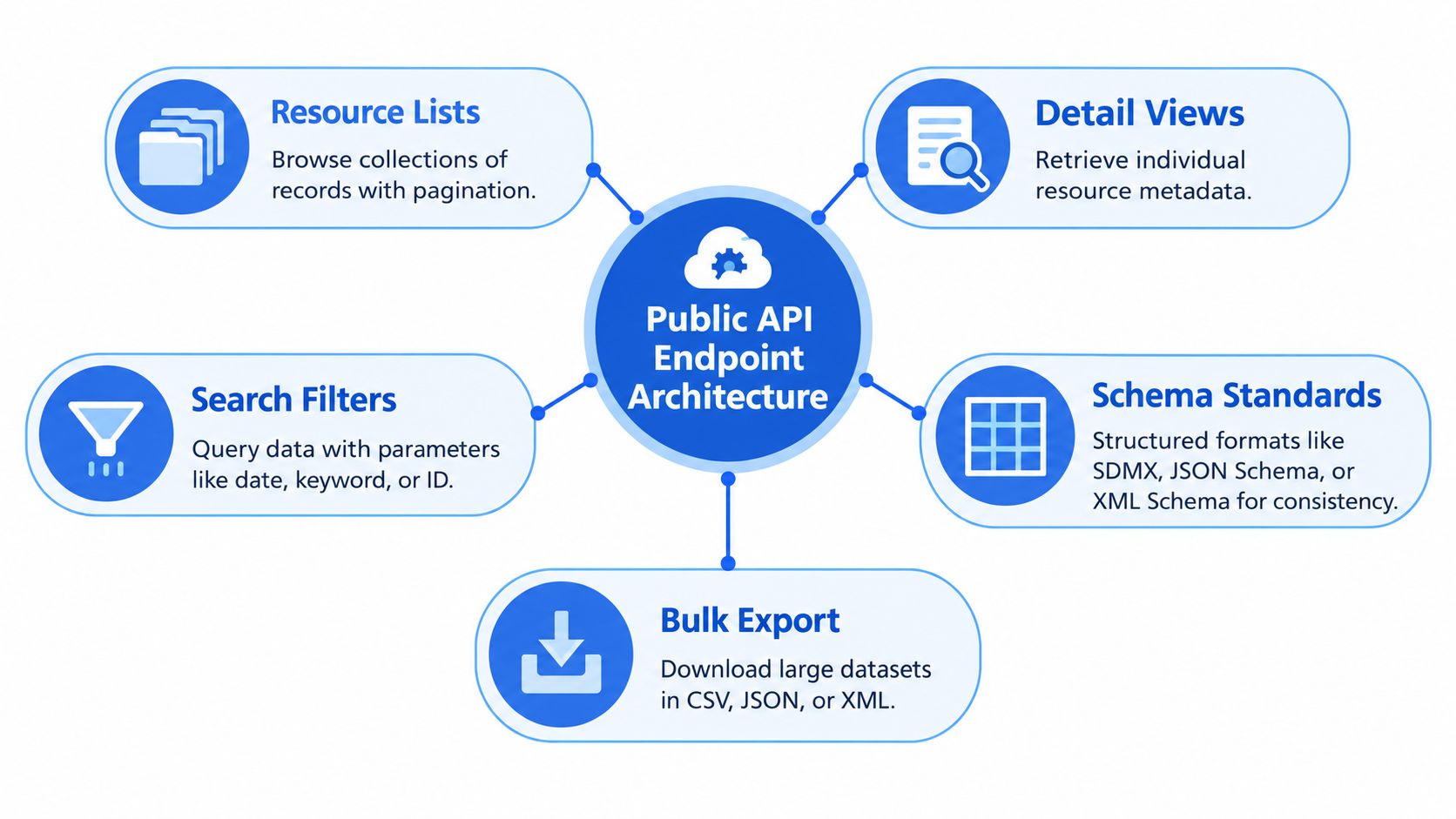
The visualization makes the point that endpoint structure and data format work hand in hand, letting applications pull single records, filtered collections, or bulk exports through a consistent interface.
Protect Personal and Sensitive Data
Privacy deserves its own checklist, even when the source publishes openly. Names, contact details, precise locations, health information, or seemingly harmless field combinations can re-identify individuals once joined with other datasets.
Before caching any responses, run through these questions:
- Does the dataset contain personal or sensitive information?
- Does your intended purpose align with the provider's stated purpose?
- Do you actually need every field, or can you trim what you collect?
- How long should cached copies stick around?
For a concrete example of how user information gets handled, review this privacy policy. Beyond that, document your deletion procedures, respect access restrictions, and never assume an API key grants you rights beyond mere technical access.
A public data API works much like a public road — shared infrastructure that only functions well when traffic flows at a manageable pace. Without guardrails, a flood of simultaneous requests can slow the service to a crawl or knock it offline entirely. That's why providers enforce rate limits (capping how many requests you can make within a given window) and quotas (setting a hard ceiling on total usage over a longer period, like a billing cycle).
These limits aren't one-size-fits-all. You might encounter caps measured per second, per minute, per day, or per month. Some APIs are transparent about it, returning headers that tell you exactly how much capacity you have left. Others simply hit you with an HTTP 429 Too Many Requests and leave you to figure out why. The bottom line: read the provider's documentation before writing a single line of code, because limits often differ by endpoint, account tier, or pricing plan.
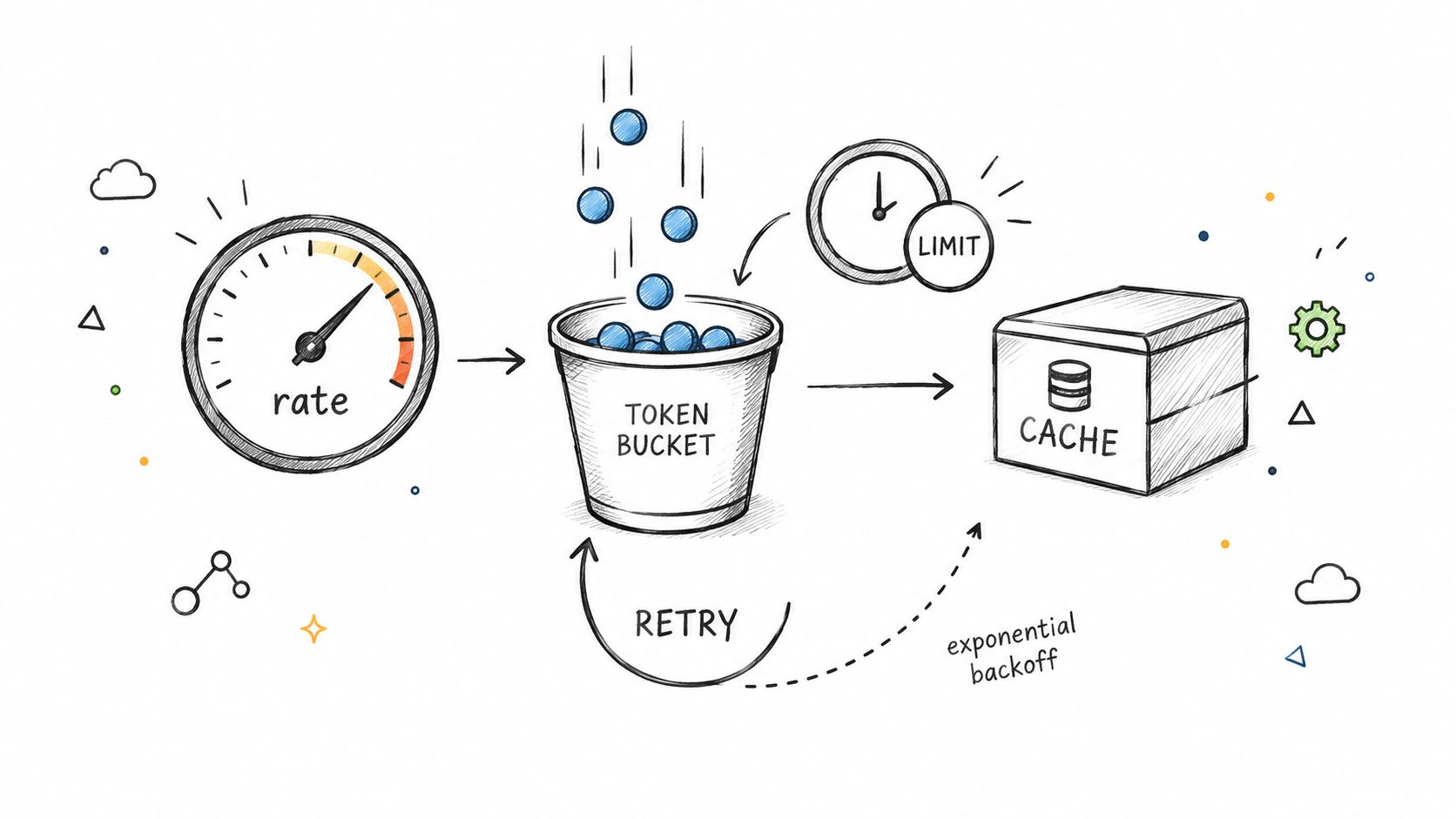
A reliable client treats a rate limit as operating guidance, not an obstacle to defeat.
Build Requests That Recover Gracefully
When a request fails temporarily, the instinct is to retry immediately — but that's exactly what makes things worse. A burst of retries from dozens of clients at once can overwhelm an already struggling server. Exponential backoff solves this by increasing the wait time after each failed attempt, often with a bit of random jitter thrown in so that multiple workers don't all retry at the same moment.
Here's a practical retry sequence that works well in most situations:
- Send the request and inspect the response.
- If the server returns
429or a temporary5xxerror, check for aRetry-Afterheader. - Wait for the suggested period, or fall back to progressively longer delays.
- Stop after a defined attempt limit and log the failure for later review.
This pattern keeps your application from spinning in an endless loop while giving the API breathing room to recover. One important distinction: separate temporary errors (server overload, network hiccups) from permanent ones (invalid parameters, missing authentication). Retrying a bad request won't magically make it valid.
Reduce Traffic Before It Starts
The cheapest request is the one your application never sends. If the data doesn't need to be fresh to the second, store responses in a cache and set expiration periods that match how often the source actually updates.
Batching is another powerful lever. Instead of firing off one request per record, look for a bulk endpoint or pass multiple identifiers in a single call when the API supports it. And when paginating through large collections, stick to the documented page size rather than pulling overlapping chunks of data.
| Technique | Best Use | Main Benefit |
|---|---|---|
| Caching | Repeated reads of the same data | Fewer requests |
| Batching | Fetching many related records at once | Lower overhead |
| Backoff | Handling temporary failures | Better recovery |
| Pagination | Traversing large collections | Controlled memory use |
For a deeper dive into these patterns, read this guide to API rate limits and request handling.
Monitor Usage and Plan Capacity
You can't manage what you can't see. Track request volume, response times, status codes, cache hit rates, and remaining quota through a dashboard or logging system. These metrics tell you whether a spike in traffic, an inefficient query, or a change on the provider's end is behind your failures.
Set alerts well before your quota hits zero, and test your integration under realistic concurrency conditions. Captapi, for example, offers a 24-hour shared cache, built-in retry logic, and rate limits up to 600 requests per second depending on your plan. Design your client so that limits and retry thresholds stay configurable — that way, when your needs change or you switch providers, your integration adapts without a full rewrite.
What a Public Data API Actually Does
A public data API becomes genuinely useful when it transforms an information problem into a repeatable request. Instead of manually copying data, a developer asks for records, filters the response, and feeds structured results straight into an application.
That same pattern powers dashboards, research projects, machine learning pipelines, and automated reporting. The UK government's Open Data Communities update offers a good example: analysts, journalists, academics, and service developers all tap into open data, but each group uses it differently.
Build Live Dashboards
Picture a product manager setting up a dashboard that tracks housing, energy, transport, or social trends. The application hits a list endpoint on a schedule, applies filters like location and date range, and stores only the fields needed for charts.
This keeps the interface current without forcing anyone to download massive files. It also simplifies comparisons, since the same request can run across multiple regions with minimal adjustment.
| Industry | Common Use Case | Typical Data Sources |
|---|---|---|
| Public services | Display local indicators | Government datasets |
| Marketing | Track mentions and engagement | Social platforms |
| Research | Compare observations over time | Statistical portals |
| Media | Support evidence-based stories | Public records |
The trick is separating collection from presentation. A background job handles retrieval, validates changes, and updates the dashboard, while the front end stays fast and focused on what users actually see.
Support Research and Machine Learning
Researchers rarely want one-off downloads. They need repeatable datasets. A script collects records, preserves retrieval dates, strips unnecessary fields, and writes clean files for analysis. That makes the whole process reproducible when the source data updates.
Machine learning teams follow a similar pipeline to prepare training or retrieval data. Captapi, for instance, offers social media endpoints for transcripts, summaries, comments, and engagement metrics, which feed into RAG pipelines, video question answering, and trend studies.
Good implementation turns public data into a dependable input, not an unmanaged pile of responses.
Before processing large volumes, nail down the target fields, update schedule, and storage policy. Then test a small sample for missing values, duplicate records, unexpected formats, and licensing constraints.
Automate Reporting Workflows
An analyst can schedule a public data API request each morning, compare new results against the previous snapshot, and push a concise report to a team channel. A marketing agency might combine social comments with engagement metrics to flag competitor activity or emerging topics.
Start with a straightforward workflow:
- Authenticate and request a small sample.
- Validate the response against expected fields.
- Cache or store the result with its timestamp.
- Transform records into a report, chart, or model input.
- Log failures and review unusual changes.
For hands-on guidance, read this guide to integrating APIs. Build incrementally, document your data sources, and keep provider-specific settings configurable so future changes don't force a complete rewrite.
A reliable public data API integration is less like a single request and more like a small supply chain. Data must arrive, pass quality checks, survive interruptions, and reach your application in a predictable form.
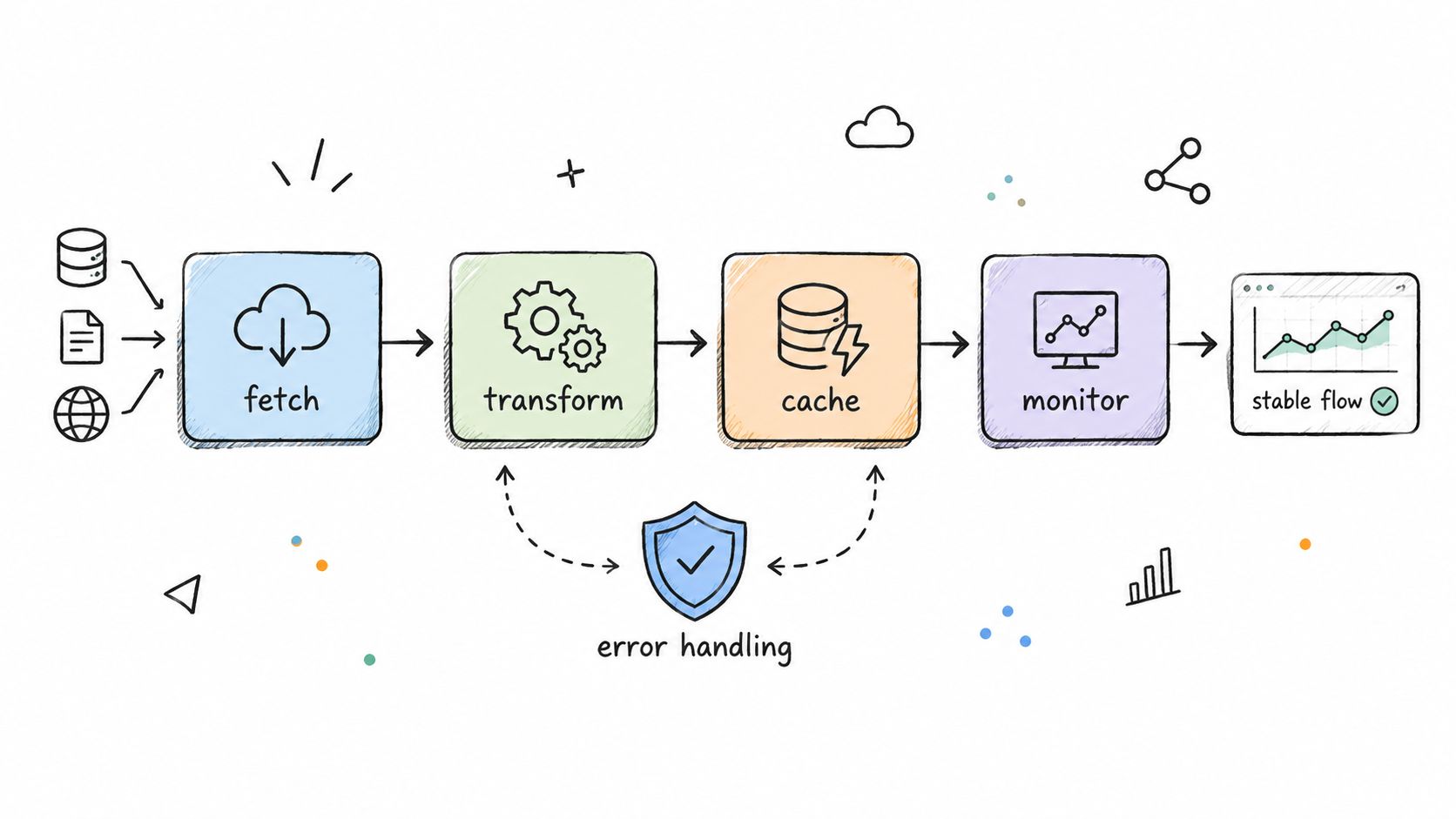
Design for Failure
Start by choosing a client library that handles timeouts, structured errors, connection reuse, and configurable retries. Not every failure is the same, so treat them differently:
- 400-level responses usually mean you need to fix your parameters or credentials.
- 429 responses are telling you to slow down and respect the provider’s rate limit.
- 500-level responses might be temporary, so retry cautiously rather than giving up immediately.
Use exponential backoff with jitter, and cap your total attempts. When the API returns a Retry-After header, follow it instead of rolling your own timing. Log the endpoint, status code, request identifier, and timestamp, but keep secret keys completely out of your application logs.
A production integration assumes the source can be slow, unavailable, or changed, then defines what happens next.
Caching cuts down both waiting time and request volume. Store repeated responses with a TTL that matches how often the source updates. A daily dataset might cache fine for twenty-four hours, while live engagement metrics probably need something much shorter.
Normalize and Monitor Data
Public data APIs rarely agree on field names or date formats. Build an internal model that maps each provider’s quirks into consistent fields, but always preserve the original payload so you can investigate issues later.
Take a social-data pipeline: one source might call it published_at, another createdTime, and a third upload_date. Map all three to a single publishedAt field. Validate required fields, flag duplicates, and quarantine malformed records rather than letting one bad response take down the whole workflow.
Track these metrics over time:
- Request success and error rates
- Response latency and timeout frequency
- Cache-hit percentage
- Remaining quota and retry counts
- Record freshness and schema drift
The UK government’s Open Data Communities update is a good reminder of why monitoring and migration planning matter. Platforms and preferred formats shift as user needs evolve.
Finally, keep provider settings out of your business logic. Store endpoints, retry thresholds, cache durations, and freshness rules in configuration files. Test against recorded responses, review documentation on a schedule, and always maintain a fallback or graceful-degradation path.
For social-media workflows, Captapi's developer-focused API offers consistent endpoints across major platforms, which makes it easier to centralize retries, transformations, and monitoring in one integration. Start with a small dataset, measure how it behaves, and expand only once the pipeline holds up under realistic load.
How Do I Find a Reliable Public Data API?
Finding a reliable public data API starts with the source itself. Check the publisher's official documentation for clear information about schemas, authentication requirements, usage quotas, and deprecation policies. Look for signs of active maintenance: regular updates, transparent status pages, and well-maintained changelogs. Government open-data programs are increasingly prioritizing machine-readable formats, as demonstrated by MHCLG's Open Data Communities update. These tend to be dependable starting points.
Which Formats Do Public Data APIs Support?
JSON dominates for application integration, while CSV works well for analysis and bulk downloads. XML and SDMX still appear in structured statistical datasets, especially from central banks and statistical agencies. Before you start coding, take time to inspect field names, timestamp formats, pagination behavior, and schema documentation. A few minutes here prevents hours of debugging later.
Do Public Data APIs Cost Money?
Cost structures vary widely. Some APIs are genuinely free. Others use API keys, credit allowances, subscriptions, or paid tiers with different limits. Always check the terms for commercial use and quota rules before building a customer-facing product. A free API is only free if your intended use matches the license.
"Public" describes access, not unlimited usage or unrestricted rights.
How Should I Handle API Changes?
Assume endpoints will change. Cache responses where it makes sense, validate schemas before processing, monitor error rates, and keep provider-specific settings in configuration files rather than hardcoded. When a deprecation notice appears, review the migration notes carefully, test the replacement endpoint thoroughly, and maintain a fallback path when you can.
For one straightforward social-media integration, consider Captapi at https://www.captapi.com.
Here are answers to the questions that come up most often when working with public data APIs.
Common Public Data Api Questions
| Question | Short Answer |
|---|---|
| How do I verify an API is trustworthy? | Check documentation quality, update history, and official status pages. |
| What format is best for analysis? | CSV for bulk exports; JSON for application-level integration. |
| Are public APIs always free? | No. Many require API keys or paid tiers, especially for commercial use. |
| What should I do when an endpoint changes? | Cache responses, validate schemas, and monitor deprecation notices. |
| Which governments publish open data APIs? | Programs like MHCLG's Open Data Communities offer accessible, machine-readable datasets. |
Most difficulties with public APIs come from skipping the fundamentals. Review the documentation, understand the license terms, plan for changes, and your integrations will be far more resilient.