
What Is Data API: A Simple Guide for Beginners (2026)
A data API acts as a digital messenger, letting one software application pull information from another system. Instead of serving up a screen full of visuals for humans to click through, it returns clean, machine-readable results — typically JSON or XML — that programs can work with directly.
Table of Contents
- The Simple Meaning of a Data API
- Core Components of a Data API
- Follow the Request Flow
- Essential Data API Terminology
- Understand the Guardrails
- APIs Became Business Infrastructure
- Feed Live Information Into RAG
- Build Real-Time Business Dashboards
- Monitor Social Media Automatically
- Data Access Methods Compared
- Pick the Right Tool
- Measure What Happens After Deployment
- Use Metrics for Operational Decisions
- Plan the Connection
- Test Limits Before Deployment
- Is a Data API the Same as a Web API?
- How Much Does a Data API Cost?
- Do You Need Coding Skills?
- What Is the Best Starting Point?
The Simple Meaning of a Data API
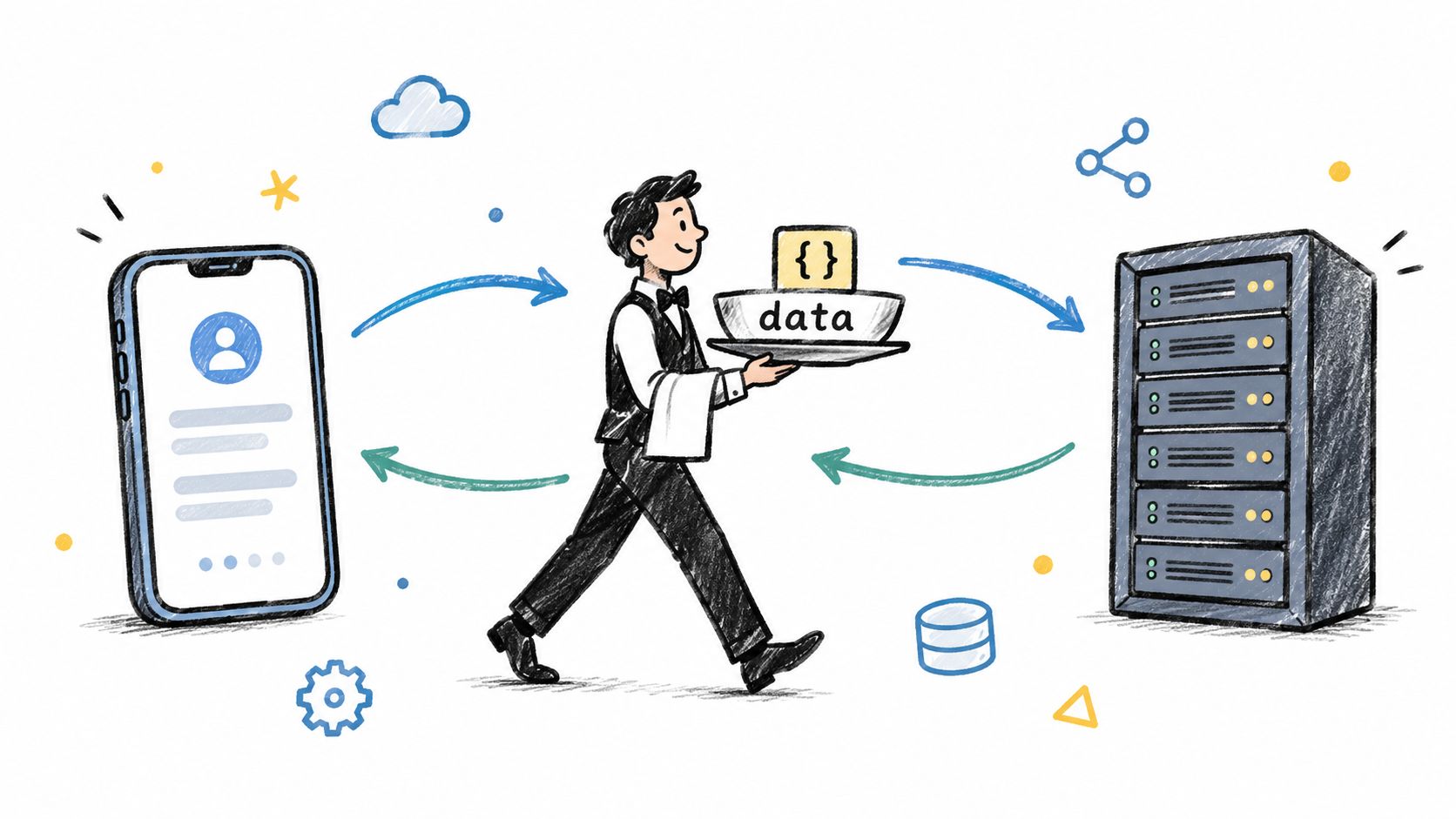
Think about a restaurant. You don't wander into the kitchen, check the ingredients, and cook your own meal. You hand your order to a waiter, who takes it to the kitchen and brings back the finished dish.
A data API follows that same logic:
- Your application is the customer placing the order.
- The API is the waiter carrying the request back and forth.
- The server and database are the kitchen doing the actual work.
- The response is the data your application can put to use.
This setup lets software grab exactly what it needs without understanding — or needing access to — how the provider stores, processes, or secures its information. A weather app, for instance, can fetch current conditions while staying completely isolated from the weather company's internal infrastructure.
Unlike a visual website, a data API is built for machines. It delivers structured, predictable fields that another program can read, filter, store, or merge with other datasets. That predictability is what makes it possible for a dashboard to auto-refresh or for an AI system to pull in up-to-date source material on demand.
A data API doesn't replace the data source. It simply provides a controlled doorway into it.
Core Components of a Data API
Every data API relies on a handful of working parts to keep requests orderly and responses meaningful. Here's a breakdown of what each piece does and how it maps to something familiar.
| Component | Role in the System | Real-World Analogy |
|---|---|---|
| Endpoint | Identifies the specific data or action being requested | A specific menu item |
| Request | Communicates what the application needs | Placing an order |
| Authentication | Verifies the caller's identity and permissions | Showing an ID card |
| Response | Delivers structured data back to the caller | Receiving the meal |
| Rate limit | Caps how frequently requests can be sent | Managing a busy queue |
In the wild, an API might return a video transcript, a product catalog entry, or a social media comment. Developer-first platforms such as this beginner-friendly API guide from Captapi make that whole exchange easier to grasp and put into practice.
So, what is a data API at its core? It is a reliable bridge between software systems — one that turns a well-defined request into useful data without ever exposing the entire backend behind it.
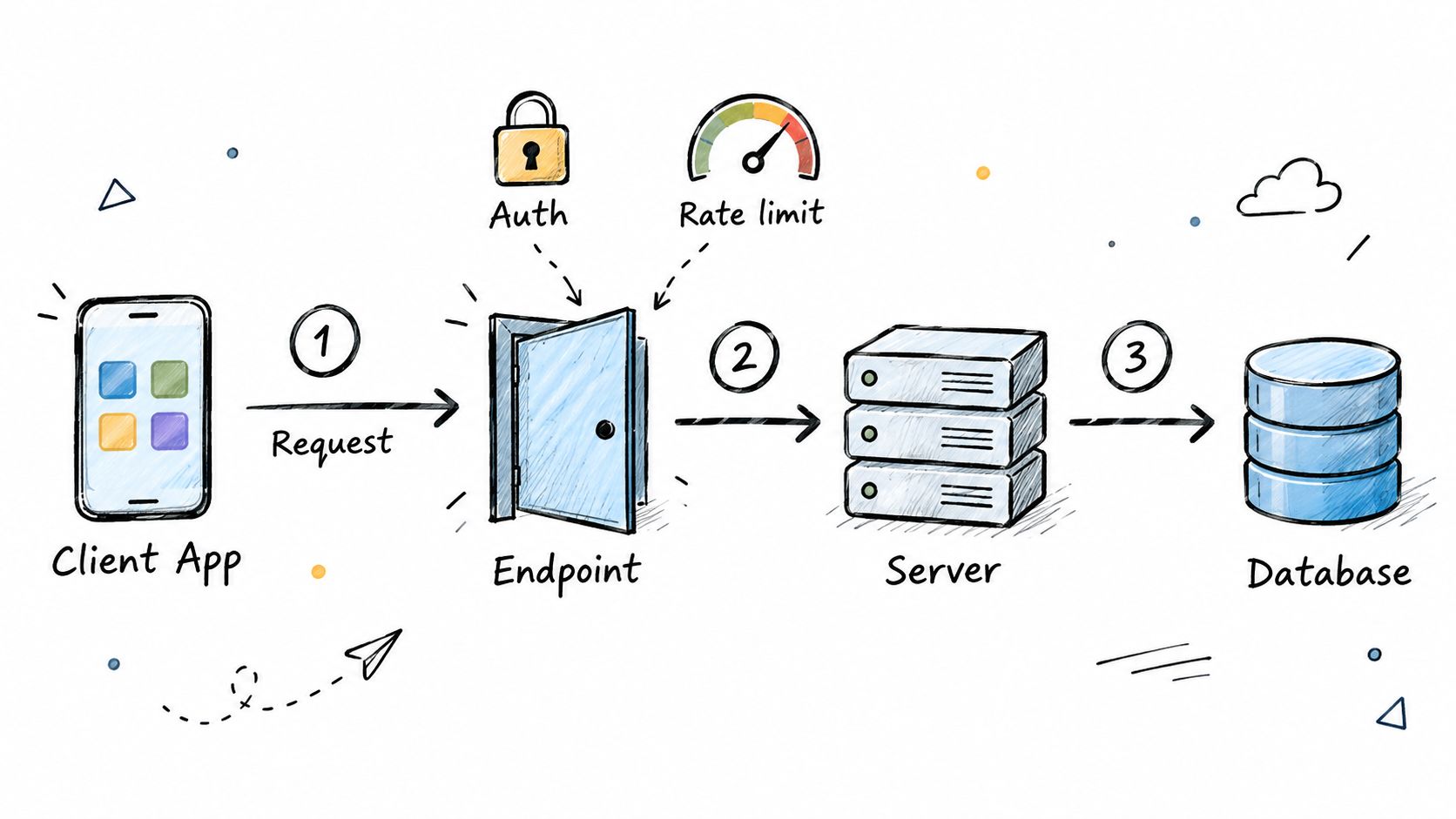
A data API works like a mailroom with strict routing. Your application sends a request, the API figures out what's being asked for, the server checks the right database, and a structured response comes back to the application. Simple concept, but the details matter.
Follow the Request Flow
Most exchanges follow a predictable pattern. Here's what actually happens behind the scenes:
- The client sends a request. Maybe it needs a YouTube transcript, a specific product record, or a batch of social media comments. The client says what it wants and where to find it.
- The endpoint receives it. Think of an endpoint as a dedicated doorway for one specific type of data. Each door leads to something different, and the API knows exactly which door handles which request. For a deeper dive into how these work, check out this breakdown of API endpoints.
- Authentication gets verified. The API key functions like a digital ID badge. It tells the system who's calling and, more importantly, what that caller is actually allowed to access.
- The server processes the request. Parameters get validated, approved data sources get queried, and the result gets packaged up.
- The API returns a response. Most of the time you'll see JSON, a format with predictable fields that any piece of software can read without breaking a sweat.
Take a real example. A video tool might request a transcript from /v1/youtube/transcript. The server grabs that specific content, formats it cleanly, and sends back the text along with relevant metadata. No clutter, no entire webpages, just what was asked for.
The endpoint chooses the door, authentication proves permission, and the response delivers only the requested information.
Essential Data API Terminology
Before going further, it helps to get comfortable with a handful of terms you'll run into constantly. This table covers the non-negotiable basics.
| Term | Simple Definition | Why It Matters |
|---|---|---|
| Endpoint | A defined route that points to a specific type of data | Keeps requests precise and prevents the system from guessing what you want |
| Authentication | The process of verifying identity and access permissions | Protects sensitive accounts and restricts data to authorized callers |
| Rate Limit | A cap on how many requests you can make within a given timeframe | Prevents server overload and ensures fair access across all users |
| JSON | A lightweight data format organized into key-value pairs | Lets different systems exchange information without compatibility headaches |
| Status Code | A numeric response indicating whether a request succeeded or failed | Gives your application immediate feedback so it can react appropriately |
These terms show up in every API documentation page, every error log, and every integration conversation. Get fluent in them early and everything else gets easier.
Understand the Guardrails
Three controls keep this whole exchange reliable and safe.
Rate limits work a lot like traffic lights at a busy intersection. A provider might allow, say, 100 requests per minute. Stay under that and everything flows smoothly. Blow past it, and the API returns a temporary limit response, essentially a "slow down" signal. Well-built applications handle this gracefully by backing off, retrying after a pause, or serving cached results instead of hammering the server.
Security is another piece people overlook. The Wiz investigation into an exposed Moltbook database laid bare just how damaging sloppy credential storage can be. Millions of API keys were left wide open, and that kind of exposure doesn't just break one connection, it compromises entire systems. A working API connection is not, by default, a secure one. Treat keys like passwords, not like configuration notes.
Then there's error handling, which separates production-grade APIs from hobby projects. When something goes wrong, whether it's a missing parameter, an invalid key, or a record that no longer exists, the API should respond with a clear status code and a helpful message. That way your application knows exactly what happened and can adjust, instead of sitting there guessing. Predictable error responses are a big part of what makes data APIs dependable enough to build real software on.
Data APIs exist for one straightforward reason: software systems need to talk to each other without exposing their internal workings. Early integrations were clunky, custom-built affairs, often designed for a single company's own applications. But as websites, cloud services, and mobile products started multiplying, businesses needed connections that could be reused across many partners and products.
A turning point arrived in 2000, when Salesforce launched its API platform. The move proved that an API could be more than hidden technical plumbing. It could become a product feature in its own right, letting customers and developers connect Salesforce data with their own tools.
An API turns a closed system into a controlled point of connection.
That shift changed how companies built and scaled. Instead of manually copying data between platforms, teams could request it programmatically and trigger actions automatically. A sales record could flow straight into reporting software. Customer activity could show up in a support or marketing system without anyone lifting a finger.
APIs Became Business Infrastructure
The commercial impact became impossible to ignore as major platforms opened up their ecosystems. eBay, for instance, used APIs to let outside developers build tools for listing products, and those integrations fueled substantial growth in marketplace listings. The takeaway was clear: third-party software could extend a platform's reach far beyond what any internal team could build alone.
Modern API programs now serve several business goals at once:
- Faster product development, because teams can reuse trusted data services instead of building from scratch.
- Partner ecosystems, where outside developers create complementary tools around a core platform.
- Automation, which cuts down on repetitive exports and manual data transfers.
- Scalable access, allowing one data source to feed dashboards, apps, and AI workflows simultaneously.
This model also changed how companies evaluate APIs. Reliability, documentation, authentication, pricing, and rate limits now directly influence product decisions, budgets, and customer experience. Autodesk, for example, describes its Data Model APIs as a way to access structured project and manufacturing data, automate workflows, and support reporting without relying on manual exports.
For social platforms, the same principle enables unified monitoring and analysis. Learn more about social media APIs and their practical uses to see how structured access can connect several networks through software.
The result is a fundamental shift from API as plumbing to API as infrastructure. A well-designed data API lets a company share useful information safely, attract developers, and unlock new revenue or workflow opportunities without rebuilding the original system every time.
A data API starts to make sense once you see what it actually does. Rather than manually moving information between tools, software can request fresh, structured data whenever a workflow needs it. That's what makes APIs so practical for AI applications, reporting, research, and social media operations.
Feed Live Information Into RAG
Retrieval-Augmented Generation, or RAG, gives an AI model relevant source material before it writes an answer. Think of a data API as the model's research assistant. It fetches current documents, transcripts, comments, or product records instead of forcing the system to rely only on older training data.
Here's a concrete example. A video intelligence application calls a transcript endpoint, splits the returned text into searchable passages, and stores those passages in a vector database. When someone asks a question, the application retrieves the relevant passages and sends them to the language model as context.
A practical RAG pipeline usually follows these steps:
- Request content through an API.
- Clean and divide the response into passages.
- Create embeddings and store them.
- Retrieve matching passages for each question.
- Generate an answer grounded in the retrieved material.
The API supplies the evidence; the AI model turns that evidence into a useful response.
Captapi supports this pattern with social data from YouTube, TikTok, Instagram, and Facebook. Developers can retrieve transcripts, summaries, comments, and search results through one REST interface, then connect that output to video question-answering, research assistants, or monitoring agents.
Build Real-Time Business Dashboards
Dashboards lose value fast when their numbers depend on yesterday's spreadsheet. A data API can refresh metrics automatically, giving teams a much closer view of sales, engagement, inventory, campaign performance, or project activity.
Picture a marketing agency tracking several brands. Instead of signing into each platform and exporting reports, its dashboard requests engagement metrics on a schedule, normalizes the fields, and displays comparisons in one place. Teams can then spot a sudden drop in views or identify a post gaining traction while there's still time to respond.
APIs also support targeted reporting. Autodesk describes its Data Model APIs as a way to query granular project information and automate dashboards, reporting, and quality checks, rather than relying on manual exports. Read about structured API access for project data.
Monitor Social Media Automatically
Social monitoring is another direct use case. Captapi collects public posts, comments, channel details, search results, and engagement signals across multiple networks, allowing one application to compare activity without maintaining separate integrations.
A brand-monitoring workflow might look like this:
- Search for competitor names and campaign terms.
- Collect comments and engagement metrics.
- Summarize recurring complaints with an AI model.
- Store results for trend analysis.
- Alert a team when unusual activity appears.
Because Captapi provides shared access through one interface, developers avoid juggling several platform SDKs. Teams can use the data for competitor research, caption generation, OSINT, or creator reporting, while remaining responsible for appropriate data handling and compliance. Explore Captapi's social media data API.
Answering what is a data API gets easier once you understand what it isn't. An official data API is a documented doorway into structured information. Scraping, by contrast, reads whatever a website happens to display on its pages, while an SDK bundles platform-specific tools for developers working inside one ecosystem.
Scraping can be fine for a quick experiment. The trouble starts afterward: your collector depends on page layouts, selectors, and access rules that can change without notice. A single redesign can break everything overnight. There's also a legal angle — scraping may conflict with a site's terms, so it pays to review permissions before collecting anything.
SDKs solve a different problem. They cut setup time for one platform, but juggling several of them creates friction fast. Each comes with its own naming conventions, release schedules, authentication methods, and error formats.
Choose your access method based on stability, permission, and long-term maintenance — not whichever option prototypes fastest.
Data Access Methods Compared
Here's how the three approaches stack up side by side:
| Method | Stability Factor | Development Effort | Compliance Risk |
|---|---|---|---|
| Data API | Usually predictable and documented | Moderate initial setup | Follow provider terms and permissions |
| Web scraping | Sensitive to page changes | Low to moderate at first | Review terms, robots guidance, and applicable law |
| Platform SDK | Convenient within one ecosystem | Varies across platforms | Follow each platform's developer rules |
The pattern worth noticing: an API trades a bit more upfront work for predictability, while scraping and SDKs push their costs into the future — through maintenance or ecosystem lock-in.
A data API gives you a consistent contract. Your application sends a defined request, receives predictable fields, and handles documented errors. That makes it far easier to test, monitor, cache, and swap out components without rewriting the whole workflow.
Picture a developer building a social listening dashboard. The scraping route means maintaining separate collectors for YouTube, TikTok, Instagram, and Facebook. The alternative is a developer-first service like Captapi's social media data API, which exposes one REST interface for transcripts, comments, summaries, search results, and engagement data across all those networks.
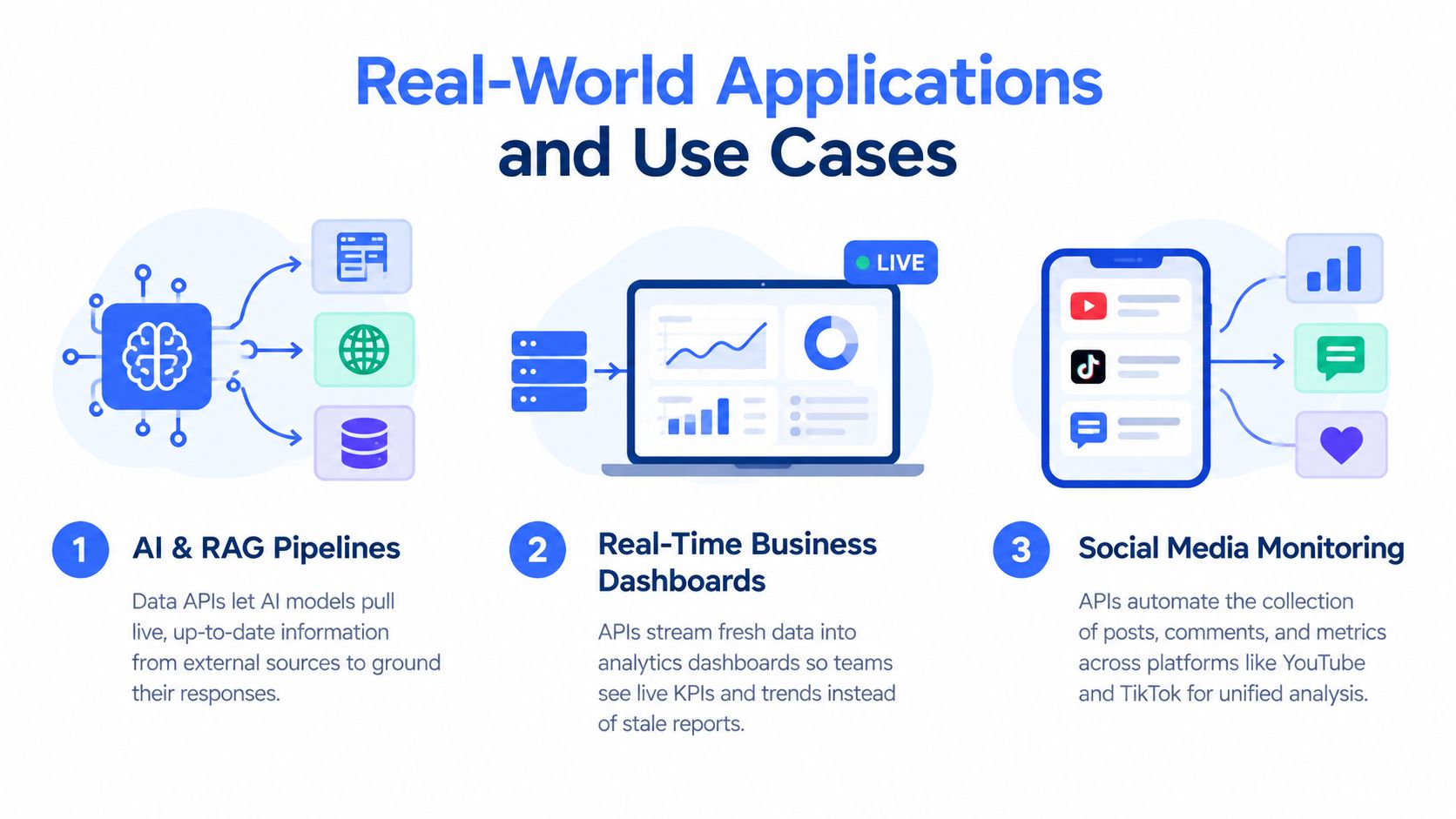
The infographic highlights three practical data API uses: AI and RAG pipelines, live business dashboards, and social media monitoring. One structured connection, three very different jobs — research, reporting, and automated workflows.
Pick the Right Tool
So when does each approach make sense?
- Use a data API when you need repeatable access, stable response formats, and a workflow that has to keep running without constant attention.
- Use scraping for permitted, short-term collection where no suitable API exists — accepting that it demands ongoing monitoring and maintenance.
- Use an SDK when you're committed to a single platform and want its native features.
Captapi also relies on shared caching, retries, and consistent endpoints to cut down repetitive work for common social data requests. Before you build anything, check the authentication requirements, rate limits, data freshness, pricing, and permitted uses.
Read also: what screen scrapers are and how they work.
A capable data API reports more than the records it returns. It also shows how reliably those records are delivered, giving teams a view of latency, errors, request volume, and query behavior.
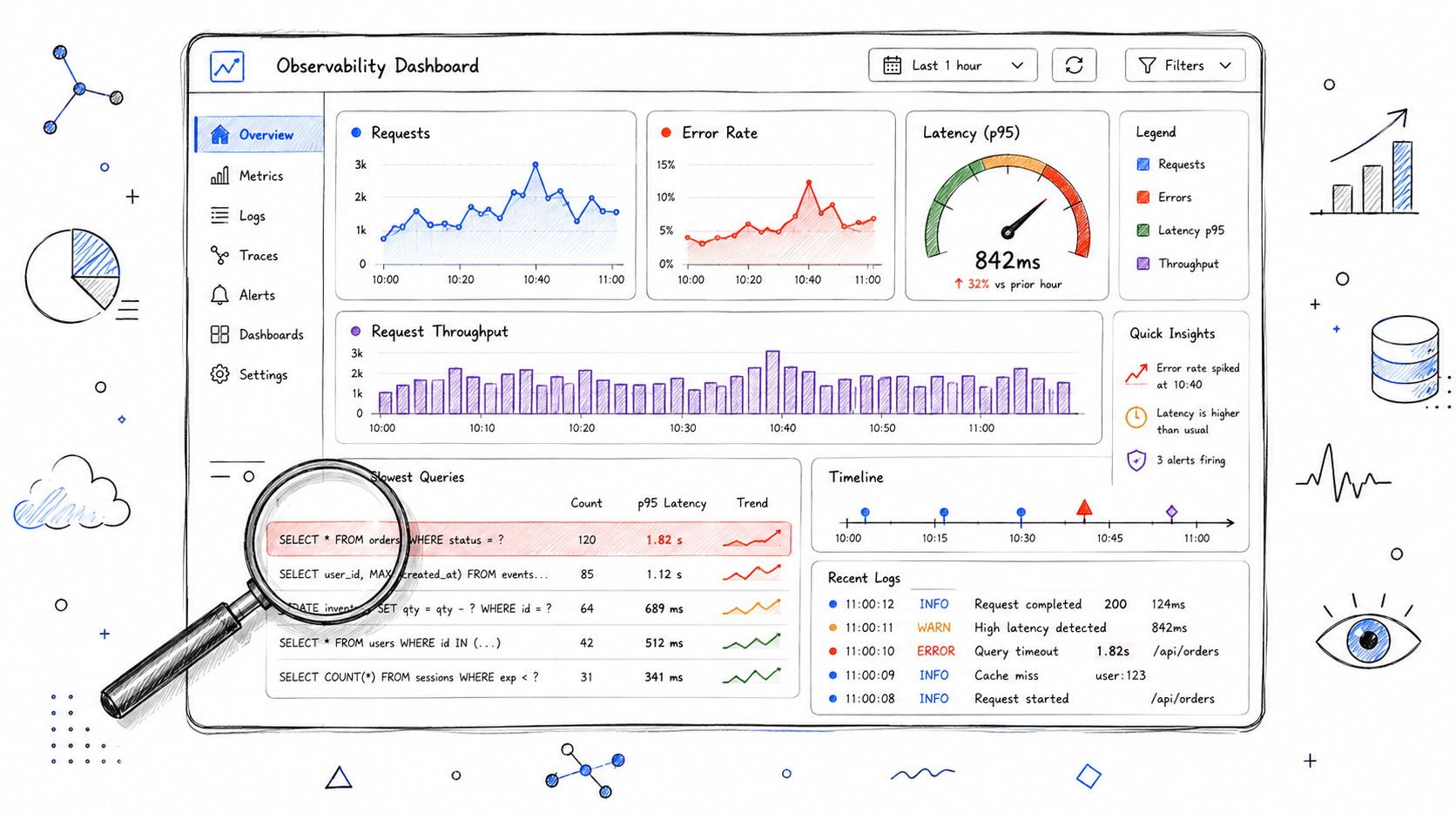
Think of observability as a car dashboard. The API response is the destination, while latency, error rates, cache hits, and throughput are the gauges warning you when the journey is becoming unsafe.
Measure What Happens After Deployment
A production integration needs more than a successful test request. Monitor these signals regularly:
- Latency, which reveals how long requests take and whether users are waiting.
- Error rates, which expose authentication failures, invalid parameters, or provider problems.
- Traffic patterns, which show peak usage times and help plan capacity.
- Query performance, which identifies expensive filters, large responses, or slow data sources.
For example, a marketing dashboard may refresh quickly during the morning, then slow down when every client requests campaign metrics at once. Usage analytics reveal that pattern before the delay becomes a customer complaint.
Observability turns an API from a delivery channel into an early-warning system.
Caching can add another useful signal. Captapi provides a 24-hour shared cache, so repeated social data requests may return faster without triggering the same underlying collection each time. Teams can compare cached and fresh-response behavior when evaluating freshness, speed, and cost.
Use Metrics for Operational Decisions
Enterprise teams also need an audit trail. Request logs can show which application accessed which endpoint, when it happened, and whether the request succeeded. That supports access reviews, incident investigation, and sensible quota planning.
A practical monitoring routine includes:
- Set latency and error thresholds.
- Track requests by endpoint and customer.
- Alert when usage approaches rate limits.
- Review slow queries and oversized responses.
- Test recovery after provider or network failures.
This approach applies beyond engineering. Teams comparing creator ecosystems can review UGC platform options for campaigns alongside API availability, reporting depth, and data freshness.
Finally, treat metrics as evidence for improvement. If most failures come from one endpoint, redesign that workflow. If demand peaks predictably, prefetch or cache permitted data. When you understand system behavior, you can protect user experience before bottlenecks spread.
Ready to build? Start by choosing a provider whose data coverage, documentation, pricing, rate limits, and permitted uses actually fit what you're building. A cheap endpoint isn't cheap at all if its responses are incomplete or its access rules block production work.
Plan the Connection
Resist the urge to jump straight into code. Pull up the docs first and confirm the endpoint path, required parameters, what fields come back, which status codes to expect, how pagination works, and whether they offer working examples. Then fire off a quick test request using Postman, which lets you inspect the response without having to scaffold a full application just to see if things work.
A practical first pass looks like this:
- Create an account and generate an API key.
- Store the key securely, using environment variables or a secret manager rather than hardcoding it in public code.
- Send one controlled request with a record you already understand.
- Check the response and handle the three outcomes: success, missing data, and authentication errors.
- Add logging and retries before wiring the API into any larger workflow.
Treat an API key like a password. Never commit it to a repository, paste it into frontend code, or share it in screenshots.
Test Limits Before Deployment
Rate limits define how quickly your application can pull data from a provider. If the service allows, say, a fixed number of requests per minute, you'll want to queue work smartly, cache repeated results, and back off gracefully when you hit the ceiling rather than hammering the endpoint in a loop.
Failure cases are where the real testing happens. Plan for these scenarios:
- Invalid or expired credentials
- Missing required parameters
- Empty result sets
- Request timeouts
- Temporary server errors
- Oversized payloads
For a step-by-step walkthrough, read this guide to integrating APIs. Once your test request behaves, move the credentials into deployment secrets, keep an eye on latency and error rates, and scale up your request volume gradually. That's how a one-off successful call becomes something you can rely on.
Is a Data API the Same as a Web API?
The terms get used interchangeably, but they aren't identical. A web API is the broader category—any API you call over the internet. A data API is a specific type built around retrieving or exchanging structured information.
Think of it this way: a payment API processes transactions, while a data API hands you video transcripts, product records, comments, or analytics metrics. Both travel over web requests, but what they're built to do is different.
Every data API can be a web API, but not every web API is a data API.
How Much Does a Data API Cost?
Pricing comes down to the provider and how they meter usage. Most fall into one of a few models:
- Free tiers, handy for testing or small projects.
- Credit-based pricing, where each request or operation eats into a balance.
- Subscription plans, which bundle a monthly request allowance.
- Consumption pricing, which bills you on actual usage.
To see how this plays out in practice, Autodesk breaks down its API pricing and what's included with subscriptions. Captapi takes a similar approach, offering free access and credit-based plans that grow with your needs. Either way, look past the headline number—check request limits, overage fees, data freshness, and commercial-use terms before you commit.
Do You Need Coding Skills?
It helps, but it's not always a hard requirement. Developers can call an endpoint straight from an application, while nontechnical users often reach the same data through dashboards, automation tools, or no-code platforms.
A basic integration usually comes down to four steps:
- Create an account and grab an API key.
- Pick the endpoint you need.
- Send your parameters with a request.
- Parse the structured response.
That said, anything running in production still demands secure key storage, proper error handling, caching, and attention to rate limits. The simple path gets you started; the careful path keeps you running.
What Is the Best Starting Point?
If what you need is public social data across YouTube, TikTok, Instagram, and Facebook, Captapi gives you one consistent REST interface for transcripts, comments, summaries, search results, and engagement metrics. One integration, four platforms, no patchwork of different formats to wrangle.
Start building with Captapi at captapi.com.