
Instagram Media Download: 5 Safe Methods in 2026

Use the official Meta Graph API, or a compliant unifying API like Captapi, when you need reliable, scalable Instagram media download. Third-party web downloaders are useful occasional manual helpers, but they aren't production solutions.
A developer may need images for a retrieval-augmented generation pipeline, a marketing team may want to monitor competitor Reels, and a researcher may be preserving public material for analysis. The download itself can look simple until the workflow encounters expired URLs, missing permissions, deleted posts, rate limits, copyright questions, or a platform policy change.
Instagram's advertising tools indicated a potential reach of at least 1.74 billion users worldwide in January 2025, equal to 21.3% of the global population and 26.9% of people aged 13 and older. Those figures describe advertising reach, not necessarily monthly active users or unique content consumers, but they still show why dependable media retrieval matters at global scale. DataReportal's Instagram statistics also shows how audiences are distributed across markets including India, the United States, Brazil, Indonesia, and Türkiye.
The engineering problem is balancing speed, reliability, and authorization. A public post may be visible in a browser, yet that visibility doesn't automatically authorize automated collection or downstream reuse. This guide treats Instagram media download as a production concern, not a shortcut for saving a single Reel.
Table of Contents
- Why Instagram Media Download Matters Now
- Official Meta Graph API Workflow
- Developer APIs, CLI Tools, and Browser Methods Compared
- Downloading Media Is Not the Same as Reusing It
- Building a Reliable Instagram Media Pipeline
- Choosing the Right Approach for Your Workflow
Why Instagram Media Download Matters Now
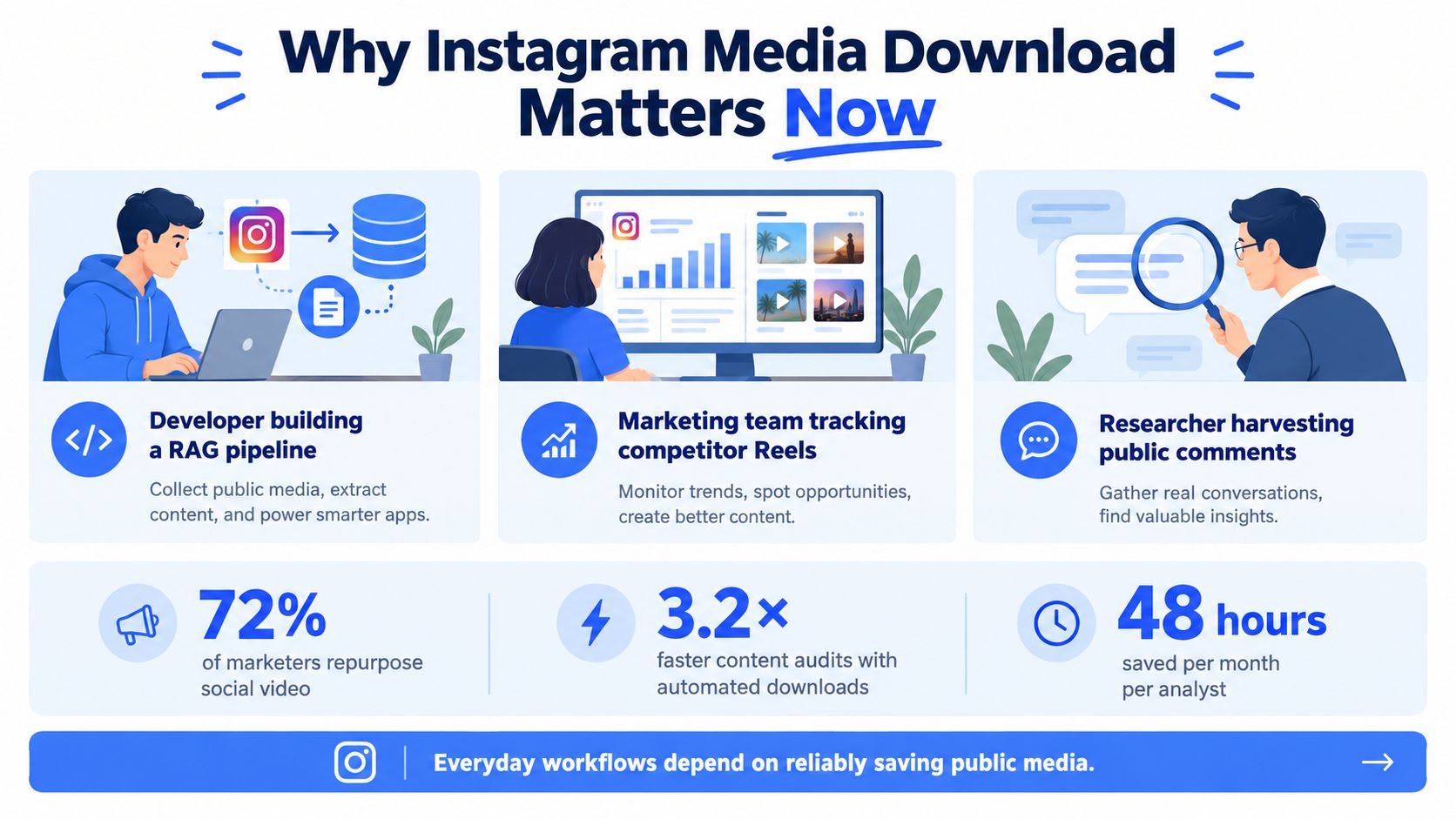
The same URL can trigger very different requirements depending on who is using it. An AI developer might retrieve public media alongside captions and comments, then attach the files to a RAG indexing workflow. A marketing team may collect approved competitor content for internal benchmarking, while a researcher may preserve public posts and comments with enough context to support later review.
Those workflows share a technical requirement, but they don't share the same permissions, retention rules, or acceptable level of automation. A creator saving a video for offline viewing has a different risk profile from an agency storing campaign assets or a company redistributing clips in paid advertising.
Scale changes the engineering decision
Instagram's global advertising reach makes manual retrieval unsuitable for teams working across many accounts or posts. The platform's ecosystem includes photos, videos, Reels, carousels, thumbnails, captions, and metadata, so a useful pipeline has to handle more than a single file type.
That scale also creates regional and operational diversity. The audience isn't confined to one language market, which means systems need clear logging, predictable failure handling, and workflows that don't depend on a particular browser layout or local session.
Developers, researchers, agencies, and creators increasingly need the same basic capability: retrieve an approved asset, understand where it came from, and preserve enough metadata to explain what happened. A broader explanation of the surrounding data ecosystem appears in this overview of social media data.
Accessibility isn't authorization
Instagram's Terms of Use state that users may not create accounts or access or collect information through automated means without Instagram's express permission, whether logged in or not. That means technical accessibility, public visibility, and authorized use must be treated as separate questions.
Practical rule: Choose the retrieval method only after identifying the account relationship, intended use, and platform permission available to your application.
A dependable approach therefore starts with an API or another explicitly permitted mechanism. It also records the source URL, account context, retrieval time, and intended use before a file enters storage. The fastest method on a single download can become the most expensive method to maintain when it depends on brittle page parsing, login sessions, or undocumented endpoints.
Official Meta Graph API Workflow
The official route begins with account ownership and permissions, not with a permalink. First determine whether the requested asset belongs to an Instagram Professional account that your application owns or manages. Then obtain the required OAuth access token and confirm that the token grants the fields and actions your workflow needs.
The supported sequence is straightforward:
- Identify the account relationship. Confirm that the account is eligible for the API workflow and that your application has an appropriate business or creator relationship.
- Authenticate with OAuth. Keep tokens outside application logs, rotate them according to your security policy, and record token age and permission scope in operational metadata.
- Enumerate media IDs. Query the account's media collection instead of treating a public permalink as proof of API access.
- Request minimal fields. Fields such as
id,media_type,media_url,thumbnail_url,timestamp, andpermalinkare often enough to decide what to retrieve. - Stream the returned media URL. Use an HTTP client that writes chunks to storage rather than loading an entire video into memory.
The Instagram Graph API reference documents the account and media model behind this workflow. Minimal field selection reduces unnecessary response data and makes it easier to detect which part of the process failed.
Public links don't bypass API controls
A permalink tells you where a person can view content. It doesn't prove that your application can enumerate the media, access its metadata, or retrieve a current download URL. Account type, token validity, permissions, media lifecycle, and application review status can all affect the result.
Public-content access may require App Review before live data is available. Treat that approval as a pipeline dependency. Track whether a failure comes from missing review, an invalid token, an unsupported account, or a media object that no longer exists.
Teams that are new to this model can also consult this guide to API in organic search for a broader explanation of how API-based data access fits structured workflows. For Instagram-specific public-data use cases, the Instagram public data API provides useful context on how developers separate discovery, retrieval, and downstream processing.
Don't build the downloader around a browser URL and add authorization later. Establish the permission boundary first, then design the retrieval path around the fields and objects the API returns.
Developer APIs, CLI Tools, and Browser Methods Compared
The right tool depends on whether the task is a one-off save, a controlled internal workflow, or a recurring data pipeline. These categories aren't interchangeable, even when they appear to produce the same MP4 or image.
| Method | Best fit | Main strength | Main weakness |
|---|---|---|---|
| Official Meta Graph API | Owned or managed Professional accounts | Explicit authentication and structured metadata | Account, permission, and review requirements |
| Unifying developer API | Multi-platform applications and recurring jobs | One integration surface across supported sources | You still need to validate coverage, permissions, and response behavior |
| CLI downloader | Occasional operator-led retrieval | Fast for local, manual tasks | Poor auditability and fragile automation boundaries |
| Browser downloader | An isolated personal save | Minimal setup | High maintenance and unclear automation permissions |
| Browser automation or credential scraping | None for a durable production system | Can imitate a user journey | Brittle, risky, and difficult to govern |
A unifying developer API can reduce SDK switching when a product needs Instagram alongside other social platforms. It may also standardize retries, response formats, and application logging. That convenience doesn't remove the need to verify whether the requested content is authorized or whether the provider's method is permitted for the use case.
CLI tools occupy a narrower but legitimate space. An operator may need to save an approved reference file during a research session, and a local command can be more practical than building an application. The boundary matters: manual assistance isn't the same as running a bulk collector behind a scheduled job.
Why browser methods fail in production
Browser-based grabbers often depend on page markup, client-side requests, cookies, or temporary URL patterns. Instagram can change any of those without preserving compatibility. Credential-based scraping adds account security exposure and creates a poor audit trail because the system's access depends on a human session.
Instagram's Terms state that automated access or collection requires express permission, so a reliable workflow should use an authorized API or another explicitly permitted mechanism rather than browser automation or credential-based scraping. The practical distinction is explained further in this comparison of web scraping versus API access.
A method that works in a browser today isn't automatically an integration strategy.
If the job runs once, a manual tool may be sufficient. If it runs repeatedly, across accounts, or inside a customer-facing product, select an API-first method with explicit authentication, documented rate behavior, structured errors, and a clear compliance owner.
Downloading Media Is Not the Same as Reusing It
Retrieval answers one question: can your system obtain the file? It doesn't answer the legal or contractual question: may your organization use the file for its intended purpose?
Public visibility doesn't transfer ownership. Original Instagram photos and videos generally remain protected by copyright, and downloading doesn't authorize reposting, editing, advertising, monetization, or redistribution. This discussion of Instagram downloader risks captures the distinction between obtaining media and having permission to use it.
Match the workflow to the intended use
Personal offline viewing may involve fewer downstream risks than commercial publication, but broad claims that personal use is always legal are unsafe because copyright exceptions differ by jurisdiction. Internal research still needs a defined purpose, access control, and retention period, particularly when posts involve identifiable people or sensitive subjects.
Quotation and criticism may be protected in some circumstances, but the exception depends on the jurisdiction, the amount used, the purpose, and the surrounding context. Commercial publishing and brand advertising generally demand a more explicit rights review because the asset may be edited, distributed, monetized, or placed beside a commercial message.
Use this decision sequence before storing or exporting an asset:
- Personal viewing: Ask whether the download is necessary and keep it private.
- Internal research: Record the research purpose, source, retrieval date, and deletion conditions.
- Quotation or criticism: Document why the excerpt is relevant and check the applicable exception.
- Commercial publishing: Obtain permission or a license covering the planned format and territory.
- Brand advertising: Confirm creator permission, commercial rights, music rights, and approval for the final edit.
A Reel can contain several rights layers. Permission from the video creator may not cover licensed music, performers, logos, or third-party footage. Attribution can identify the creator, but it isn't the same as permission.
Build provenance into the data model
Every stored asset should carry provenance metadata, not just a filename. At minimum, record the source URL, retrieval date, account visibility, consent or license status, and retention or deletion policy.
A compliance-oriented schema might also include the internal requester, intended use, review status, media ID, checksum, and the reason for any export. The social media compliance guide offers broader context for treating access, storage, and reuse as connected responsibilities.
Operational boundary: Your downloader should make unauthorized reuse harder to automate, not easier.
Separate archival retrieval from republication. A research archive may preserve an object for analysis while blocking public export. A marketing workspace may permit approved campaign assets but reject files without a documented license. That separation turns rights management into a system control rather than a reminder in a project document.
Building a Reliable Instagram Media Pipeline
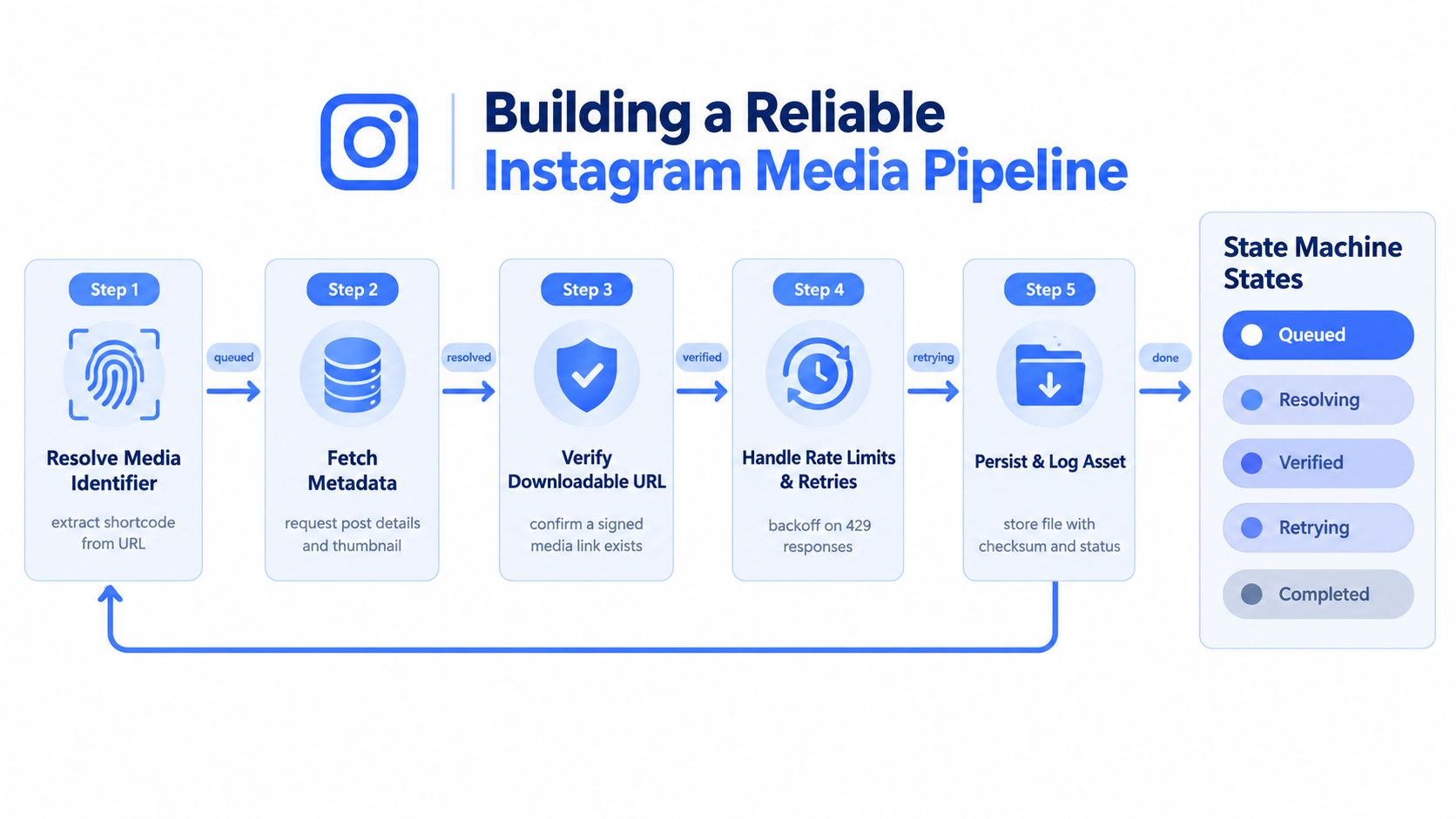
A production downloader should treat each request as a state machine with an auditable outcome. The system shouldn't jump directly from URL to file. It should resolve the identifier, validate the metadata, retrieve the object, and record why the operation succeeded or failed.
Use explicit processing states
Start with a queued request containing the source URL, requester, purpose, and account context. Resolve the media identifier, fetch metadata, confirm that a downloadable URL exists, issue a streamed GET request, validate the response, and persist the object with a checksum.
The important checks happen before storage:
- Identifier resolution: Confirm that the URL maps to the expected media object.
- Metadata validation: Verify the media type and required fields before downloading bytes.
- URL verification: Ensure the returned URL exists and redirects only to approved hosts.
- Content validation: Check MIME type, byte count, and file completeness.
- Persistence: Store the object, checksum, source metadata, retrieval timestamp, and final status.
Streaming matters for large videos because the client can write chunks directly to durable storage. It also gives the pipeline a place to detect incomplete transfers instead of treating an open connection as a successful download.
Retry only the failures that can recover
Use exponential backoff with jitter for retryable throttling and server errors, including 429 and 5xx responses. Cap the attempts and preserve the original error so an operator can distinguish a temporary network problem from a permanent access denial.
Don't retry authorization failures or policy denials. Repeating an invalid token request won't grant permission, and repeatedly submitting a denied operation can make incident diagnosis harder. Deleted or privacy-restricted media, unsupported formats, expired URLs, redirects, and interrupted connections should each produce a distinct outcome.
A useful benchmark view separates photos, videos, Reels, and carousels. Track:
- Completion rate: How often each media type reaches a valid persisted object.
- Latency: Median and p95 time from accepted request to completion.
- Transfer volume: Bytes transferred by media type and endpoint.
- Retry count: Attempts caused by throttling or transient server errors.
- Corruption rate: Files rejected by MIME, size, checksum, or decode validation.
Those metrics describe technical reliability, not permission success. Monitor App Review status, token health, endpoint changes, and policy decisions separately. A system can download every requested object while still operating outside an approved access boundary.
Teams without in-house pipeline capacity may choose to hire developers from Latin America for the integration, observability, and storage work. The data pipeline automation guide is also relevant when retrieval becomes one stage in a larger enrichment, indexing, or reporting process.
Choosing the Right Approach for Your Workflow
Developers should choose an API-first design with explicit account, token, field, and reuse boundaries. Marketers should use manual or approved-tool workflows for campaign assets, especially when music, creator permissions, or paid distribution are involved. Researchers should preserve provenance, define retention rules, and separate archival copies from public redistribution.
A CLI or browser tool can be reasonable for an occasional, authorized manual save. It becomes the wrong choice when it powers a recurring job, customer feature, bulk archive, or unattended account session. At that point, the maintenance and compliance costs outweigh the initial convenience.
Audit your current retrieval method, document usage rights for every stored asset, and measure failures by media type rather than hiding them behind a single success number. Prefer integrations that respect authentication, rate limits, platform terms, and deletion requests.
The safest product isn't the one that downloads the most media. It's the one that makes unauthorized collection and reuse difficult to automate.
Captapi provides a developer-focused social media data API with Instagram download capabilities for public photos and videos, alongside structured metadata and other social data endpoints. If you're replacing browser-based retrieval with an auditable workflow, visit Captapi to evaluate an API-based integration for your pipeline.