
Service Fusion API Explained and How to Integrate It
A field-service business often reaches the same uncomfortable point: the CRM has the latest customer details, the website captures a new service request, and the accounting system needs job and estimate data, but Service Fusion remains the operational source of truth. Someone then starts copying records between screens, or a developer is asked to “just connect the Service Fusion API” without a clear understanding of what that API can support.
That confusion is understandable. A native field-service API and a unified data API may both use REST and JSON, but they solve different problems. A unified API can normalize several platforms behind one interface, while a native API usually gives you deeper access to one product's own workflows. Teams evaluating integrations can also benefit from a broader primer such as this guide to API integration for Amazon sellers, especially when comparing operational syncs with marketplace data flows.
This guide focuses on the practical question: is the Service Fusion API a suitable bridge for the workflow you need? You'll learn what it exposes, where its transactional design helps, why its commercial and rate-limit boundaries matter, and how to choose between native development and a unified alternative. You'll also see the failure points that commonly turn a small sync into a fragile production system, alongside the most common data integration issues worth identifying before implementation.
Table of Contents
- Introduction to Service Fusion API Integration Challenges
- What a Service Fusion Style API Actually Does
- Core Capabilities and Typical Endpoints Explained
- Unified Data API Versus Native SDKs and When to Choose Each
- Authentication Rate Limits and Reliable Integration Practices
- Common Integration Patterns and Real World Use Cases
- Making the Right Choice for Your Next Integration
Introduction to Service Fusion API Integration Challenges
Suppose a plumbing company receives a quote request through its website. The office wants the submission to create or update a customer in Service Fusion, then create a job for dispatch. After the technician completes the visit, another system needs the resulting job information for reporting or billing coordination.
The business requirement sounds simple, but the data has a lifecycle. A person becomes a customer, a request becomes a job, and a job may be associated with an estimate. Each transition has to preserve identifiers, avoid duplicate records, and handle changes made by office staff or technicians. If one system creates a customer while another system updates the same contact, your integration needs a clear ownership rule rather than an improvised field-by-field copy.
The phrase Service Fusion API usually refers to the platform's Open API, a REST/JSON interface secured with OAuth 2.0 at api.servicefusion.com/v1. Service Fusion launched in late 2014 and has been continuously developed for over a decade, with EverCommerce ownership since 2020 supporting additional investment, according to the Service Fusion API overview and documentation references. That history matters because you're integrating with an established field-service product, not a generic database.
Why the API gets misunderstood
Developers often expect an API to provide unrestricted access to every record for analytics, migration, and high-volume processing. Service Fusion's documented operations are more focused. They center on creating and retrieving core field-service resources, which makes the API useful for transactional bridges but less suitable as a bulk data firehose.
A second source of confusion is the difference between unified and native APIs. A unified API can make several unrelated services look similar, but it may not expose every platform-specific write operation. The native Service Fusion API is the path to Service Fusion-specific customer, job, and estimate workflows, subject to the account's plan and the API's operational constraints.
By the end, you should be able to make four decisions:
- Whether your workflow needs a native Service Fusion connection.
- Which records should move in each direction.
- Whether the expected request pattern fits a moderate transactional API.
- How to design authentication, throttling, retries, and commercial approval before writing production code.
What a Service Fusion Style API Actually Does
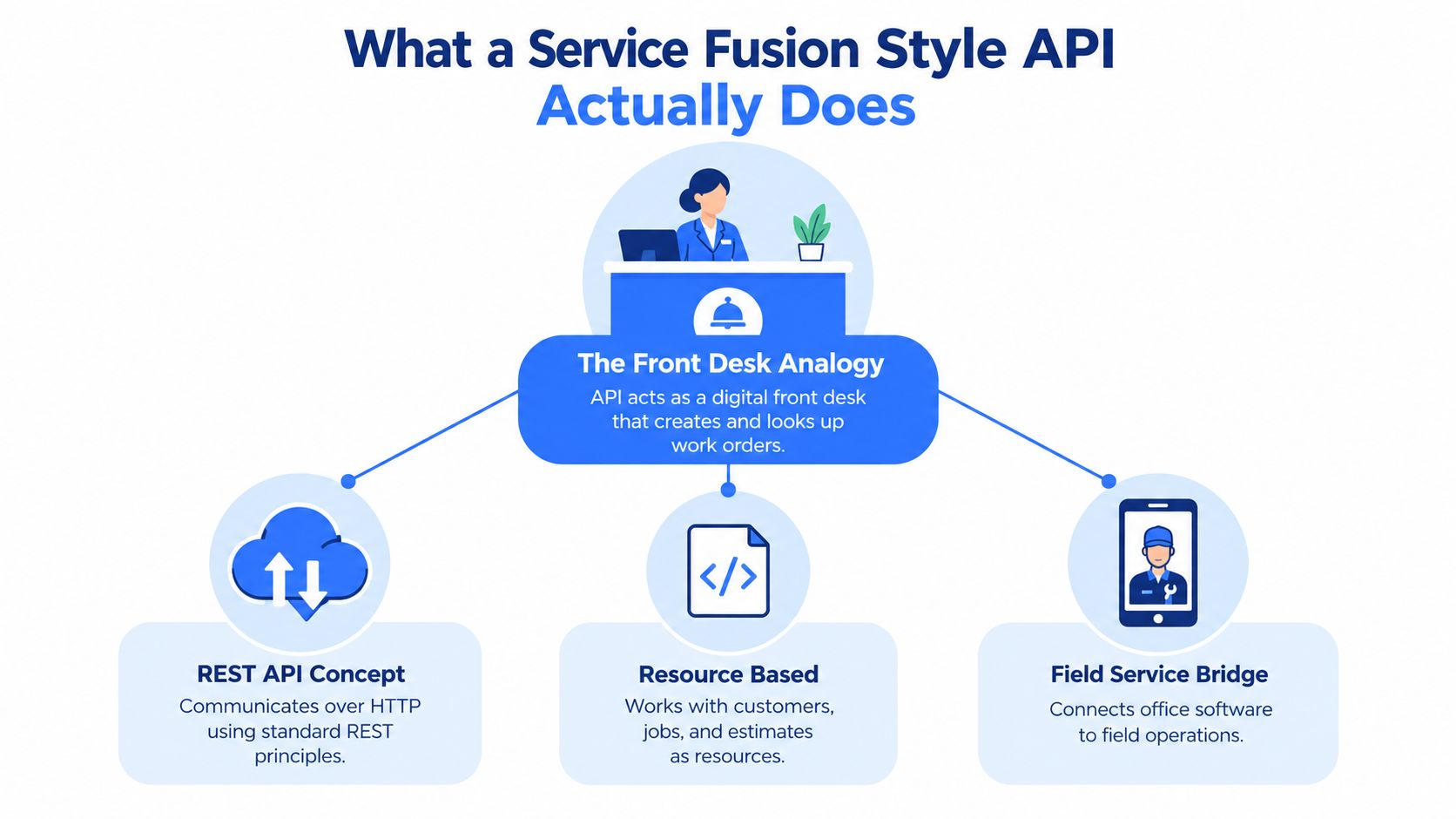
Think of a field-service API as a digital front desk. A customer calls the office, and the front desk records the customer's information, creates a work order, or looks up an existing appointment. An API plays a similar role for software. Your CRM, website, or internal application sends a structured request, and Service Fusion processes that request against its field-service records.
REST and JSON in practical terms
REST describes a conventional way for applications to communicate over HTTP using resources and operations. A resource is a business object, such as a customer or job. Your application sends a request to an endpoint, includes authentication, and receives a response that represents the requested action or data.
JSON is the structured format used to represent the request and response payloads. For example, a website integration might collect a customer name, contact details, and service address, then transform those fields into the JSON shape expected by a customer-creation endpoint. The important engineering work isn't the syntax alone. It's mapping business meaning correctly.
A job number, customer identifier, address, appointment details, and status may each have different ownership rules. Your integration should store the Service Fusion identifier after creation, because a name or email address isn't a safe substitute for a durable record key.
Practical rule: Treat the API as an operational doorway, not as a mirror of the entire application.
Service Fusion's public Open API is documented as a REST/JSON interface secured with OAuth 2.0 at api.servicefusion.com/v1, and the documentation is available only to Pro plan subscribers, as described in the Service Fusion API reference. OAuth gives the API a controlled way to verify the application and authorize access. It also means your integration needs token handling, secure credential storage, and a plan for expired or revoked access.
Transactional bridge versus data warehouse feed
A transactional bridge handles a business event. A form submission creates a customer, a dispatcher's action creates a job, or an approved estimate is passed to another workflow. These requests are usually bounded and tied to an immediate operational outcome.
A high-throughput extraction API serves a different purpose. It may feed a warehouse, refresh a large analytical dataset, or process extensive public data collections. Service Fusion's documented scope points toward the first category. You should design around deliberate synchronization, stored identifiers, incremental changes where available, and controlled reconciliation rather than assuming that every record can be pulled continuously at scale.
That distinction prevents a common architectural mistake. If your requirement is “create a job when a qualified lead submits a form,” the API may be a sensible fit. If your requirement is “extract the entire operational history repeatedly for broad analytics,” you need to validate endpoint coverage, pagination behavior, account access, and request capacity before committing to that design.
Core Capabilities and Typical Endpoints Explained
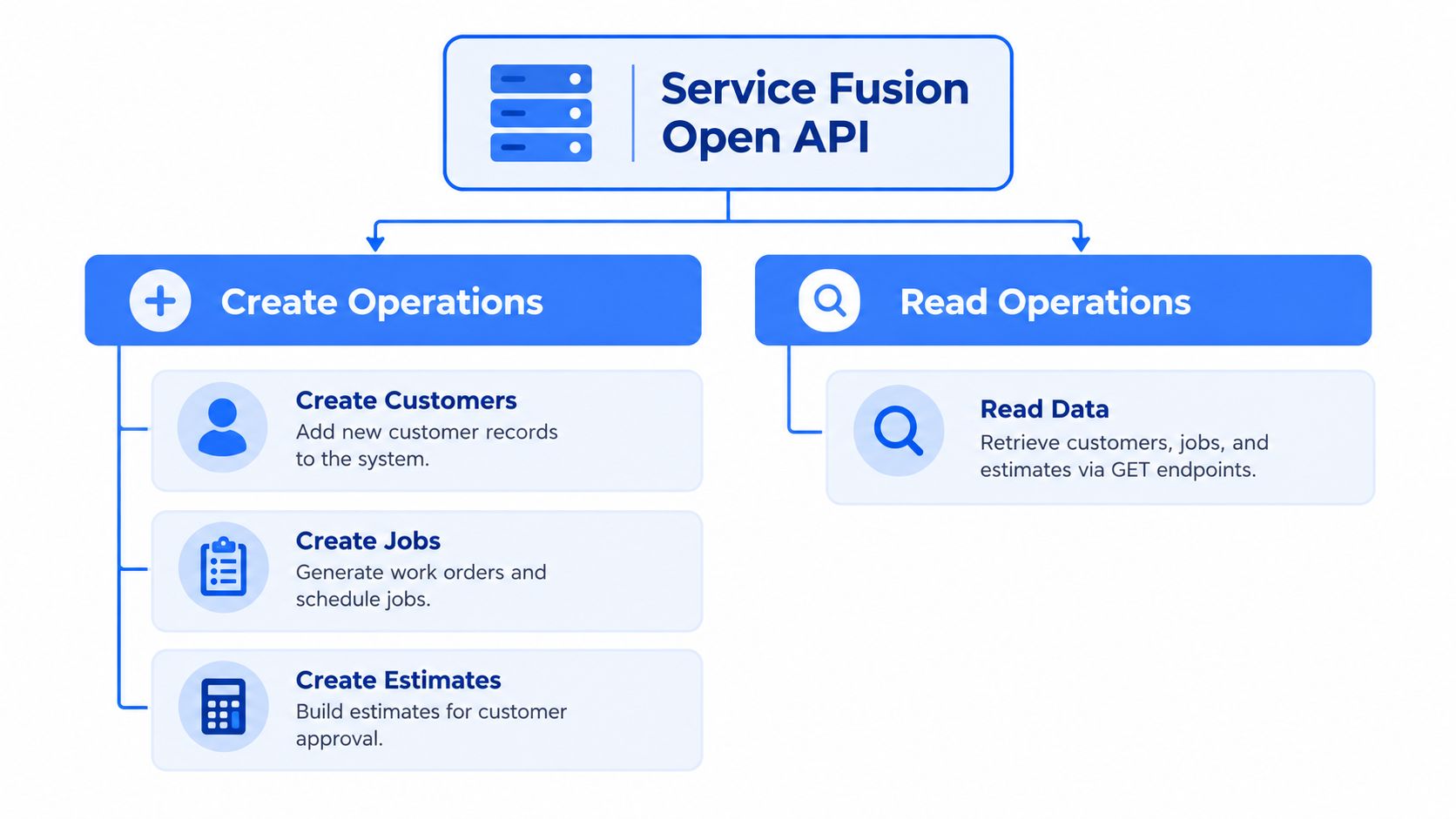
A homeowner submits a service request, and your intake system must create the customer, record the job, and perhaps attach an estimate. Service Fusion's Open API supports that kind of transaction-focused workflow. Its documented endpoint surface includes creating customers, jobs, and estimates, while read operations retrieve customers, jobs, estimates, technicians, and equipment by search criteria or unique ID, as summarized in the Service Fusion Open API collection.
Create operations map to office workflows
Creating a customer is usually the first API action after an external system receives a service request. Before submitting anything, check whether the person already exists. If the record is new, send the required customer fields, receive the Service Fusion identifier, and store it beside the CRM record or form submission ID. That identifier becomes the label connecting both systems.
Creating a job represents a stronger operational commitment than capturing a lead. Create it only after the workflow has enough information for dispatch or follow-up. Depending on the API contract, that may include the customer relationship, service location, requested work, and scheduling details.
An estimate follows a different business state. An external quoting process can place a structured estimate into the field-service system, but an estimate is not a completed job. Keep those states separate, then define the event that allows another system to treat the estimate as approved or ready for action.
Read operations support lookup and coordination
Read endpoints allow connected applications to retrieve customers, jobs, estimates, technicians, and equipment through search criteria or unique IDs. A CRM can look up a customer before creating a record. A scheduling display can retrieve relevant job or technician information. A reporting process can read selected records for a controlled operational view.
Search and ID-based retrieval serve different purposes. Searches help reconcile systems or locate a record from business attributes, such as a customer name or service location. Once your integration knows the correct identifier, an ID-based read targets one object directly and reduces matching ambiguity.
| Operation | Field-service purpose | Integration concern |
|---|---|---|
| Create customer | Register a customer from a form, CRM, or intake workflow | Prevent duplicates and save the returned identifier |
| Create job | Put a service request into the operational workflow | Validate scheduling details and customer relationships |
| Create estimate | Record a proposed scope or price for approval | Keep estimate state separate from job completion |
| Read by search | Find records during reconciliation | Control matching rules and ambiguous results |
| Read by unique ID | Retrieve a known record | Handle missing, deleted, or inaccessible records |
| Read technicians or equipment | Provide operational context | Confirm that the available fields fit the use case |
Independent API directory listings show at least one collection versioned as 1.0, while the platform is described as supporting roughly 60 requests per minute, according to the Service Fusion rate-limit documentation. That capacity reinforces the architectural point: Service Fusion is a transactional field-service bridge, not a bulk data firehose. It fits deliberate record creation and lookup, while repeated historical extraction requires validation of pagination, endpoint coverage, account access, and request capacity.
For a junior developer, begin with the workflow rather than an assumed endpoint list. Draw the event, identify the record to create or read, then define the identifiers, duplicate checks, and retry behavior around that action. A broader guide to what API endpoints mean can help connect each endpoint to the capability it exposes.
Unified Data API Versus Native SDKs and When to Choose Each
A booking arrives for an HVAC company. The application must create a customer and job in Service Fusion, then confirm the resulting records. That workflow needs a transactional bridge into a field-service system, not a bulk data firehose. The right integration depends on whether your application needs normalized access across services or direct control over Service Fusion's own resources.
A unified data API places several platforms behind one interface. It can reduce the authentication schemes, response formats, and client libraries your team maintains. This works well when the job is collecting comparable records from different providers. Coverage is the trade-off: a unified service may expose shared fields while leaving out a Service Fusion operation that your workflow must perform.
Native Service Fusion access connects directly to the platform's documented REST resources. It uses OAuth 2.0, and API access is restricted to Pro subscribers. One independent review estimates that this integration tier costs about $533 per month when billed annually, making plan eligibility a commercial decision as well as a technical one, according to the Service Fusion pricing review.
A practical comparison
| Criteria | Unified Data API | Native Service Fusion Open API |
|---|---|---|
| Main purpose | Normalize access to multiple supported platforms | Connect directly to Service Fusion |
| Authentication | One integration model may cover several services | OAuth 2.0 for Service Fusion |
| Endpoint consistency | Common interface across providers | Service Fusion-specific resources and behavior |
| Service Fusion writes | Available only if the unified provider exposes them | Direct path for documented customer, job, and estimate creation |
| Maintenance | Less provider-specific code, but depends on abstraction coverage | More direct control, with Service Fusion-specific maintenance |
| Rate limits | Defined by the unified provider and underlying services | Approximately 60 requests per minute per account |
| Commercial gate | Depends on the unified provider's plan | Pro subscription required for API documentation and access |
| Best fit | Cross-platform aggregation and normalized reads | Operational Service Fusion workflows and native writes |
Name the job before choosing the tool. A product that combines public data from several social platforms may benefit from one interface instead of separate SDKs and provider-specific response handling. The trade-offs are different from a field-service write workflow, as shown in this overview of social media APIs.
For the HVAC booking, the native API is the clearer choice unless a unified provider explicitly supports customer and job creation. Direct access preserves Service Fusion's own resource model and gives the application a defined write path. A unified layer remains useful when the application only needs normalized reads from unrelated systems, but compare its coverage, freshness, error handling, and request limits first.
The architecture should follow the boundary where data changes. Use a unified API to gather comparable information across services. Use native Service Fusion access when the application must create or update an operational record there. This distinction also prevents a common mistake: selecting a broad aggregation tool for a workflow that depends on one provider's write behavior.
Authentication Rate Limits and Reliable Integration Practices
A technician's booking can be delayed even when every API request is correctly formed. An expired token, an account without the required plan, or a burst of requests can interrupt the workflow between receiving a customer request and updating Service Fusion. Treat the integration as a controlled transaction, not a bulk data firehose.
The published setup uses OAuth 2.0 at api.servicefusion.com/v1, and API access is restricted to Pro plan subscribers, according to the Open API integration getting-started documentation. Check eligibility before building a proof of concept. Otherwise, the application may be designed around an API the account cannot use.
Build the integration checklist first
- Confirm the plan: Verify Pro access before development begins. Pricing should be confirmed with the provider rather than inferred from older third-party material.
- Protect OAuth credentials: Store client credentials and tokens in a secrets manager, never in source code or logs. Treat token refresh as a normal part of the connection lifecycle.
- Throttle at the client: Design around roughly 60 requests per minute per account, as described in the rate-limit documentation. For a deeper explanation of client-side throttling, see this guide to API rate limits. A local queue is safer than allowing every web request to call the API immediately.
- Handle HTTP 429: Excess usage can return HTTP 429. Honor
Retry-Afterwhen supplied, then retry with backoff instead of sending another immediate request. - Batch with pagination awareness: Process pages deliberately, save progress, and make each batch resumable. A failed page should not force a full restart.
- Make writes idempotent: Store both source IDs and Service Fusion IDs. A retry can then find the existing customer, job, or estimate instead of creating a duplicate.
The rate limit shapes the application's design. A synchronous web form may accept the request, place a work item on a queue, and return confirmation while a worker performs the Service Fusion action. The queue separates the user's response time from API availability and gives failed operations a controlled retry path.
Operational habit: Log the request purpose, source record ID, destination record ID, response status, and retry count. That context lets an operator replay one failed business event without guessing.
Common Integration Patterns and Real World Use Cases
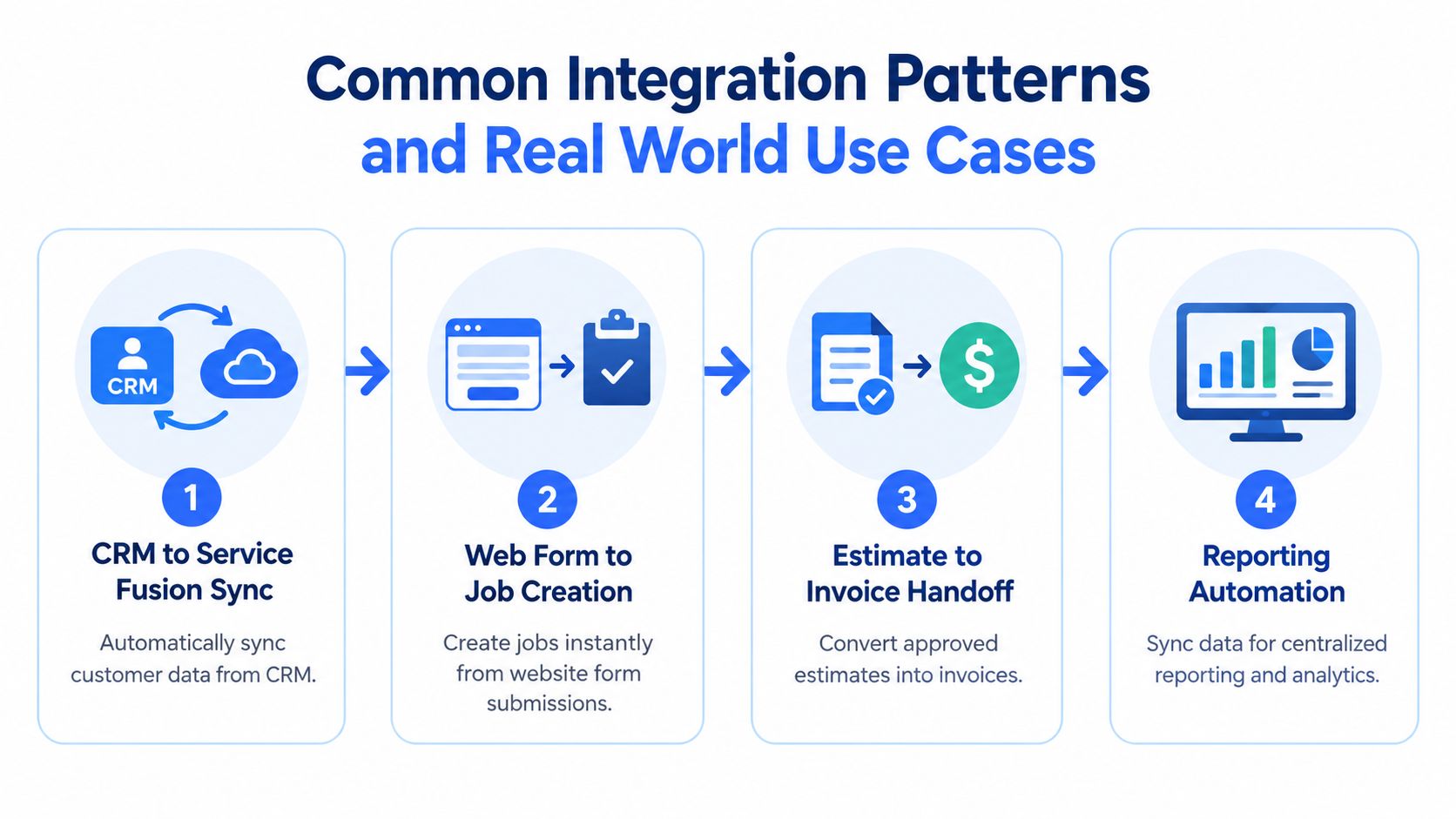
Service Fusion integrations work best when each one has a clear trigger, direction, and ownership rule. The following patterns keep the API in its intended role as a transactional field-service bridge.
CRM customer synchronization
A CRM receives a new contact or a change to an existing service address. The integration searches Service Fusion, matches using a deliberate key strategy, and creates the customer only when no suitable record exists. The returned identifier becomes the link between both systems.
Don't synchronize every field automatically. Decide which system owns contact details, which owns service history, and how conflicts are resolved. A small plumbing operation may let the CRM own marketing consent while Service Fusion owns the operational customer record.
Web form to job creation
A qualified request arrives from an online booking form. A worker validates the address and service description, creates or finds the customer, then creates a job linked to that customer. If the form lacks required information, the worker should hold the request for review rather than creating an incomplete work order.
This pattern is transactional by design. One customer request should produce one traceable workflow event, with a stored source ID that makes safe retries possible.
Estimate to downstream billing
An estimate created in Service Fusion may need to reach an accounting or finance workflow. The integration reads the estimate and passes only the fields the receiving system needs, while preserving the Service Fusion estimate ID for reconciliation. Approval status must be treated carefully, because copying an estimate isn't the same as authorizing an invoice.
A useful control is a state transition table. Define what happens when an estimate is created, changed, approved, rejected, or replaced. That avoids accidental billing actions caused by a stale read.
Technician and equipment context
An operations dashboard or internal application may read technician and equipment records to give office staff more context around jobs. The data flow is usually Service Fusion to the consuming application, not a bidirectional write model. Cache stable reference data where appropriate, then refresh operational details according to business need.
That approach differs from a social-data pipeline that ingests large collections of transcripts, comments, or engagement records for research and AI processing. Such workloads need a provider designed for broad extraction and aggregation, while Service Fusion is better approached as a controlled system-of-record connector. For implementation planning across triggers, queues, transformations, and error handling, use this practical guide to how to integrate APIs.
Making the Right Choice for Your Next Integration
A contractor's intake form submits a new customer and job. If Service Fusion must receive that transaction, choose its native API, provided the account meets the Pro access requirement. Service Fusion works like a dispatch counter, handling field-service records and actions rather than serving as a bulk data firehose. The account-level request limit means queuing, batching, and retry behavior belong in the design from the start, as described in the official integration guidance.
Choose a unified data API when the application mainly reads and normalizes information from unrelated platforms. A common interface can reduce provider-specific code, but it may not support native Service Fusion writes or preserve their operational meaning. Check endpoint coverage and behavior before choosing that layer.
Use this decision path:
- Must Service Fusion receive a customer, job, or estimate action? Start with the native API.
- Will the application combine data from several unrelated platforms? Evaluate a unified API.
- Can work arrive in bursts or involve many records? Add a queue, throttling, pagination-aware workers, and resumable checkpoints.
- Does the account meet the commercial requirement? Confirm the current Pro subscription terms before building.
Start with one complete business event, such as form submission followed by customer and job creation. Test authentication, identifier storage, duplicate handling, and 429 recovery. This vertical slice exposes integration gaps before the project expands.
Captapi provides a consistent REST interface for public data from YouTube, TikTok, Instagram, and Facebook. It suits cross-platform social research and high-volume content workflows better than a field-service transaction API. Visit Captapi to assess that separate data requirement.