
Top LinkedIn Analytics Tools for 2023

Understanding LinkedIn Analytics Tools
LinkedIn analytics tools are designed to help organizations and individuals gather, analyze, and interpret data generated by their activities on LinkedIn. These tools focus on providing insights into user engagement, content performance, audience demographics, and network growth, which can be crucial for personal branding, recruitment efforts, and marketing strategies.
The primary purpose of LinkedIn analytics tools is to convert raw data into actionable insights. By analyzing metrics such as post reach, engagement rates, follower demographics, and profile visits, users can identify trends and tailor their strategies accordingly. This insight can lead to better content creation, targeted audience interaction, and enhanced visibility on the platform.
LinkedIn offers its own inbuilt analytics through personal and company pages, which can cover a broad range of basic metrics. However, advanced LinkedIn analytics tools often provide more in-depth analytics, allowing for the tracking of specific KPIs (Key Performance Indicators) over time. These tools can also offer more sophisticated visualization options and the capability to export data for further analysis.
- Understanding audience demographics
- Measuring engagement metrics like shares, likes, and comments
- Tracking the performance of individual posts
- Monitoring follower growth and network changes
Effective use of LinkedIn analytics tools helps users align their content and engagement strategies with their broader business goals, ensuring a more efficient use of the platform's capabilities to reach and interact with their target audience.

Top LinkedIn Analytics Tools Comparison
When evaluating LinkedIn analytics tools, consider features, data accessibility, ease of integration, and cost. Common choices include LinkedIn's own analytics, third-party tools like Shield, Hootsuite, and using LinkedIn data via Captapi. Each option provides different advantages, whether it's depth of data, user interface, or integration capabilities.
| Tool | Core Features | Integration | Data Accessibility | Pricing |
|---|---|---|---|---|
| LinkedIn Analytics | Built-in analytics for content engagement, follower statistics | Native integration within LinkedIn | Limited to LinkedIn's platform | Free with Premium options |
| Shield | Personal and company analytics, detailed reporting, export features | Third-party integration with LinkedIn | More comprehensive than native LinkedIn | Subscription-based |
| Hootsuite | Social media management, scheduling, basic analytics | Integrates with multiple social networks | Basic insights for LinkedIn | Varied plans, starting from basic to premium |
| Captapi | Comprehensive data access, JSON outputs, extensive platform support | REST API for developer-friendly integration | Access to posts, profiles, comments | Free tier with 100 credits, pay-as-you-go for more |
While LinkedIn's native analytics provide essential insights, tools like Shield and Hootsuite offer enhanced features for deeper analysis and multi-platform management. For developers seeking direct data integration and comprehensive access, Captapi delivers flexible and scalable options.
Integrating Captapi for LinkedIn Data
Leveraging Captapi to access LinkedIn data for analytics is straightforward, allowing developers to integrate comprehensive LinkedIn social media data with minimal effort. Captapi supports the extraction of profiles, posts, comments, and AI-generated summaries from LinkedIn, offering a wide array of data points crucial for in-depth analytics.
To start using Captapi, developers first need to obtain an API key by signing up on the Captapi website. With a free tier offering 100 credits, users can start without any financial commitment. Once you have your API key, requests can be made to the LinkedIn endpoints for the desired data. Captapi returns this data as clean JSON, which simplifies data parsing and integration into analytics systems.
The API is designed to be RESTful, ensuring clear and consistent interactions with the service. Requests to Captapi can include specific parameters such as user IDs or hashtags to filter the LinkedIn data further, allowing for targeted analytics based on precise criteria.
- Endpoint for profiles: Retrieval of public profiles including job history and skills.
- Endpoint for posts: Access to user-generated content and engagement metrics.
- Endpoint for comments: Insights into audience interaction.
- AI summaries: Quick synthesis of long-form content.
Developers integrating Captapi benefit from its cross-platform capabilities, allowing the merging of LinkedIn data with other social media insights from 27 platforms. This comprehensive data aggregation provides a robust foundation for analyzing trends, engagement, and content effectiveness across diverse social channels.
Implementing a Basic LinkedIn Analytics Script
To retrieve LinkedIn analytics data using Captapi, you'll need your API key and the LinkedIn profile or page you want to analyze. The following examples demonstrate how to make a request using curl and Python.
First, use curl to fetch the analytics data. Replace YOUR_API_KEY with your own Captapi key and ensure you are authorized to access the specific LinkedIn data.
curl -X GET "https://api.captapi.com/linkedin/profile/analytics" \
-H "Authorization: Bearer YOUR_API_KEY" \
-d "profile_id=YOUR_PROFILE_ID"
The Python example leverages the requests library. You need to install this library if it's not already available in your environment. Execute the following script:
import requests

url = "https://api.captapi.com/linkedin/profile/analytics"
headers = {
    "Authorization": "Bearer YOUR_API_KEY"
}
params = {
    "profile_id": "YOUR_PROFILE_ID"
}

response = requests.get(url, headers=headers, params=params)

if response.status_code == 200:
    data = response.json()
    print(data)
else:
    print(f"Error: {response.status_code}, {response.text}")
A typical successful response will be returned as JSON and may contain fields like views, followers, and engagement_rate. Here’s a brief look at what the JSON structure may resemble:
{
    "views": 1234,
    "followers": 567,
    "engagement_rate": 0.043
}
This basic setup retrieves essential metrics, providing a foundation to enhance your LinkedIn strategy through further analysis and insight extraction.

Choosing the Right Tool for Your Needs
When selecting a LinkedIn analytics tool, it's essential to consider several factors to ensure it meets your specific needs. Firstly, evaluate the range of data metrics the tool offers. Tools vary in the types of analytics, such as engagement rates, follower demographics, or post-performance insights. Ensure it provides access to the metrics most relevant to your goals.
Integration capabilities are also crucial. If you're using other platforms or need to aggregate data across various channels, ensure the tool can integrate smoothly with your existing infrastructure. Check whether the tool supports APIs, which can facilitate seamless data transfer and integration with other systems.
Ease of use is another important consideration. The tool should have an intuitive interface and provide a straightforward setup process. A steep learning curve can hinder productivity, especially if multiple team members will be using the software.
Cost-effectiveness is a major factor, especially for startups or small businesses. Consider if the tool offers a pricing model that fits your budget without compromising essential features. Some tools might offer a free tier or trial period, allowing you to test functionalities before making a commitment.
- Data Metrics That Align with Your Goals
- Integration Capabilities and API Support
- Ease of Use and Interface Design
- Cost-Effectiveness and Pricing Models
Finally, consider the tool's scalability. As your LinkedIn presence grows, you'll want a tool that can adapt and continue to provide valuable insights without needing to switch platforms frequently.
Optimizing Your LinkedIn Strategy with Analytics
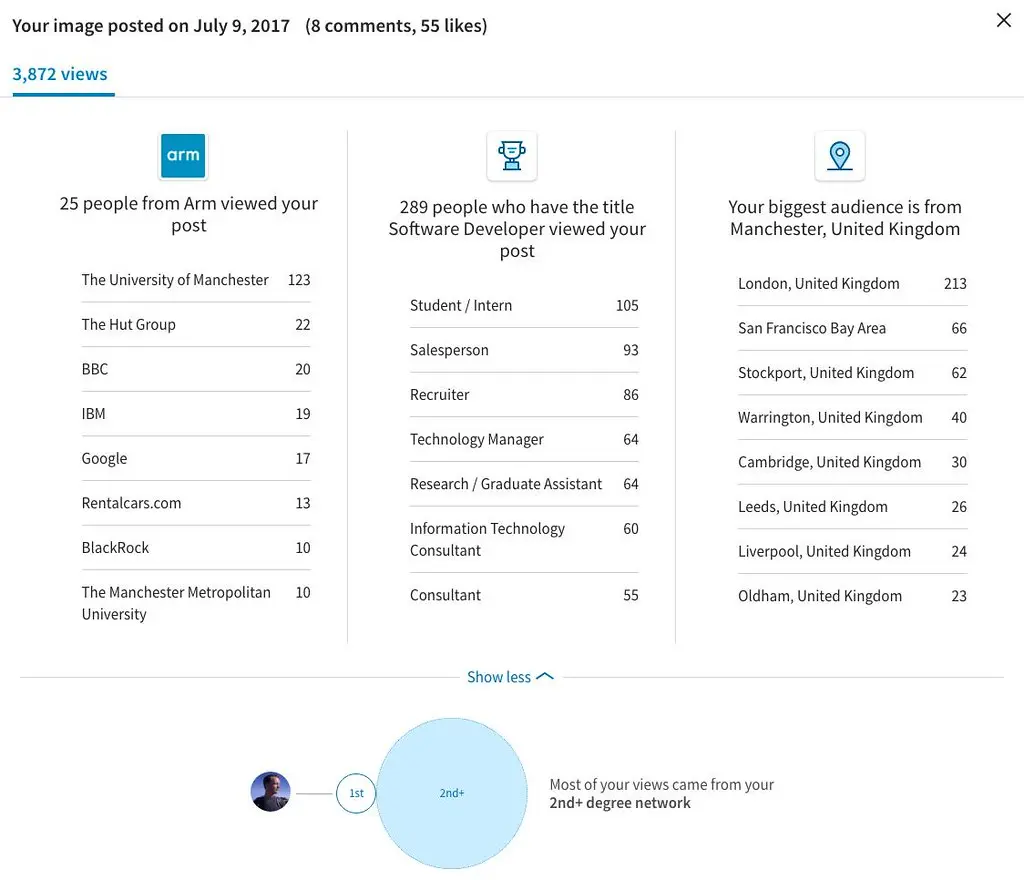
To refine your LinkedIn strategy using analytics, start by examining your audience insights and engagement metrics. Identify the demographics, such as industry, job titles, and locations, of those interacting with your content. This data helps tailor your messaging to resonate more effectively with your target audience.
Analyze post performance to discern what types of content drive the most engagement. Evaluate metrics such as likes, shares, and comments, and identify patterns in successful content types, whether they are thought leadership articles, industry news, or company updates. Replicating successful content styles can lead to more consistent interactions.
Use analytics to track visitor metrics to your company page or personal profile. Understanding whether there is consistent traffic growth or stagnation allows you to make informed decisions about content promotion strategies. For example, an increase in profile views following a focused posting campaign indicates successful audience interest, which can be leveraged to convert views to actionable connections or business opportunities.
Review LinkedIn's engagement and reach data to adjust your posting schedule. Testing and adjusting the times and days of your posts can enhance visibility and interaction. Moreover, audience feedback in comments can guide necessary adjustments in content direction.
- Monitor your competitors’ performance to understand how they engage similar audiences.
- Test different post formats, such as videos and polls, to diversify engagement methods.
- Regularly assess key performance indicators (KPIs) to measure the impact of implemented changes.
Finally, integrating comprehensive social media data via tools like Captapi can enhance your analysis, providing a centralized view across platforms, and enabling you to correlate LinkedIn data with broader social media trends and performance metrics.
Frequently asked questions
Can I use Captapi to gather LinkedIn analytics data?
Yes, you can use Captapi to gather LinkedIn data as part of its support for multiple social media platforms. With a single API key, you can access various LinkedIn data points, such as profiles, posts, and comments, returned as clean JSON. Note that the specific analytics capabilities Captapi offers depend on LinkedIn's API permissions.
What are the best tools for LinkedIn analytics in 2026?
The best tools for LinkedIn analytics in 2026 include both comprehensive social media management platforms and LinkedIn-specific solutions. Popular choices often include tools like Hootsuite, Sprout Social, and LinkedIn's own analytics dashboard, each offering unique features such as detailed engagement metrics, audience insights, and competitive analysis.
Is there a free tool for LinkedIn analytics?
LinkedIn provides basic analytics for free on their platform, which can be accessed directly from your profile or company page. These include insights into profile views, post engagement, and follower demographics. Third-party tools often offer free tiers with limited features for LinkedIn analytics as well.
How can I track my LinkedIn profile analytics?
To track your LinkedIn profile analytics, navigate to your profile page and access the 'Dashboard' section, which displays information like profile views, search appearances, and post interactions. Utilizing third-party analytics tools like Captapi can also provide additional context by integrating and comparing data across different platforms.