
Instagram Video Transcript: Extract, Read, and Reuse
A product launch folder lands in your drive with hundreds of Instagram Reels. The CMO wants the videos searchable, the SEO team wants reusable text, localization needs German copy, and accessibility reviewers need an accurate record of what was said. Watching every clip and copying captions manually won't satisfy all four requests.
An Instagram video transcript turns spoken audio from a Reel, in-feed video, or Story into text that people and software can search, edit, translate, summarize, and reuse. The useful version isn't just a paragraph copied from a player. It includes timestamps, language metadata, quality signals, and a format that downstream systems can ingest.
Table of Contents
- Why Instagram Video Transcripts Matter Now
- What an Instagram Video Transcript Actually Is
- Extracting a Transcript Through an API
- Native Captions vs API-Extracted Transcripts
- Formatting and Exporting Transcripts for Pipelines
- Real-World Automation Use Cases
- Building a Responsible Transcript Workflow
Why Instagram Video Transcripts Matter Now
Instagram video has moved from very short clips toward longer, more text-rich content. Reels launched on August 5, 2020, in more than 50 countries as a 15-second format, expanded to 90 seconds in 2022, and reached 3 minutes in January 2025, according to Axis Intelligence's timeline of Instagram Reels. Longer clips create more spoken material to search, caption, summarize, translate, and route into AI systems.
That matters when a social team manages a product launch rather than one isolated post. A transcript can connect a spoken pricing change to a timestamp, surface every Reel mentioning a feature, give a localization team editable source text, and help a content editor turn one video into a blog section or email draft. A raw MP4 can't provide those workflows on its own.
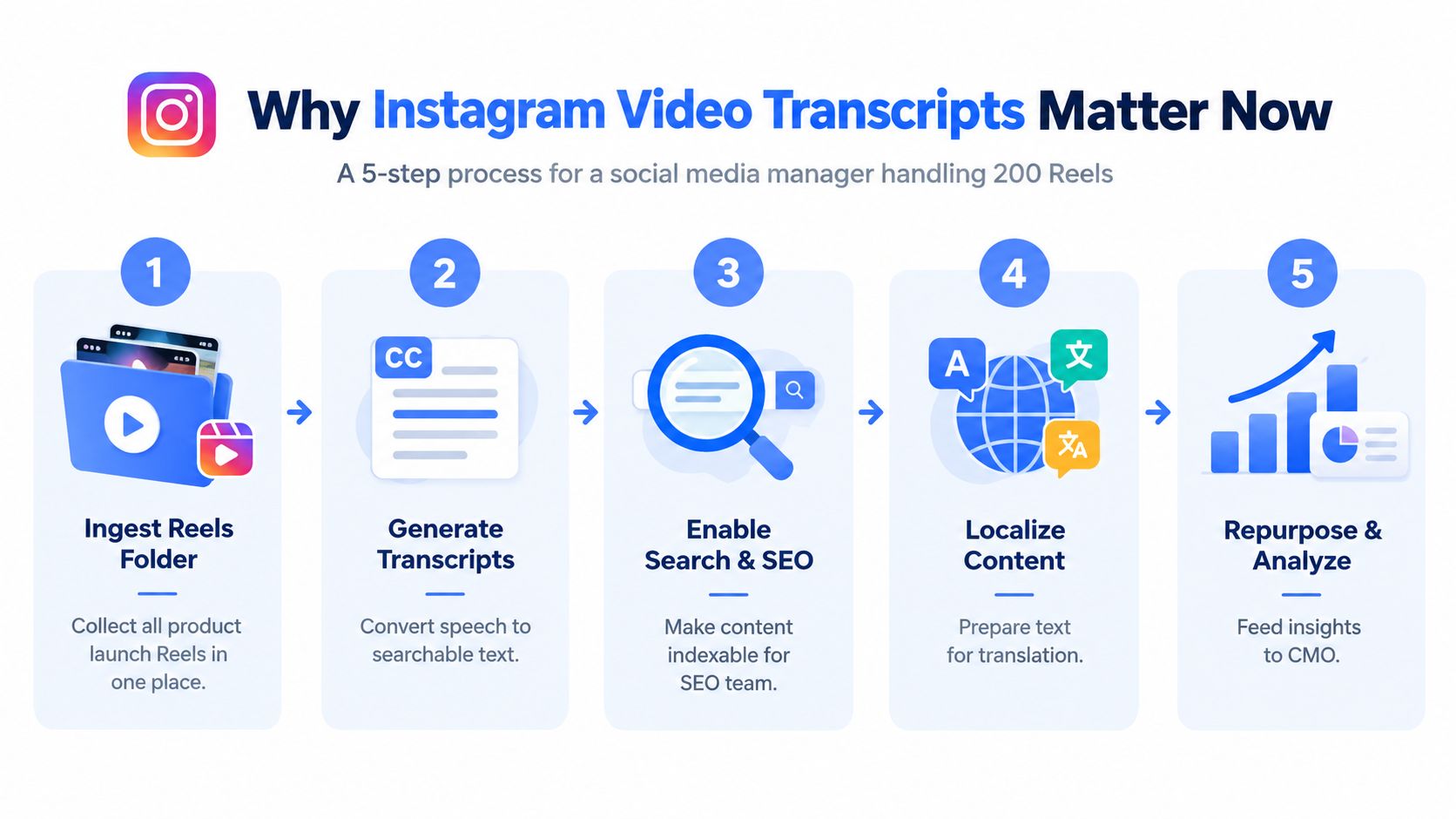
Searchability is only the beginning
Accessibility makes the need more concrete. A 2026 academic review described captioning as critical to accessibility, engagement, and visibility across major platforms, while Clemson researchers found that social media accessibility tools, including video captions, are often underused. The same review of video caption research places this issue in a large Instagram ecosystem, with public statistics indicating more than 1.5 billion Reels as of 2025 and around 2 billion monthly people interacting with Reels.
The operational lesson is simple: transcript generation belongs in the content pipeline, not in an emergency spreadsheet after publication. By the end of this guide, you'll have a practical model for extracting public video speech, cleaning it to an accessibility-grade standard, exporting structured files, and sending the result into RAG, social listening, search, and repurposing systems.
Practical rule: Treat the transcript as a reusable content asset, not as a disposable caption copy.
What an Instagram Video Transcript Actually Is
An Instagram video transcript is a text representation of the words spoken in a video's audio track. It may be plain text for reading and indexing, or time-coded text for subtitles, clip retrieval, and synchronization. It isn't the same thing as text embedded in the image, a caption written in the post description, or the temporary caption display generated by Instagram.
Native captions are useful for immediate playback, but they aren't necessarily an exportable source of record. A pulled transcript is created by processing the available audio through a transcription service or another speech-recognition workflow, then optionally adding punctuation, language detection, segmentation, and speaker information.
| Attribute | Native IG Captions | API Transcript |
|---|---|---|
| Primary purpose | Display speech during playback | Create reusable text data |
| Availability | Depends on the post and caption settings | Depends on public accessibility and the extraction service |
| Output | Player captions or rendered text | TXT, SRT, VTT, JSON, or another structured format |
| Editing | Usually limited inside Instagram | Can be reviewed in code, a CMS, or an editor |
| Downstream use | Accessibility during viewing | Search, RAG, translation, analytics, and repurposing |
| Timing | Platform-controlled | Can include segment or word timestamps |
A transcript can also preserve the difference between spoken words and visual context. If a speaker says “the result is on screen,” the text alone won't contain the chart or product shot that makes the sentence meaningful. Strong pipelines therefore store the transcript beside the source URL, media metadata, and, when needed, a description of important visual events.
For a practical illustration of how transcript output can look outside the Instagram player, see this video transcript example. The important design decision is to choose the source based on the job. A viewer may only need readable captions, while a retrieval system needs stable segments with timestamps and identifiers.
Extracting a Transcript Through an API
A production workflow starts with access, not parsing. Create an account in the Captapi dashboard, copy the API key, and confirm that your plan includes the relevant Instagram endpoint. Reels, feed videos, and Stories can expose different retrieval conditions, so your integration should record the source type and handle unsupported or unavailable URLs explicitly.

Submit, poll, and validate
Your request should contain the public Instagram URL or shortcode, the desired language behavior, and the output format. A representative request might look like this:
curl -X POST "https://api.captapi.com/v1/instagram/transcript" \
  -H "Authorization: Bearer $CAPTAPI_API_KEY" \
  -H "Content-Type: application/json" \
  -d '{
    "url": "https://www.instagram.com/reel/EXAMPLE/",
    "language": "auto",
    "format": "json"
  }'
The exact endpoint contract should come from the current API documentation. A client treats the initial response as job creation, stores the returned job ID, and polls the status endpoint until the service returns a completed payload or a terminal error. If your account supports callbacks, a webhook is preferable for bulk jobs because it avoids wasteful polling and lets your queue react as soon as processing finishes.
Python teams can keep the client small:
import os
import time
import requests

headers = {
    "Authorization": f"Bearer {os.environ['CAPTAPI_API_KEY']}",
    "Content-Type": "application/json",
}

payload = {
    "url": "https://www.instagram.com/reel/EXAMPLE/",
    "language": "auto",
    "format": "json",
}

response = requests.post(
    "https://api.captapi.com/v1/instagram/transcript",
    headers=headers,
    json=payload,
    timeout=30,
)
response.raise_for_status()
job = response.json()

while job.get("status") in {"queued", "processing"}:
    time.sleep(2)
    result = requests.get(
        f"https://api.captapi.com/v1/instagram/transcript/{job['id']}",
        headers=headers,
        timeout=30,
    )
    result.raise_for_status()
    job = result.json()
Before indexing the result, validate that the payload has text, a language value, and ordered timing segments. Also preserve the original response for audit and reprocessing. The Captapi API integration guide is useful when you need to move from a one-off request to queueing, authentication, retries, and normalized responses.
Private accounts and geo-blocked Reels are common access failures. Don't bypass those controls. An audio-only post may still produce speech text, but your application should flag the absence of visual context instead of presenting the transcript as a complete description of the media.
The extraction flow is easier to understand when you can see the endpoint interaction in context.
Native Captions vs API-Extracted Transcripts
Native captions and API transcripts solve related but different problems. Instagram's captions are close to the viewing experience, while an API result is closer to a data object that a team can inspect, transform, and store. The right choice depends on whether the immediate need is playback accessibility, searchable archives, or machine processing.
A caption track can be enough when the creator controls the video, the language is known, the speech is clear, and no export is required. It becomes fragile when the track is missing, contains errors, doesn't preserve the complete spoken sequence, or can't be passed into a translation or indexing workflow.
| Dimension | Native Instagram Captions | API-Extracted Transcript |
|---|---|---|
| Accuracy control | Platform or creator interface | Reviewable after speech recognition |
| Exportability | May be difficult to reuse as data | Designed for structured processing |
| Timing | Intended for playback | Can support segment-level retrieval |
| Formatting | Player-dependent | TXT, SRT, VTT, or JSON |
| Audio conditions | Inherits platform recognition limits | Can be reprocessed and post-edited |
| Compliance | Stays within the publishing surface | Adds third-party storage and processing duties |
| Best fit | Fast publication and in-app viewing | Search, RAG, localization, and analytics |
The biggest quality mistake is treating automated speech recognition as final copy. Rice University accessibility guidance says ASR captions and transcripts are only roughly 80% accurate, below the accessibility threshold, and recommends manual correction of names, technical terms, punctuation, and synchronization in its transcript workflow guidance. Fast speech, music beds, and overlapping voices make review more important, not less.
Use native captions for the viewer's immediate experience. Use an extracted transcript when the organization needs a durable, searchable, transformable record.
For creator-owned public content, a combined workflow often works well. Start with the available caption track when it contains useful timing, generate or obtain a transcript for completeness, then reconcile differences against the audio. For third-party or private content, authorization and Instagram's terms take priority. Don't send restricted media to an external service without a documented legal and consent path. Teams adding captions during editing can also consult this guide to add auto-captions to video, then retain the corrected text as the canonical version.
Formatting and Exporting Transcripts for Pipelines
Raw JSON is a good interchange format, but different systems need different representations. Keep one canonical object with a segments array containing start, end, and text, then derive SRT, VTT, JSON Lines, and TXT deterministically. Never ask separate services to create each format independently, because small timing and punctuation differences will make later reconciliation harder.
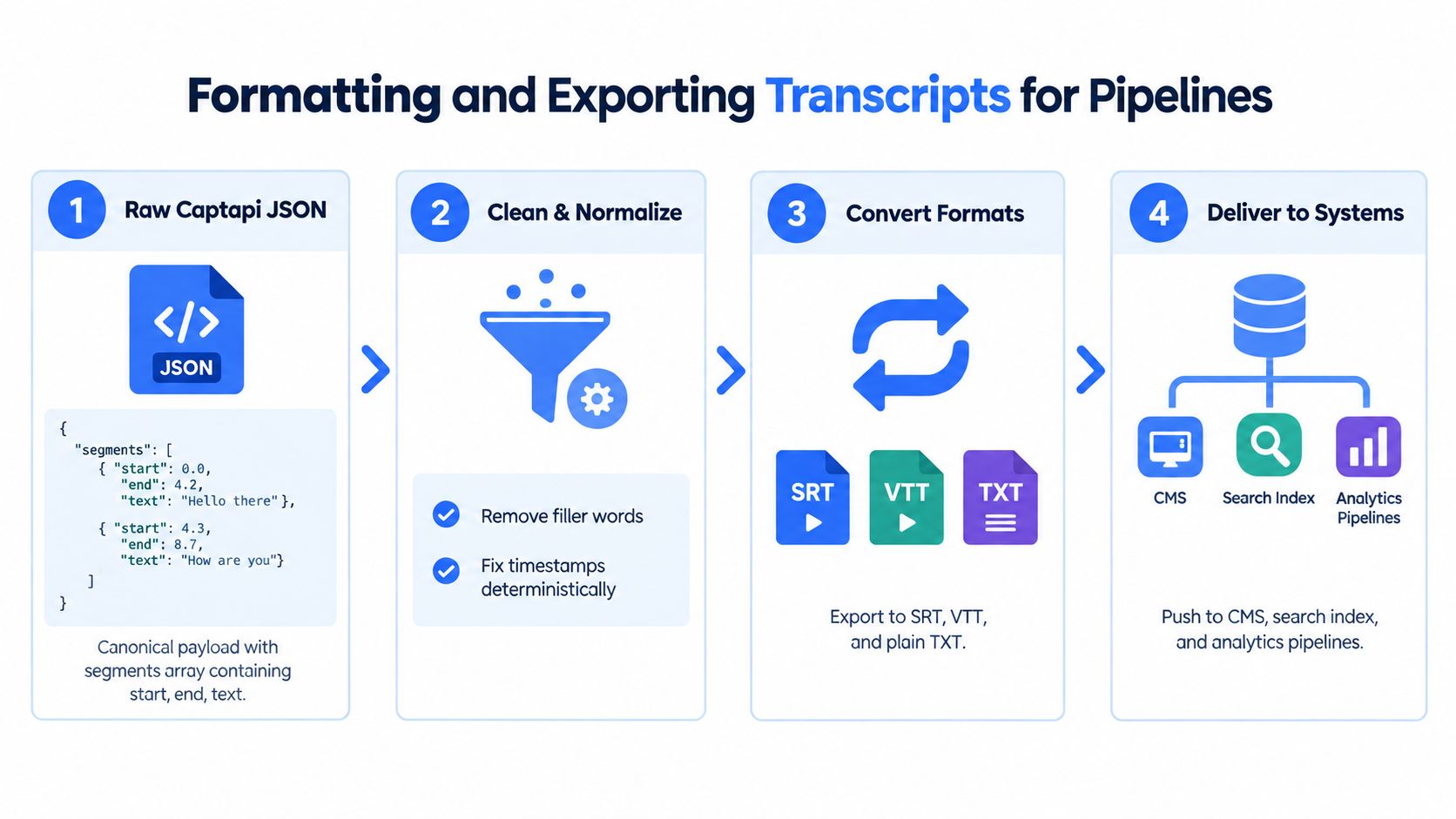
Build exports from one canonical payload
SRT requires numbered cues and timestamps in HH:MM:SS,mmm form. This Node.js function converts segment objects without changing the source text:
function srtTimestamp(seconds) {
  const totalMs = Math.max(0, Math.round(seconds * 1000));
  const hours = Math.floor(totalMs / 3600000);
  const minutes = Math.floor((totalMs % 3600000) / 60000);
  const secs = Math.floor((totalMs % 60000) / 1000);
  const ms = totalMs % 1000;

  return `${String(hours).padStart(2, "0")}:` +
    `${String(minutes).padStart(2, "0")}:` +
    `${String(secs).padStart(2, "0")},` +
    `${String(ms).padStart(3, "0")}`;
}

function toSrt(segments) {
  return segments.map((segment, index) => {
    return [
      String(index + 1),
      `${srtTimestamp(segment.start)} --> ${srtTimestamp(segment.end)}`,
      segment.text.trim(),
      ""
    ].join("\n");
  }).join("\n");
}
WebVTT uses a WEBVTT header and period-separated milliseconds, while JSON Lines stores one segment per line for streaming ingestion. TXT should remain deliberately boring. Include the full text, preserve paragraph boundaries where they aid reading, and avoid adding generated summaries to the transcript field.
The JSON versus CSV comparison can help when choosing an interchange format, but timestamped speech normally benefits from nested JSON before you flatten it for a spreadsheet or warehouse.
Clean before embedding or publishing
Normalize Unicode so emoji, accented characters, and punctuation behave consistently in search. Keep the original text beside the normalized field, because aggressive cleanup can remove meaning. For embeddings, chunk by semantic boundaries and enforce your model's token limit. A 1,500-token window is one practical target for the workflow described here, but teams should tune chunk size to their retrieval model and preserve post_id, segment timing, language, and source URL in metadata.
To burn captions onto a reposted video, a Python pipeline can call FFmpeg after generating an SRT file:
import subprocess

subprocess.run([
    "ffmpeg", "-i", "reel.mp4",
    "-vf", "subtitles=transcript.srt",
    "-c:a", "copy",
    "reel-captioned.mp4",
], check=True)
Review timing near cuts and music changes. Rounding can create frame drift, especially when the video editor and exporter use different frame rates. A compact QA checklist should include:
- Sample cues: Spot-check 5% of cues against the audio, using the workflow's defined sample rule.
- Check language: Confirm the detected language matches the intended transcription or translation path.
- Validate encoding: Test newline behavior and Unicode handling in the target CMS, index, and subtitle player.
- Review proper nouns: Correct product names, people, locations, and technical vocabulary manually.
- Test: Watch the video with sound off and confirm the captions still make sense, as recommended by this accessibility workflow paper.
Real-World Automation Use Cases
A transcript becomes valuable when it answers a business question without forcing someone to replay a video. The same segment can support a retrieval result, a social listening alert, a subtitle file, and a repurposed draft, provided the pipeline retains timing and provenance.
RAG for a creator-economy product
A SaaS team can ingest transcript segments into a vector store such as pgvector, attach author and publication metadata, and preserve the source URL plus start and end times. A question such as “Which Reel introduced the pricing change?” should return the matching text and a link that opens the relevant clip context, rather than a citation-free paragraph.
The retrieval layer should filter by account, date, language, and permission before similarity search. A prompt template might look like this:
Answer using only the retrieved Instagram transcript segments.
Include the Reel URL and timestamp for every factual answer.
If the segments don't contain the answer, say that the evidence is unavailable.
That structure matters more than a polished summary. It gives reviewers a way to inspect the source and prevents a model from turning an uncertain transcript into an authoritative claim.
Social listening for competitor speech
A DTC marketing team can schedule a nightly job against approved public competitor accounts, place each new Reel in a queue, and transcribe only unseen posts. The deduplication key can combine post_id with a transcript hash, which prevents repeated processing when the same URL is encountered again but the extracted text changes.
A resilient worker needs explicit retry behavior. Use exponential backoff, stop after the configured retry ceiling, record the failure class, and send a reviewable alert when a post is private, unavailable, or silent. The alert can include the account, post URL, detected topic, and the segment that triggered the rule, while the raw transcript remains protected by the team's retention policy.
Operational signal: A transcript alert is useful only when the reviewer can verify the exact words and timing that caused it.
Measure the workflow against business outcomes, not transcription volume alone. Useful indicators include successful job completion, correction rate, time to searchable availability, alert precision, and repurposing acceptance. Teams defining a broader measurement framework can use KPIs for social media automation as a planning reference, then adapt the measures to their own review and consent requirements.
Building a Responsible Transcript Workflow
A reliable transcript feature combines extraction, editorial review, privacy controls, and operational monitoring. Accessibility guidance recommends planning for clean audio, one speaker at a time where possible, manual correction, and silent-playback testing. That workflow is especially important because Instagram videos often combine music, fast delivery, visual overlays, and conversational interruptions.
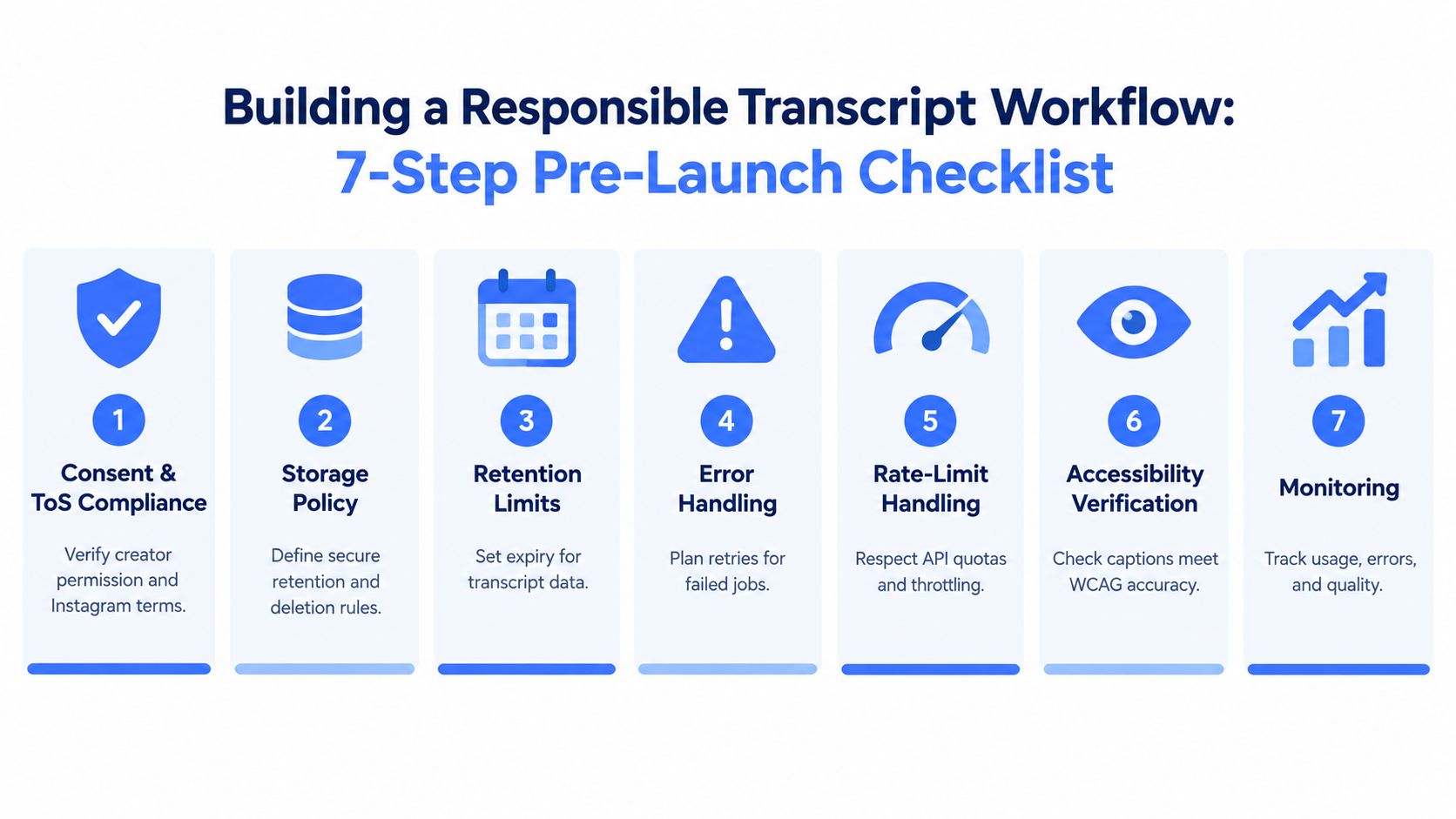
Put controls around the data
Start with permission. Restrict ingestion to content your organization is authorized to process, use official Instagram Graph API scopes where they apply, and document why an external extractor is allowed for the specific workflow. Public availability doesn't automatically remove privacy, copyright, platform-policy, or contractual obligations.
Then protect what the transcript reveals. Mask personal data before sending text to a vector store, encrypt stored payloads, separate raw media from derived text, and define deletion behavior for both. Store confidence scores per segment so an application can route uncertain passages to a human instead of presenting every word with equal certainty. The social media compliance guide provides useful context for turning those decisions into an operational policy.
Set service objectives for queue latency, completion rate, and review turnaround. Log upstream status codes, retry counts, parser version, language, and model version. When an API or speech model changes behavior, those fields let you identify which records need reprocessing.
Go-live checklist
Copy this into Notion or Linear:
- Consent and terms: Confirm the source, account permission, and platform-policy basis.
- Retention: Set expiry rules for media, raw transcripts, corrected transcripts, and embeddings.
- Privacy: Detect and mask personal information before indexing.
- Quality: Require human review for low-confidence or high-impact segments.
- Accessibility: Verify names, punctuation, synchronization, and sound-off usability.
- Reliability: Add bounded retries, exponential backoff, dead-letter handling, and webhook validation.
- Monitoring: Track latency, failures, correction patterns, language errors, and usage.
- User control: Let users view, correct, export, and delete transcript data.
- Rollback: Keep a way to disable ingestion or revert to the prior parser and model.
A transcript-powered feature should ship with an audit trail and a clear owner. If a Reel becomes unavailable, a parser changes, or a model mishears a key product term, your team needs a visible failure state and a safe recovery path, not a corrupted knowledge base.
Captapi can extract speech from public Instagram Reels and return full text with timestamped segments in structured JSON for search, RAG, social listening, and repurposing workflows. Visit Captapi to review the Instagram transcript API and connect a controlled extraction pipeline to your application.