
Instagram Post Scraper How to Extract Posts

If you need an Instagram post scraper this week, you're probably not looking for a theory lesson. You've got a profile list, a deadline, and a spreadsheet or pipeline that still needs real captions, timestamps, hashtags, and author context without turning into a blocked-login mess.
A practical approach starts with a narrow question: which public fields can you extract reliably, which ones are sometimes missing, and how do you prove the result is usable? That matters because publicly viewable content is not the same as unlimited access, and the difference shows up fast when pagination, deleted posts, or auth walls appear.
Table of Contents
- What You Can Realistically Extract From Instagram Posts
- Choosing a Compliant Way to Collect Post Data
- Getting Ready With Captapi and Your First Request
- Handling Pagination Rate Limits and Caching Like a Pro
- Verifying Results and Avoiding Incomplete Data Traps
- Putting Post Data to Work and Staying Compliant
What You Can Realistically Extract From Instagram Posts
A marketer usually comes in asking for "all the posts," then discovers that the actual need is much smaller and much more useful. They want post URLs, captions, hashtags, timestamps, visible engagement counts, author details, and maybe image or media links, because that's enough to build a competitive view of what a brand publishes and how it frames its content.

A compliant Instagram post scraper should be treated as a structured extractor, not a bulk downloader. The historical Instagram scraping lawsuit around a dataset with 615 million Instagram records and at least 34 fields per profile is a good reminder that the valuable part is usually the metadata and context around the post, not just the image file itself. Meta's alleged field list in that case included identity, publishing activity, audience size, topical metadata, and business context, which shows why post data becomes useful for market intelligence, social listening, competitor analysis, and research. Contemporary coverage of the Meta v. Bright Data scraping dispute
Practical rule: treat each post as a record with a stable ID, then attach the caption, timestamps, hashtags, and visible engagement fields to it. If a field isn't available, label it unknown instead of guessing.
That framing keeps the workflow honest. Public extraction can include post URLs, captions, hashtags, timestamps, comments, visible engagement counts, author information, and profile-level context, but not every account exposes the same shape of data at the same time. If you need a compact conceptual overview of public Instagram data access before you build, the guide on Instagram public data access is a useful companion.
The other thing to keep in mind is that post scraping is broader than media download. A research pipeline may never need the image bytes at all, only the surrounding text, counts, and identifiers that make the data joinable with other sources.
Choosing a Compliant Way to Collect Post Data
The wrong choice is usually the one that looks fastest on day one and becomes fragile on day three. Manual copy-paste is fine for a few posts, but it falls apart the moment you need repeatability, audit trails, or a dataset you can trust in a dashboard.
A DIY script can work for a small internal experiment, but it tends to inherit maintenance pain from platform changes, anti-automation defenses, and field drift. The research literature describing Instagram collection tools notes frequent maintenance requirements and blocking risks when requests look suspicious, which is exactly why a conservative approach matters. The compliance note on social media collection workflows is worth reading before you lock in a process.
| Approach | Best for | Maintenance |
|---|---|---|
| Manual copy | One-off checks, tiny samples | Low at first, then unscalable |
| DIY script | Internal experiments, narrow use cases | High, because selectors and access behavior change |
| Captapi API | Repeatable public data pipelines, structured extraction | Lower operational overhead, but you still own data handling |
A developer-first API is usually the cleaner middle ground when you want public compliant data extraction without running your own scraping stack. One option is Captapi, which exposes Instagram post and profile-oriented endpoints through a consistent REST interface, so you can request structured post data instead of building browser automation from scratch. For a lot of teams, that's the difference between shipping a pipeline and spending a week debugging selectors.
Good fit: if your use case is research, monitoring, content analysis, or internal enrichment, choose the path that gives you structured fields, predictable retries, and easy exports.
If you're deciding between formats rather than just tools, think about the downstream job. For example, teams that are also doing saving Instagram Reels for later often care more about reliable metadata and collection consistency than about a perfect visual clone of the original post. That same logic applies here, because the value is in the fields you can trust and reuse.
The core trade-off is effort versus stability. Manual workflows are simple but brittle, DIY scripts are flexible but expensive to maintain, and an API-backed workflow sits closer to repeatable engineering practice, especially when the goal is public compliant data extraction rather than aggressive automation.
Getting Ready With Captapi and Your First Request
Start with three things: a Captapi account, an API key, and the Instagram post or profile identifier you want to fetch. That's enough to make a first request and verify that the response contains the fields you need before you build anything bigger.
A clean first call should return structured JSON, not a page of HTML that you then have to scrape again. With a post endpoint, you generally want to inspect the caption, media URL, publish time, author fields, and visible engagement values, then compare that response against what your downstream schema expects. Captapi's Instagram channel posts endpoint is designed for pulling post data from public Instagram profiles or channels in a machine-readable format. Captapi's Instagram channel posts endpoint
A simple project layout helps keep raw and parsed data separate:
raw/for the untouched API response.parsed/for normalized records.logs/for request metadata, failures, and timestamps.schema/for the versioned field definition.
That split matters because parser changes are easier to audit when the original response is still on disk. It also helps when the platform changes field availability, since you can re-run a parser against the same raw payload instead of guessing whether a missing field came from the API or your code.
Practical rule: save the raw response first, then parse it into your schema. If parsing fails, the raw record still exists for review.
A first-pass JSON normalization step usually maps post data into fields like post_id, post_url, caption, hashtags, published_at, author_username, media_url, like_count, and comment_count. Keep timestamps in a consistent format, preserve immutable IDs, and avoid overwriting the source response with transformed values. A versioned schema lets you add fields later without breaking older exports.
Here's the logic in plain terms. Request the post, store the response, parse the caption and metadata, and write the record into a stable structure that won't collapse when you expand from one post to thousands. That structure is what turns an instagram post scraper from a quick test into a repeatable pipeline.
Handling Pagination Rate Limits and Caching Like a Pro
Pagination is where a lot of scraping jobs go wrong. A request can succeed, the page can render, and you still end up with an incomplete dataset because the cursor stopped early, the next page token wasn't saved, or the process retried in a way that duplicated records.
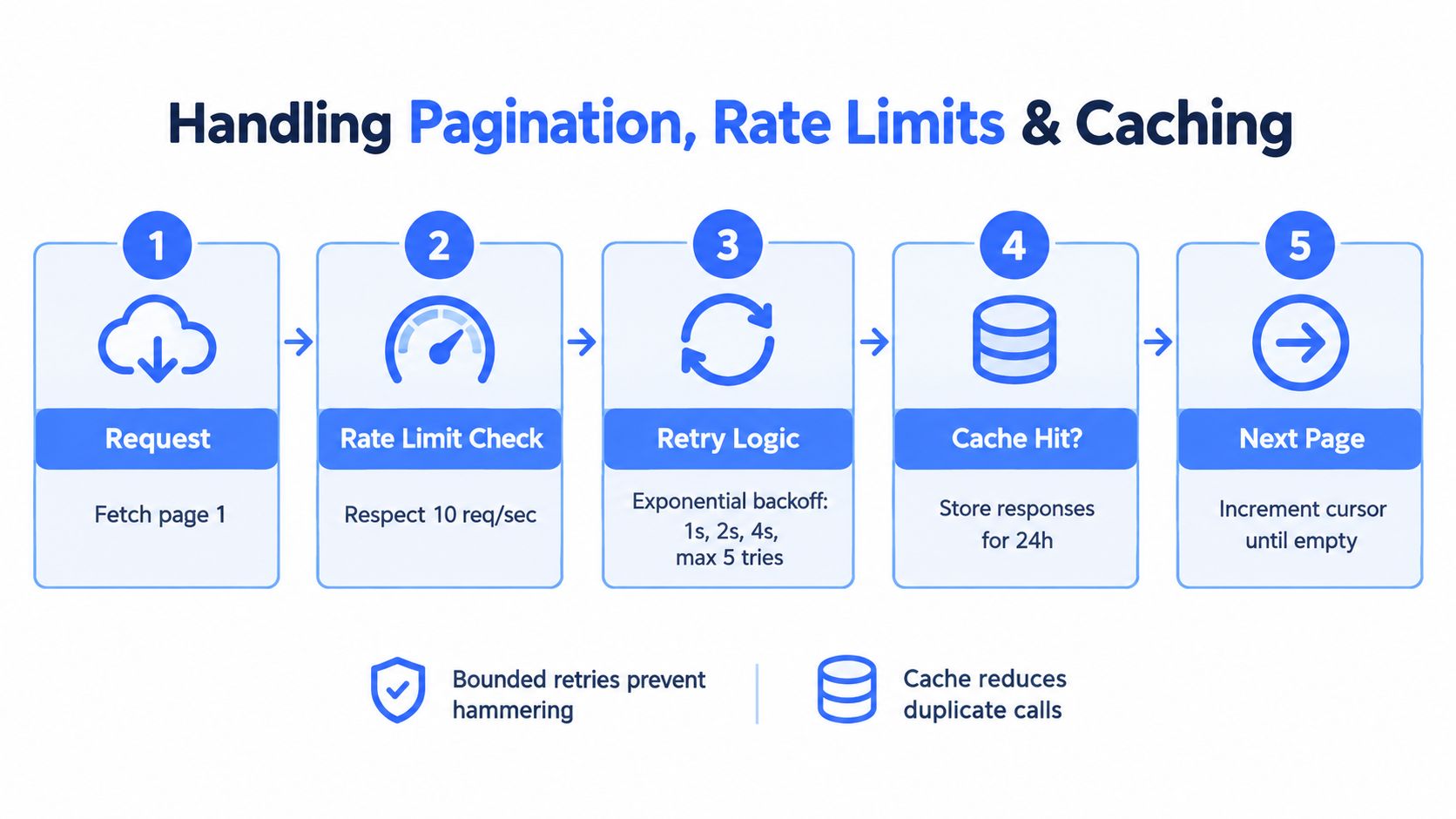
The safest pattern is boring on purpose. Fetch one page, record the pagination state, respect a conservative request cadence, and retry only when the failure looks transient. The literature on Instagram collection tools specifically warns that suspicious request patterns can lead to blocking, so bounded retries with exponential backoff are the right default, not an optional enhancement. The API rate limit guidance is useful if you're tuning retry behavior across a broader pipeline.
A practical retry loop looks like this:
- Fetch one page.
- Store the cursor and request timestamp.
- Retry with backoff on transient failures.
- Reuse cached responses when the same request repeats.
- Stop cleanly on auth challenges or repeated 403 and 429 responses.
The cache is where teams save a lot of wasted calls. Captapi's published product description notes a 24-hour shared cache for sub-second repeats and zero-cost repeats, which is exactly the kind of behavior that helps during debugging and reprocessing. If you request the same resource repeatedly during a test window, cache hits should keep you from hammering the source and make reruns cheaper and faster.
The most important operational fields to log are the ones that let you replay the run later. That means target identifier, collection timestamp, pagination cursor, HTTP status, parse outcome, and failure reason. If a response looks malformed, quarantine it instead of dropping it without a trace, because “missing” and “unreachable” are very different failure modes.
For example, if a post collection job stops on repeated redirect patterns, that's not a success with a smaller output. It's a signal that the session or route is no longer valid, and the run should be marked incomplete. The same applies when comments disappear between requests or when a page returns a technically valid response that hides a login interstitial.
If you want a broader pattern for building resilient API clients, the piece on open API examples for developers is a helpful reference point. The value is not just in making one request, it's in making the same request safely, repeatedly, and with enough metadata to prove what happened.
Verifying Results and Avoiding Incomplete Data Traps
A 200 OK only means the server answered; it says nothing about whether your data is complete. In Instagram pipelines, the response can still hide missing comments, login walls, deleted posts, or fields that are unavailable for a specific account or request path.
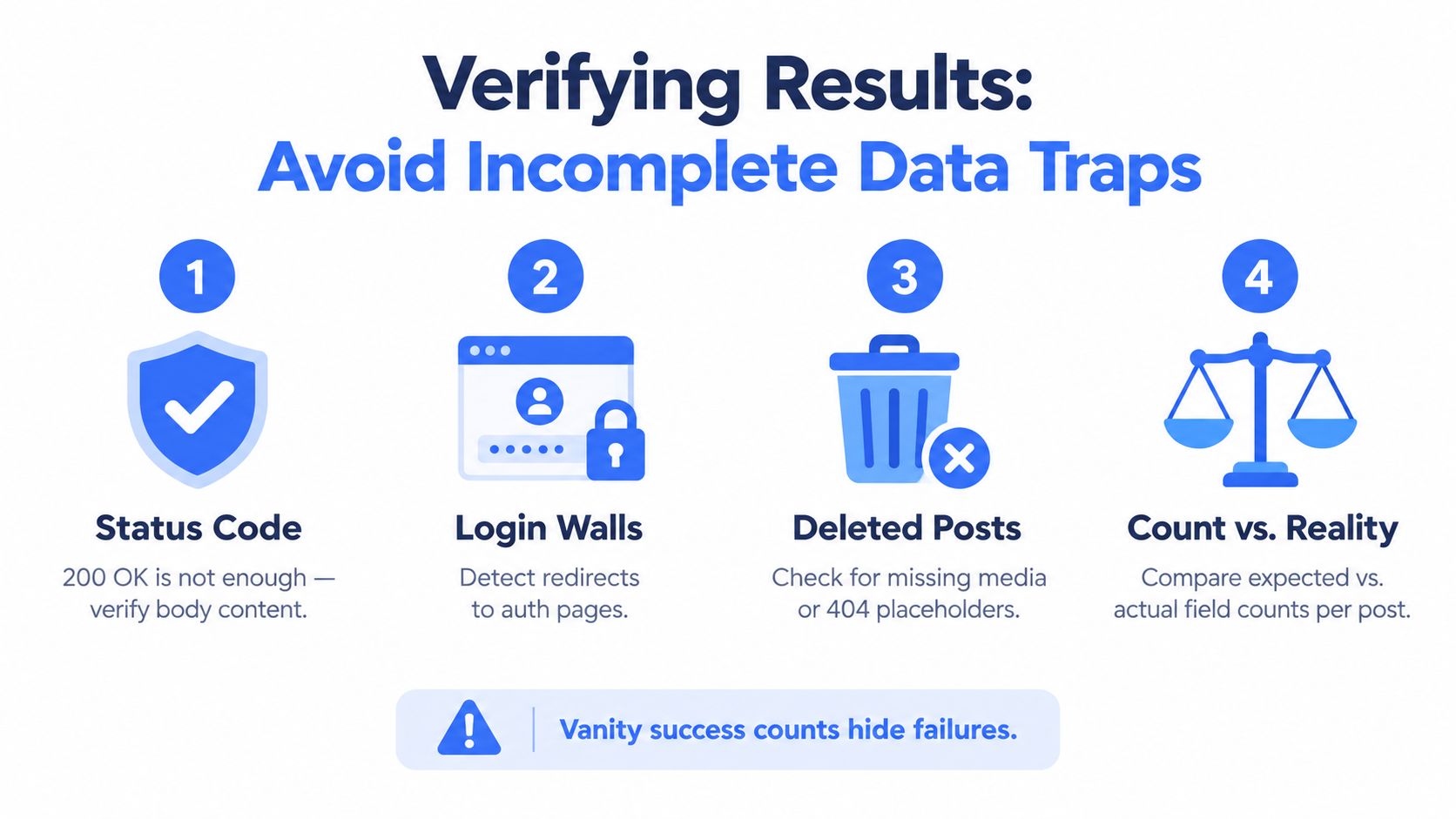
Track four separate rates instead of collapsing quality into one success number:
- Request success rate shows how often the server answered.
- Parse success rate shows how often your code understood the body.
- Record completeness measures how many required fields were present.
- Deduplicated coverage shows how many unique target posts you recovered.
That split matters in practice. The platform documentation for Instagram public content access makes it clear that live public content access can require successful App Review, which is a reminder that “publicly visible” and “available through an API” are different conditions. Instagram public content access documentation
A solid quality pass starts with a simple comparison between what you asked for and what came back. The guide on data quality assurance covers this approach in more depth. If you requested a profile's recent posts, count the unique post IDs in the output, then compare that against the number you expected from the sampling window. If certain fields are missing more often than others, measure missingness by field and by account, not as a single global issue.
Practical rule: rerun a small stratified sample at different times. If recovery changes a lot between runs, you are dealing with coverage instability, not random noise.
Label unknown fields as unknown. Do not infer them from blanks, and do not fill them with guesses from a different post or a different account. That choice keeps downstream dashboards and AI pipelines cleaner, because silent substitution is hard to detect after aggregation.
Publish the quality metrics separately from the raw counts. Inspect duplicate IDs, compare requested versus returned records, and keep the failure reasons attached to the run. If a field drops out only for one account segment or one request path, you have a reproducible defect to investigate instead of a vague completeness problem.
Putting Post Data to Work and Staying Compliant
Once the data is clean, the use cases become straightforward. Teams feed captions and transcripts into RAG pipelines, track competitors and brand mentions, auto-generate summaries, and bulk-export public post data for research or internal review. The difference between a useful workflow and a risky one is usually how carefully you limit frequency, document the source, and preserve the original response.
Storage should be plain and durable. Keep the source JSON, keep the parsed versioned record, and keep the engagement fields separate from derived analytics so you can reprocess later without losing provenance. That makes it easier to answer basic questions like which fields came from the source and which ones were added by your own logic.
If your pipeline also touches images or editorial assets, MerchLoom's licensing advice is a useful reminder that rights and reuse rules matter just as much as access. Public availability doesn't grant blanket reuse, and the safest operational posture is to extract only what you need for the workflow you run.
A compliant launch checklist stays short:
- Minimize frequency so you're not creating unnecessary load.
- Respect platform policies and stop when access patterns change.
- Keep raw responses so audits and parser fixes are possible.
- Mark unknowns clearly instead of inventing missing values.
- Scale only when the output is stable, not when the first run looks impressive.
Good practice: the cleanest pipeline is the one that produces slightly less data but gives you records you can trust, rerun, and explain.
That's the key advantage of a disciplined Instagram extraction setup. You can start with a small public sample, verify the schema, and expand only when the collection, parsing, and coverage checks all hold up.
If you want to ship this without building your own scraping stack, Captapi gives you a public Instagram extraction path through a consistent REST API, with structured post data, retries, and cache behavior that fits real pipelines. Try it when you need a compliant way to pull post metadata into research, monitoring, or RAG workflows without guessing whether the data is complete.