
Facebook Video Search Engine How to Build One That Works
You're probably here because Facebook's native search didn't give you the video you knew existed.
Maybe you're building competitor monitoring. Maybe legal asked for every public video tied to a campaign. Maybe you're feeding social video into RAG and discovered that typing keywords into Facebook is fine for casual browsing, but weak for reliable retrieval. That's the point where a Facebook video search engine stops being a nice-to-have and becomes infrastructure.
The practical mistake is treating Facebook search results like truth. They're not. For engineering work, they're a candidate list shaped by indexing scope, ranking, recency, and engagement bias. If you build around that reality, you can ship something useful. If you assume native search is exhaustive, your pipeline will miss videos and your users will blame your product.
Table of Contents
- Why Facebook Video Search Needs a Custom Engine
- What You Need Before You Build
- Fetching and Normalizing Facebook Video Data
- Turning Transcripts Into Searchable Intelligence
- Building Search Indexing and User Experience That Scales
- Keeping Your Engine Compliant and Ready to Launch
Why Facebook Video Search Needs a Custom Engine
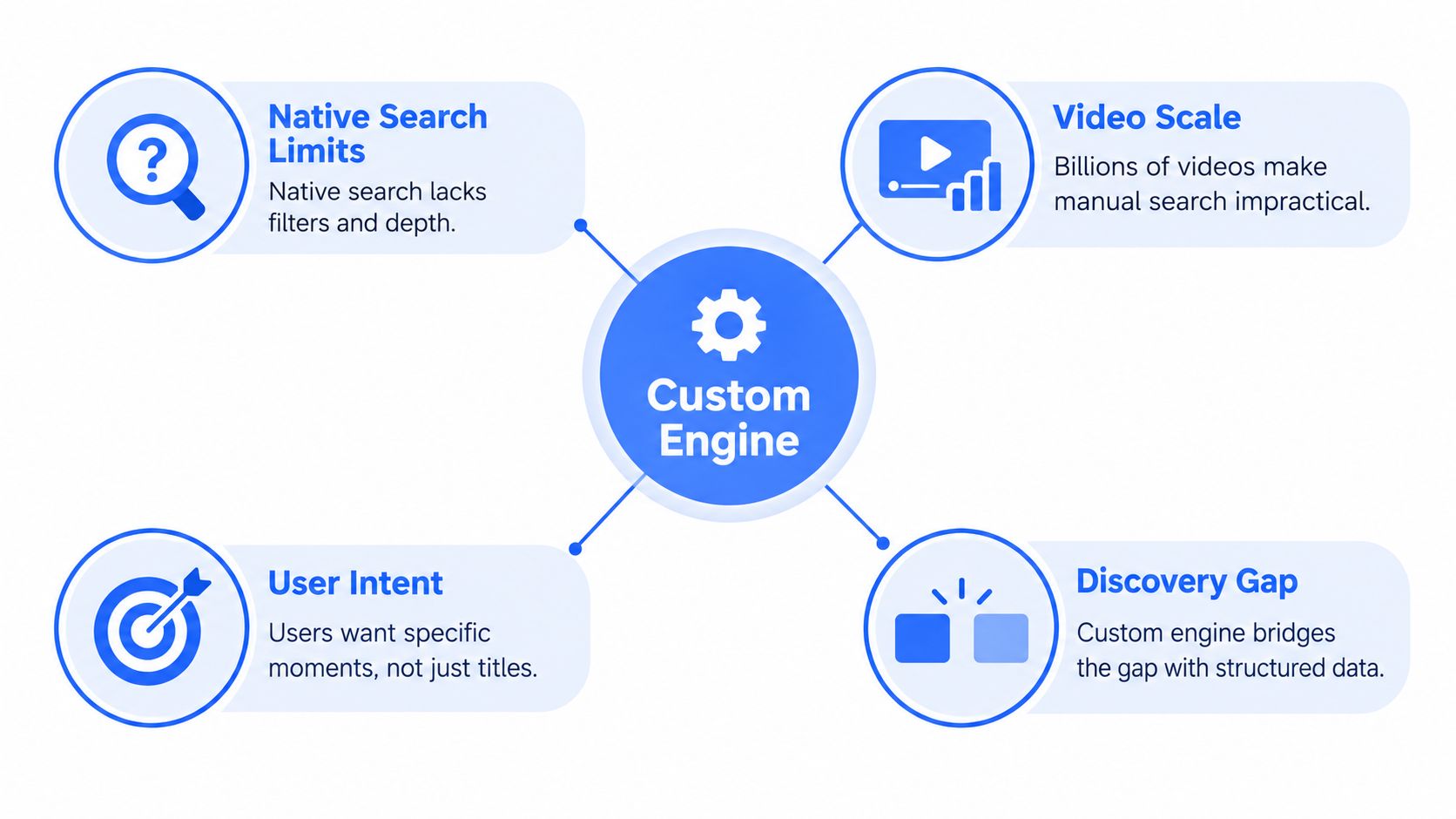
A lot of teams start with the wrong question: “How do we search Facebook videos better?” The better question is, “How do we reliably discover relevant public videos when Facebook search is incomplete?”
Facebook video is large enough to matter. A widely cited 2020 Facebook metric said 46% of Facebook's monthly active user base visited Facebook Watch every month, representing about 1.25 billion people according to Adam Connell's summary of Facebook video statistics. That scale explains why video discovery matters for analysts, agencies, and product teams even if Facebook later shifted naming from Watch toward Facebook Video.
Native search works for browsing, not coverage
If you've shipped search systems before, Facebook's behavior feels familiar. The platform returns something useful, but not necessarily everything relevant. Independent scraper documentation and API-oriented writeups describe Facebook video search as recall-limited, influenced by query relevance and recency rather than exhaustive retrieval, with public and permissioned scope constraints on what can be listed through official paths like page or user video endpoints in Apify's Facebook video search scraper guide.
That changes the mental model. Search isn't your database. Search is one fetch strategy.
Treat Facebook search results as lead generation for records, not as a canonical inventory.
A custom engine solves the gap between casual search and production retrieval. It lets you pull candidates from multiple public surfaces, normalize them into one schema, deduplicate variants, enrich them with transcripts and summaries, and expose a UI that supports both exact lookup and broader topical discovery.
The real job is discovery, not query syntax
Generic articles about Facebook search usually stop at filters and sorting. That's useful for a human hunting one clip manually. It doesn't help when your product needs to discover all public videos related to a topic across pages and formats.
That gap is why teams end up building their own stack around public data collection, enrichment, and ranking. If you're thinking about search and discovery systems more broadly, this search and discovery overview is the right framing. The job isn't typing clever keywords. It's building a system that can fetch, reconcile, and rank noisy public records under compliance constraints.
Set the boundary early
Private videos, closed audience content, and account-restricted materials should be out of scope unless you have explicit rights and an approved path to access them. A practical Facebook video search engine is a public-content retrieval and enrichment system. That boundary keeps your architecture cleaner and your compliance story defendable.
What You Need Before You Build
Most failed builds don't fail in ranking. They fail in source strategy.
Teams waste time assuming Facebook has a clean, universal video index with stable fields and one obvious API path. It doesn't. Before you write code, decide what sources you'll trust, what surfaces you'll ignore, and what artifacts you want to store long-term.
Start with public retrieval paths
For official, structured retrieval, the most useful baseline is the public Page and User video listing model. Meta-oriented API references and scraper documentation point to endpoints such as /{PAGE_ID}/videos and /{user-id}/videos?type=uploaded, which return fields like IDs, descriptions, and updated times, as discussed in Apify's Facebook video search scraper page. That gives you a dependable seed source for public videos tied to known entities.
What it won't give you is complete topic discovery across the platform.
That's why a serious build usually combines multiple candidate sources:
- Known Page inventories: Best for monitoring publishers, brands, media outlets, and competitors you can enumerate upfront.
- Known User public uploads: Useful in narrower cases, but typically less stable as a discovery backbone.
- Search-derived candidates: Helpful when you don't know which Pages or profiles will publish the relevant video.
- Related public objects: Posts, reels, and mentions can point to videos your first-pass inventory missed.
Know what data is actually worth storing
Don't build around every field you can scrape. Build around fields that support retrieval, ranking, and auditability.
At minimum, store:
- Stable identifiers: The video ID is your dedupe anchor.
- Source context: Page ID, profile ID, or the parent object that exposed the video.
- Human-readable metadata: Description, title-like text if present, and timestamps.
- Fetch provenance: Which strategy found this item, and when.
- Raw payloads: Keep the original response. You'll need it when mappings change.
Practical rule: Save the raw object first, then map into your clean schema. Raw payload retention is what saves you during parser revisions.
Provision the systems that matter
You don't need a huge platform on day one. You do need a clean split between collection, enrichment, and retrieval.
A lean production setup usually includes:
- Object storage for raw API and scraper responses.
- A relational store for normalized video records.
- A search index for keyword and faceted retrieval.
- A vector store for semantic transcript search.
- A job queue for retries, backfills, and transcript processing.
- Secrets management for API keys and provider credentials.
Don't plan around unavailable private history
Engineers sometimes conflate two separate jobs: discovering public videos across Facebook and recovering what a user personally watched. Facebook doesn't provide a dedicated, centralized watch-history system like YouTube. Users typically recover traces through the Activity Log and “Videos you've watched” entries rather than a standalone history product, as described in 7Labs' walkthrough of Facebook watched video history. That's not a reliable foundation for product-grade search, so don't architect around it.
If you need transcripts and normalized metadata without stitching together multiple SDKs, one option is Captapi, which exposes public Facebook video transcript and summarization functionality through a unified REST interface. The key design choice is less about vendor preference and more about keeping your fetch layer focused on public, permissioned inputs rather than chasing data you can't lawfully or reliably retrieve.
Fetching and Normalizing Facebook Video Data
The build starts when you stop thinking in queries and start thinking in records.
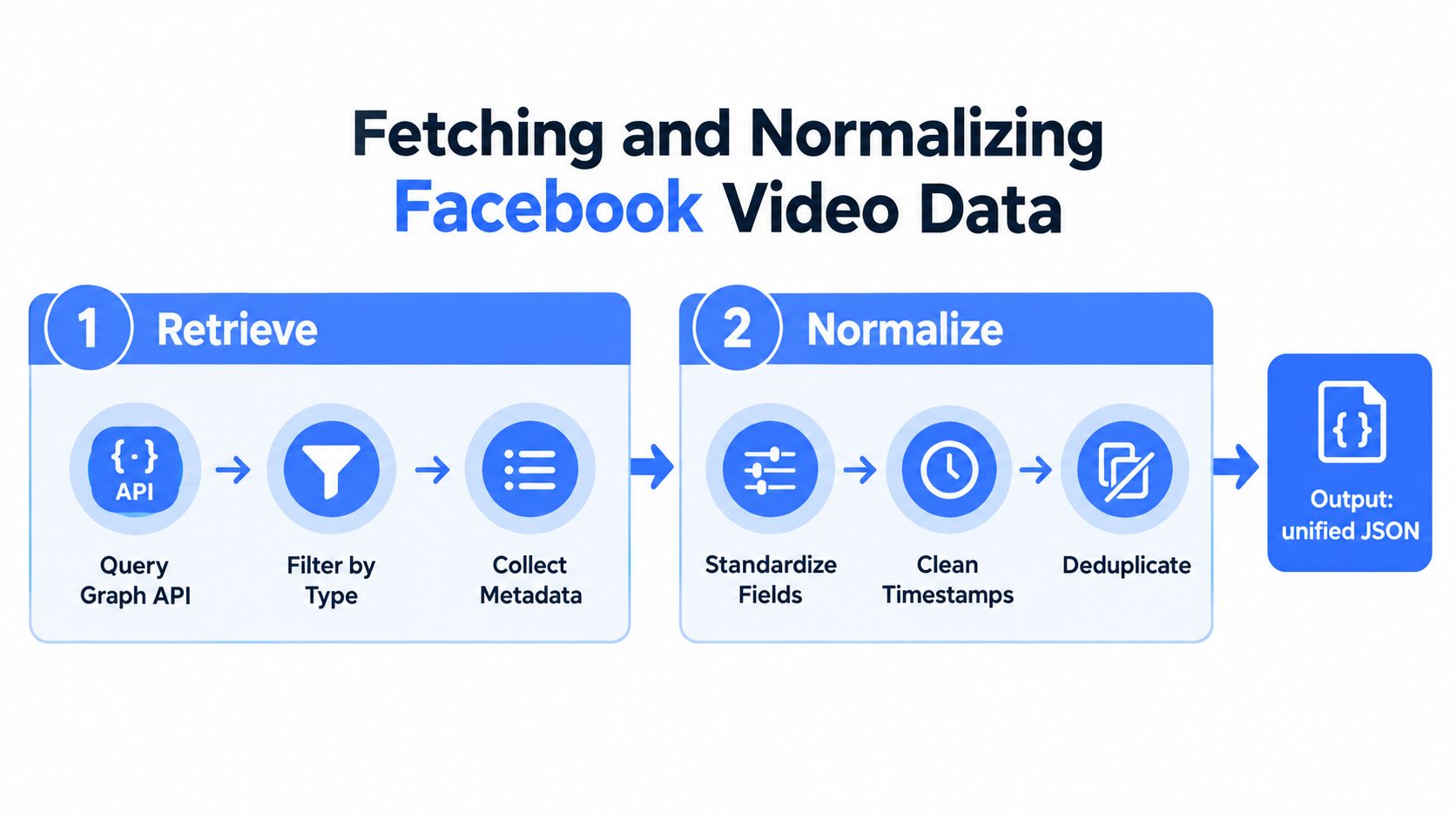
A workable Facebook video engine uses a two-stage workflow. First, retrieve candidates from public inventory paths and search-derived sources. Second, normalize those candidates into one schema and deduplicate by video ID. That structure matters because keyword search alone is incomplete and can miss uploaded versus tagged variants, a limitation called out in Apify's Facebook API documentation guide.
Stage one pulls candidates, not truth
The first stage should be intentionally redundant. You want overlap because overlap reveals misses.
A practical collector often does some combination of:
- Page video enumeration for publishers and monitored brands
- User upload enumeration where public profiles are part of the scope
- Keyword search collection for open-ended topics
- Post and reel traversal when videos are embedded or cross-posted indirectly
You're not trying to make every source perfect. You're trying to maximize candidate recall within public limits.
Later in the pipeline, this video is worth watching if you want a quick visual walkthrough of the retrieval problem and the trade-offs in Facebook collection workflows.
Stage two makes the data usable
Most of the engineering value sits in normalization.
Without normalization, your index fills up with near-duplicates, inconsistent timestamps, incomplete descriptions, and source-specific field names. Users then see repeated videos, weak filtering, and unpredictable relevance.
Normalize into a canonical record with fields like:
| Field | Why it matters |
|---|---|
| Video ID | Primary dedupe key |
| Canonical URL | Useful for UI and audits |
| Source entity | Supports filters and analytics |
| Published or updated time | Enables recency ranking |
| Description text | Powers keyword search |
| Retrieval source | Helps debugging and trust scoring |
| Transcript status | Shows whether semantic search is possible |
Uploaded versus tagged is where duplicates sneak in
One of the messier Facebook behaviors is that the same underlying video can surface through different routes. A video may appear as a Page upload, a tagged object, or a post-level reference. If you only dedupe on URL shape or text similarity, you'll keep copies that should collapse into one record.
Use a layered dedupe strategy:
- First pass: Exact match on video ID
- Second pass: Canonicalized URL comparison
- Third pass: Soft duplicate detection on metadata plus source context
- Final review: Keep provenance from all source paths even if the user sees one merged item
Keep one user-facing record and many source-path breadcrumbs. That lets analysts inspect how the engine found the item without polluting results with duplicates.
Store raw payloads and enrich later
Don't do heavy transformation inline with collection if you can avoid it. Fetchers should collect, validate, and persist. Enrichment jobs can run asynchronously.
That split gives you three advantages:
- Retries stay cheap: Re-run parsing without re-fetching when field mappings change.
- Backfills stay possible: Add new derived fields across old records.
- Audits stay clean: You can show exactly what the source returned.
Transcript extraction belongs in this enrichment layer too. Pull the transcript when available, attach language metadata if you have it, and preserve the original text before cleanup. Don't overwrite the raw transcript with your edited version. Search tuning and QA are easier when both exist.
Turning Transcripts Into Searchable Intelligence
Titles and descriptions won't carry a serious Facebook video search engine. Spoken content does.
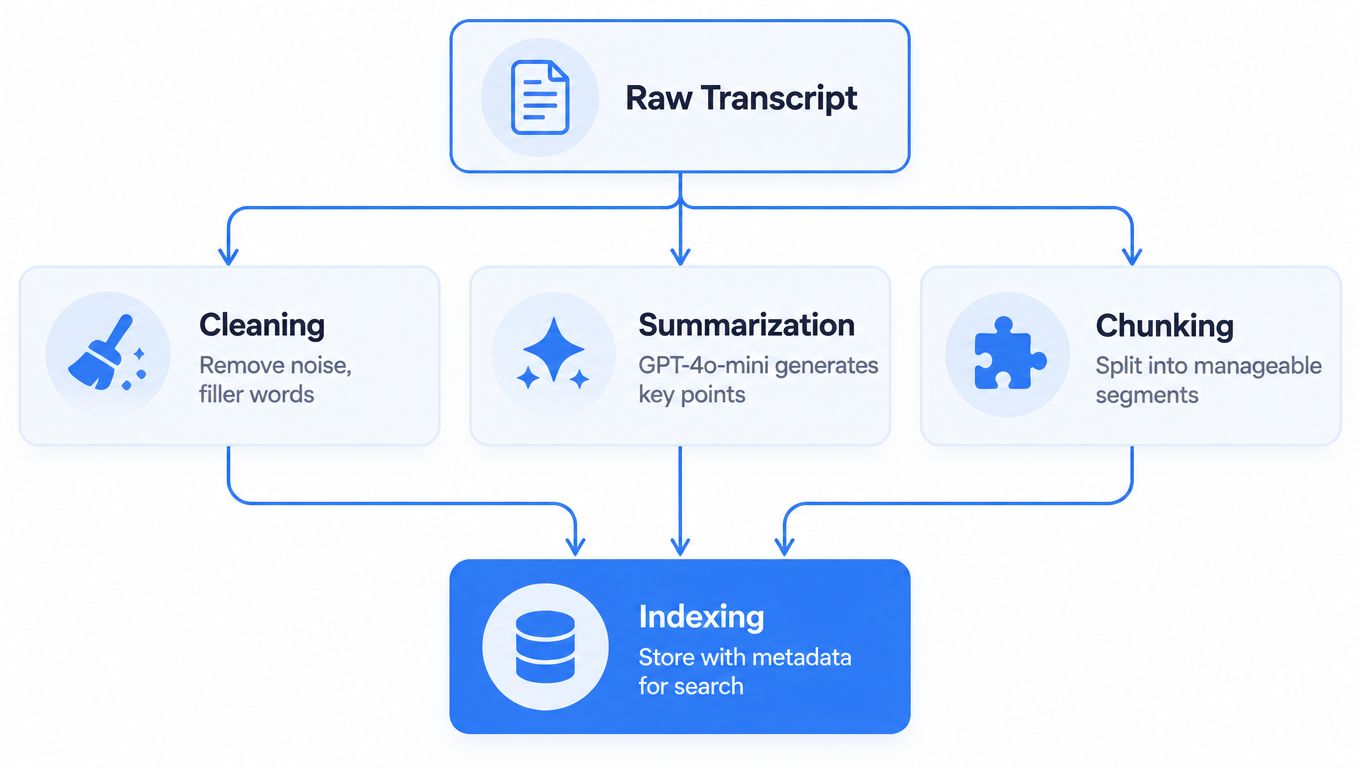
If your goal is topical discovery, Q&A over videos, or retrieval by what people said, transcripts become the core document. The challenge is that transcripts arrive noisy. They include filler, broken punctuation, inconsistent casing, duplicated fragments, and multilingual drift. Good indexing starts with cleaning, not embedding.
Clean the transcript before you rank it
Raw speech-to-text is rarely search-ready. Even when the text is mostly right, formatting noise hurts both keyword matching and summary quality.
A strong cleaning step usually does four things:
- Removes junk tokens: Filler artifacts, repeated segments, and timestamp noise if present.
- Restores sentence boundaries: Better chunks lead to better embeddings.
- Normalizes casing and whitespace: Small cleanup, big downstream impact.
- Preserves traceability: Keep offsets or segment IDs so you can map results back to moments in the video.
If you want the transcript retrieval side of this stack, this guide to Facebook video transcription is useful because it focuses on turning a public video into text you can process rather than stopping at captions.
Summaries are not just a UI feature
Many teams treat summarization as decoration. That's a mistake.
A short machine summary helps in three places:
- Facet generation: You can derive cleaner topics and entity hints from a summary than from raw transcript fragments.
- Result presentation: Users decide relevance faster when they see a compact explanation.
- Triage workflows: Analysts can review more items without opening every video.
For this stage, use your summarization model as a compression layer, not as a replacement for the transcript. The full transcript remains the searchable source of truth for semantic retrieval.
Build principle: Summary for speed, transcript for evidence.
Chunk for semantics, not for convenience
Semantic search gets weak when teams chunk mechanically. Fixed-size slices without respect for sentence or topic boundaries produce vague embeddings and poor highlight quality.
A better chunking pattern is:
- Split on sentence boundaries first
- Merge into medium-sized topical windows
- Keep overlap between adjacent chunks
- Attach chunk metadata like video ID, source entity, and sequence order
That structure supports conversational queries such as “find clips where a speaker discusses moderation policy changes” even when the title never mentions moderation.
Run hybrid retrieval from day one
Pure vector search sounds elegant until a user asks for a brand name, a person's exact wording, or a public statement with unusual spelling. Then keyword search wins.
Pure keyword search has the opposite problem. It fails on paraphrases, concept queries, and implied meaning.
Use both:
- Keyword index for exact phrase, names, and faceted filters
- Vector index for meaning-based discovery
- Hybrid ranker that blends lexical and semantic evidence
For multilingual or noisy transcripts, language-aware preprocessing matters. Don't force all content into one normalization path if the transcript quality differs sharply by language or source. Segmenting by language family, or at least labeling language reliably, makes ranking far more predictable.
Building Search Indexing and User Experience That Scales
Backends don't save a bad search experience.
You can collect public videos, normalize records, enrich transcripts, and still ship a weak product if the ranking logic and UI encourage false confidence. The platform itself already biases discovery toward relevance heuristics, engagement, and recency. Your engine has to expose that uncertainty instead of hiding it.
Rank like an analyst, not like a social feed
A social feed wants attention. A search engine wants retrieval quality.
That means your ranking should combine several signals instead of copying platform ordering:
- Text match strength: Terms in title-like fields, descriptions, and transcript chunks
- Semantic similarity: Useful for broad, conversational, and concept-driven queries
- Freshness controls: Important for newsy searches, but not universally dominant
- Source trust and scope: Known publisher, monitored list, or general discovery source
- Completeness of record: Transcript present, metadata complete, duplicate confidence high
Don't let engagement-like fields dominate ranking just because they exist. Public search sources often expose views, reactions, and comments, but those fields can reinforce the same popularity bias that already distorts candidate retrieval.
If you rank mostly on popularity, your engine won't answer “what exists.” It will answer “what already performed.”
The UI should communicate confidence and scope
Most search interfaces fail by pretending results are complete. On Facebook, that's risky.
Your result pages should show:
- Source type
- Published or updated date
- Transcript availability
- Matched on keyword or semantics
- Duplicate-collapsed status if relevant
Add filters users can reason about, such as posted date, source entity, and live-video status when your inputs support it. Independent writeups on Facebook video search still describe basic controls like relevance or recent sorting, posted-date filters, and live filtering, while highlighting that they don't solve exact-match or archive-grade discovery in Fluent Support's discussion of advanced video search engines.
Choose your search method deliberately
| Search Method | Best For | Limitation to Plan For |
|---|---|---|
| Keyword search | Exact titles, names, quoted phrases, compliance lookups | Misses paraphrases and concept-level matches |
| Semantic search | Broad topics, natural-language questions, transcript-heavy retrieval | Can drift on short or noisy transcripts |
| Faceted search | Narrowing by date, source, live status, or content type | Depends on clean metadata coverage |
| Hybrid search | General-purpose production search | Requires tuning and evaluation, not just default settings |
Caching and pagination are product features
If your pipeline re-fetches the same public records for every query, it won't scale and it won't feel stable.
Use caching at two layers:
- Collection cache: Reuse recent fetches for the same public objects.
- Query cache: Cache normalized search responses for common user queries when freshness requirements allow.
A 24-hour shared cache pattern is often a sensible compromise for public social data workflows because it cuts redundant work while keeping results reasonably fresh for most monitoring use cases. The same principle matters for pagination. Stable pagination requires deterministic sort keys and duplicate collapse before page slicing, not after.
For teams operationalizing this in production, this data pipeline automation guide aligns with the way social retrieval systems need retries, backfills, and scheduled refreshes to stay usable.
Expect retries and source drift
Facebook collection pipelines break less from dramatic failures than from quiet schema drift.
Plan for:
- Field absence: Some records won't have the metadata you expect.
- Ranking changes upstream: Search-derived candidate quality will move over time.
- Reprocessing: When you improve chunking or dedupe logic, you'll want to rebuild indexes.
- Audit requests: Legal or research users will ask how a result entered the system.
That's why provenance is part of the search product, not just an implementation detail.
Keeping Your Engine Compliant and Ready to Launch
A Facebook video search engine is only useful if your team can defend how it was built and what it does not include.
The safest launch pattern is narrow scope, explicit public-data boundaries, and strong handling rules for stored content. If your retrieval logic depends on hand-wavy assumptions about access rights, it will become a problem later when users trust the system more than they should.
Public data only is not a minor detail
Design the product around public content from the start. That means public Pages, public profiles where applicable, public posts, public reels, and other publicly accessible video surfaces that your chosen retrieval method can lawfully access.
It also means being clear about what the engine doesn't do:
- No private watch history reconstruction
- No closed-group access without rights
- No pretending search coverage is complete
- No silent mixing of public and restricted records
Those choices should appear in your product docs, your internal runbooks, and your customer-facing expectations.
AI search changes discovery, not compliance duties
There's a new wrinkle here. Independent reporting from June 2026 says Meta launched an AI Mode conversational search tab that retrieves answers from public posts, groups, and reels, and expanded AI search across its apps, according to Memeburn's report on Meta AI tools and search changes. That may improve broad discovery for end users.
It doesn't replace a custom engine for archival lookup, repeatable monitoring, or audit-grade retrieval.
AI answers are useful when someone wants a synthesized response. They're not the same as a stable, inspectable retrieval system with preserved evidence, dedupe logic, transcript indexing, and repeatable query behavior.
Compliance teams need records they can review. Product teams need pipelines they can rerun. Conversational search doesn't solve either problem by itself.
Launch with guardrails, not assumptions
A practical launch checklist looks like this:
- Document scope: Define exactly which public surfaces you index.
- Preserve provenance: Keep source path, fetch time, and raw payload references.
- Expose uncertainty: Label search-derived results as discovered candidates, not exhaustive truth.
- Support deletion workflows: Be ready to remove or refresh records if upstream visibility changes.
- Review handling policy: Make sure storage, retention, and customer use align with your obligations.
If your team needs a broader framework for those boundaries, this social media compliance guide is a useful reference point for product and engineering decisions.
Start with one use case. Competitor monitoring. Brand safety review. Research archive. Get the fetch and normalize loop right, then expand coverage. That's how these systems become reliable.
Captapi gives developers a unified way to pull public social video data, including Facebook transcripts, summaries, and related metadata, through one REST interface instead of stitching together separate collection workflows. If you're building a Facebook video search engine and want a cleaner ingestion layer for public video enrichment, visit Captapi.