
API Integration Explained for Real-World Developers

You're staring at a dashboard that should have updated five minutes ago. The chart is blank, the sync job is “successful,” and the team chat is already asking whether the data source is broken or the integration is just late again.
That's the true face of api integration explained in production. It's not a one-time handshake where you call an endpoint, get a JSON blob back, and move on. It's a living system of contracts, retries, permissions, caches, limits, and failure handling that either keeps your product steady or slowly turns every upstream hiccup into customer pain.
A lot of junior guides stop at “send a request, read a response.” Real systems need more than that. They need a shared mental model, a sane HTTP pattern, a security posture that doesn't drift, and enough observability to tell the difference between a slow provider, a bad token, and a duplicate write.
Table of Contents
- What API Integration Actually Looks Like in Practice
- The Core Concepts Behind Every API Integration
- REST Patterns, HTTP Methods, and Realistic Examples
- Authentication Methods and How to Choose Between Them
- Pagination, Rate Limits, and Error Handling as One System
- Retries, Idempotency, Caching, and Circuit Breakers
- Security, Governance, and the Hidden Risks of a Working Integration
- Testing, Monitoring, and Shipping With a Deployment Checklist
What API Integration Actually Looks Like in Practice
You click “refresh” in a social analytics tool, and a few seconds later the engagement chart fills in. Behind that simple moment, your app has probably requested one or more resources, authenticated, handled retries or pagination, transformed the response, and stitched it into a view the user can understand. That's why a good integration feels invisible when it works.
A useful mental model is to think in layers. The visible chart is only the last layer, the part your user sees. Underneath it, the client has to know where to call, how to authenticate, what to ask for, how to interpret errors, and how to avoid hammering the provider when traffic gets messy.
If you want a compact walkthrough of that journey, Captapi's integration guide is a practical companion, and Developer-friendly API integrations is a nice example of how teams document the moving parts for other developers. The same pattern shows up whether you're pulling social data, syncing CRM records, or feeding AI pipelines.
Practical rule: if an integration only works in the happy path, it's still a demo, not a production system.
A single call is the smallest unit, but real integrations chain those calls together. One request may fetch a list, another may page through the next batch, and a third may retry only if the operation is safe to repeat. That's why production work is less about “calling an API” and more about designing reliable behavior around a remote dependency.
The Core Concepts Behind Every API Integration
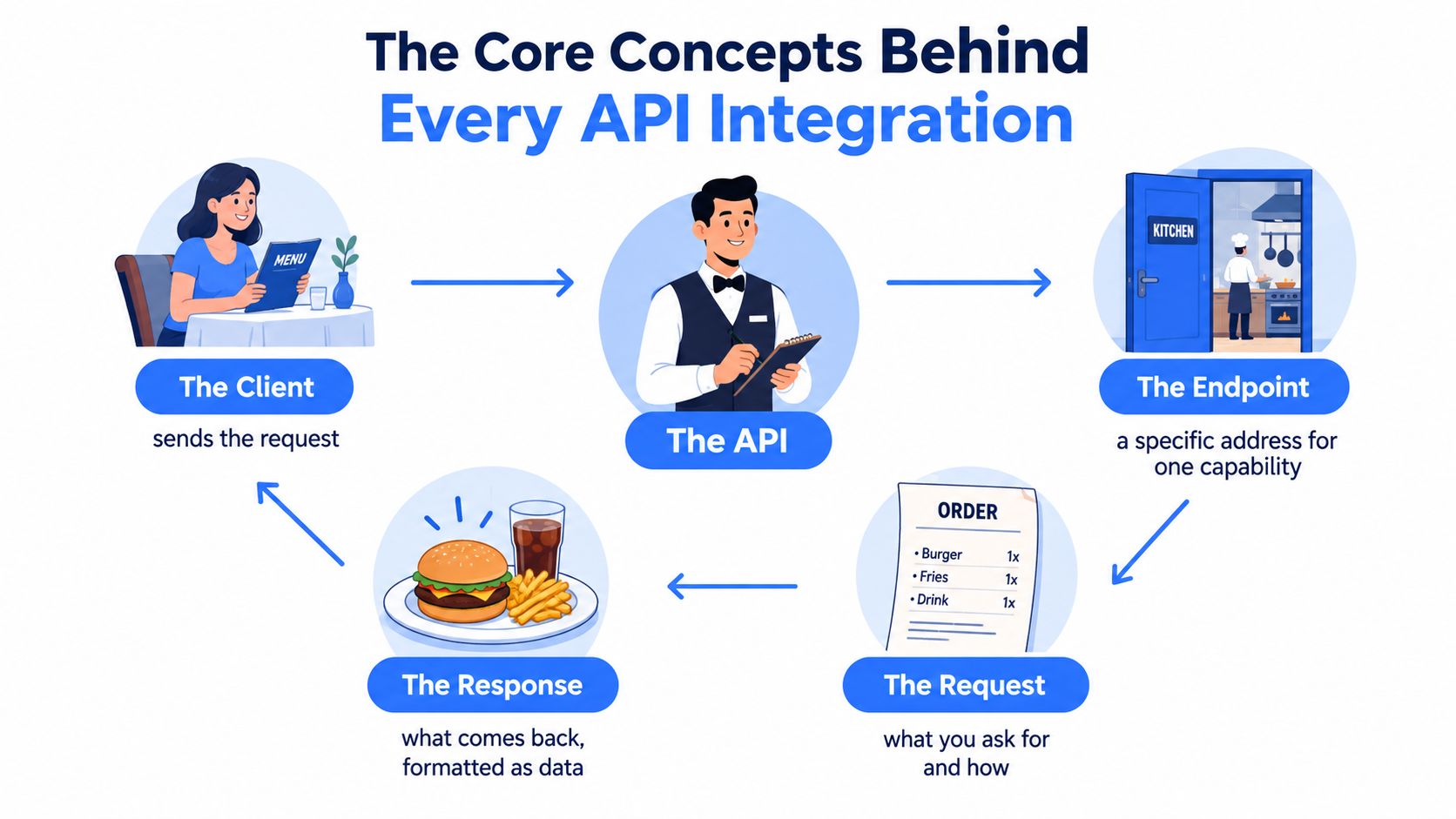
A restaurant analogy still works because it maps cleanly to the software side. The client is the customer at the table, the API is the waiter carrying the order, the endpoint is the specific kitchen door or station, the request is the ticket, and the response is the plated dish coming back.
The pieces that make the conversation work
An API is a contract, not a piece of magic. It tells one program what another program is willing to accept, what it will return, and how the exchange is structured. REST became the dominant style because Roy Fielding's 2000 dissertation defined it around stateless client-server interactions, a uniform interface, and resource identification through URLs, which fit naturally on top of the web's existing HTTP infrastructure REST's historical foundation.
That's why the terms matter. An endpoint is a specific address for a capability, like “give me this transcript” or “update that record.” A request includes the method, headers, and sometimes a body. A response gives you status, headers, and data, usually structured as JSON, though the exact format depends on the provider.
Synchronous and asynchronous behavior
Not every API call behaves the same way. A synchronous call returns data right away, which feels like ordering and receiving food at the table. An asynchronous workflow queues work first and delivers the result later, which is more like getting a pager and waiting for the kitchen to finish.
That distinction matters when you build integrations that trigger extraction, summaries, exports, or other metered work. The client may get an immediate acknowledgment while the actual result arrives later, so your code needs a separate way to track completion and failures. If you treat those two patterns like they're the same, your retry logic gets messy fast.
The tricky part isn't sending the request. It's knowing whether the system on the other side has already committed the side effect when your client times out.
For a deeper terminology primer, Captapi's endpoint guide is useful because it keeps the language tight without overcomplicating the diagram. Once the vocabulary is clear, the rest of the integration stack gets easier to reason about.
REST Patterns, HTTP Methods, and Realistic Examples
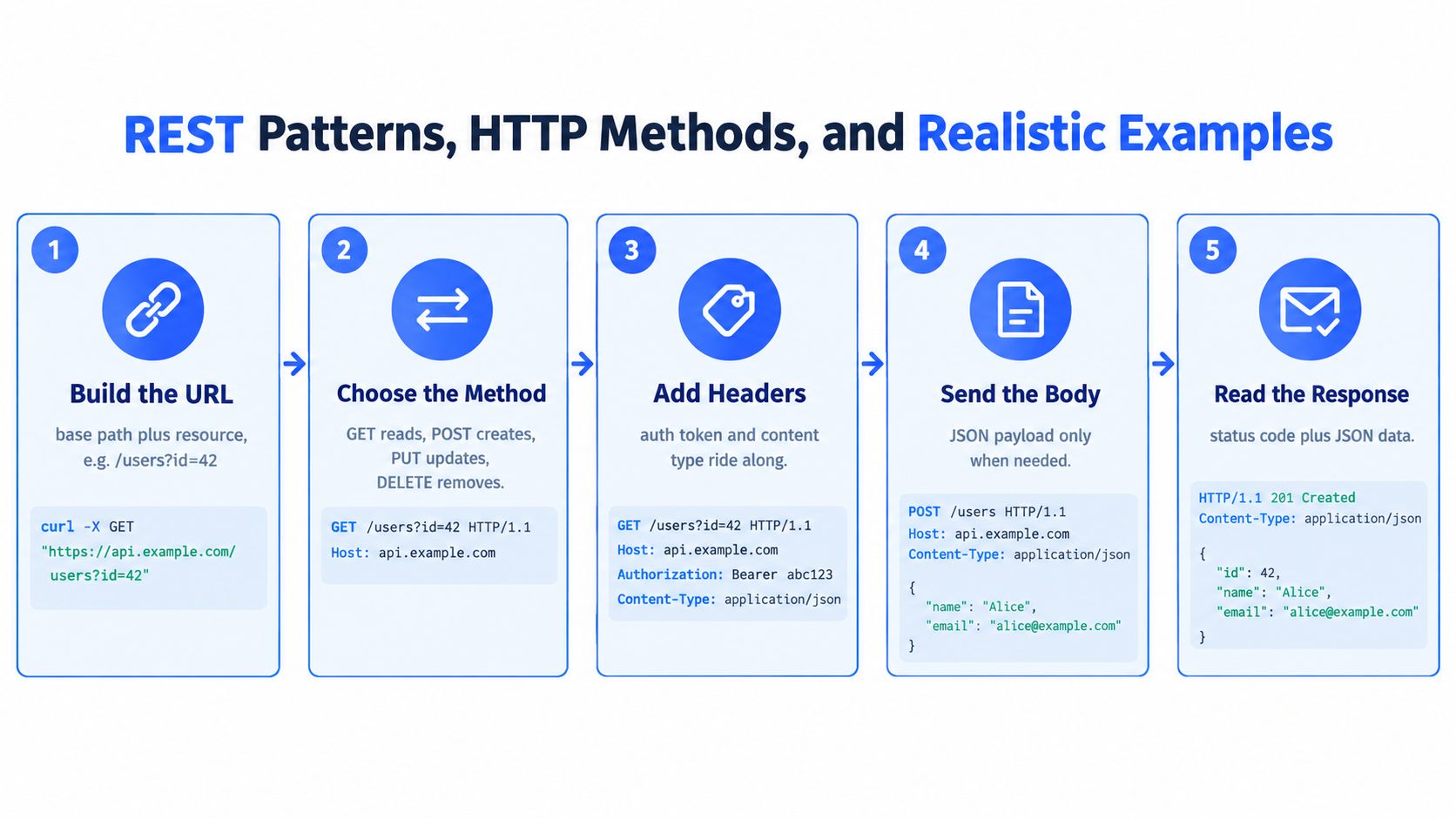
REST works because it gives every caller the same grammar. You identify a resource with a URL, choose a method, send the right headers, include a body only when needed, and interpret the response by status and payload. That predictability is why independently built systems can still understand each other.
What a clean request usually looks like
A request is normally a combination of base path, resource, query parameters, and headers. The path names the thing you want, the query parameters narrow it down, and the headers tell the server how to treat the call, especially around authentication and content type.
A typical read might be a GET request for a transcript resource. A create action usually uses POST. An update that replaces a whole object fits PUT, and DELETE removes a resource. Those verbs are not arbitrary labels, they tell the server and client how safe the call is to repeat and how the request should behave.
Here's the intuition that saves time later:
- GET reads data and should stay side-effect free.
- POST creates or triggers work, so it can be dangerous to repeat blindly.
- PUT updates or replaces a known resource and fits clean retry behavior better.
- DELETE removes a resource, which makes idempotent handling especially important.
The same pattern applies whether you're working with product data, transcripts, or social metrics. Captapi's REST API best practices is a good reference point if you're trying to keep your own endpoints readable and consistent.
Reading the response like a developer
The status code is part of the contract too. A 200 says the request succeeded, 201 means something was created, 400 points to a problem in the request, 401 means authentication failed, 404 means the resource wasn't found, and 429 means you've hit a limit. The body then gives you the actual data, often wrapped in a shape that includes the primary fields plus metadata for tracing.
A solid habit is to log any correlation identifier the provider returns. When a support ticket arrives later, that ID makes it much easier to trace one request through the system instead of guessing from timestamps. That's boring infrastructure work, but boring is what you want when production traffic starts misbehaving.
Authentication Methods and How to Choose Between Them
Authentication is where a lot of integrations fail. The request still goes through, the endpoint still responds, but the data is incomplete, access is too broad, or a leaked secret keeps working longer than it should.
Picking the right access model
An API key is the simplest option. It's easy to issue and easy to rotate, which makes it fine for low-risk server-to-server access, but it usually gives you coarse control. A bearer token is better when you need short-lived access with clearer scoping. OAuth 2.0 client credentials fits machine-to-machine flows where a service needs to authenticate as itself, not as a user. Signed requests are useful when the server wants proof that the request wasn't tampered with in transit.
| Method | Setup cost | Rotation effort | Granularity | Best fit |
|---|---|---|---|---|
| API key | Low | Low to moderate | Coarse | Simple server-to-server use |
| Bearer token | Moderate | Moderate | Better scoped | Short-lived authenticated access |
| OAuth 2.0 client credentials | Higher | Moderate | Fine-grained | Service-to-service with stricter control |
| Signed request | Higher | Moderate | Strong integrity | Requests that need verification |
The choice is usually about blast radius. If a secret leaks, how much can an attacker do with it? If you can answer that in one sentence, you're already thinking about auth the right way.
Safe storage and rotation habits
Never hardcode secrets in a client-side bundle. Store them in environment variables or a secrets manager, rotate them before you need an emergency change, and make sure the app can keep running during the switchover. If a key is exposed, assume it's being tried until you revoke it.
Practical rule: the best secret is the one your users never ship to the browser.
A good production team also watches for weird access patterns. Sudden spikes from one key, new geographies, or requests hitting endpoints the service never normally uses can all point to abuse. That's not just security hygiene, it's basic operational awareness.
For a more detailed breakdown of the trade-offs, Captapi's authentication methods guide is a useful read because it frames auth as a design choice, not just a setup task.
Pagination, Rate Limits, and Error Handling as One System
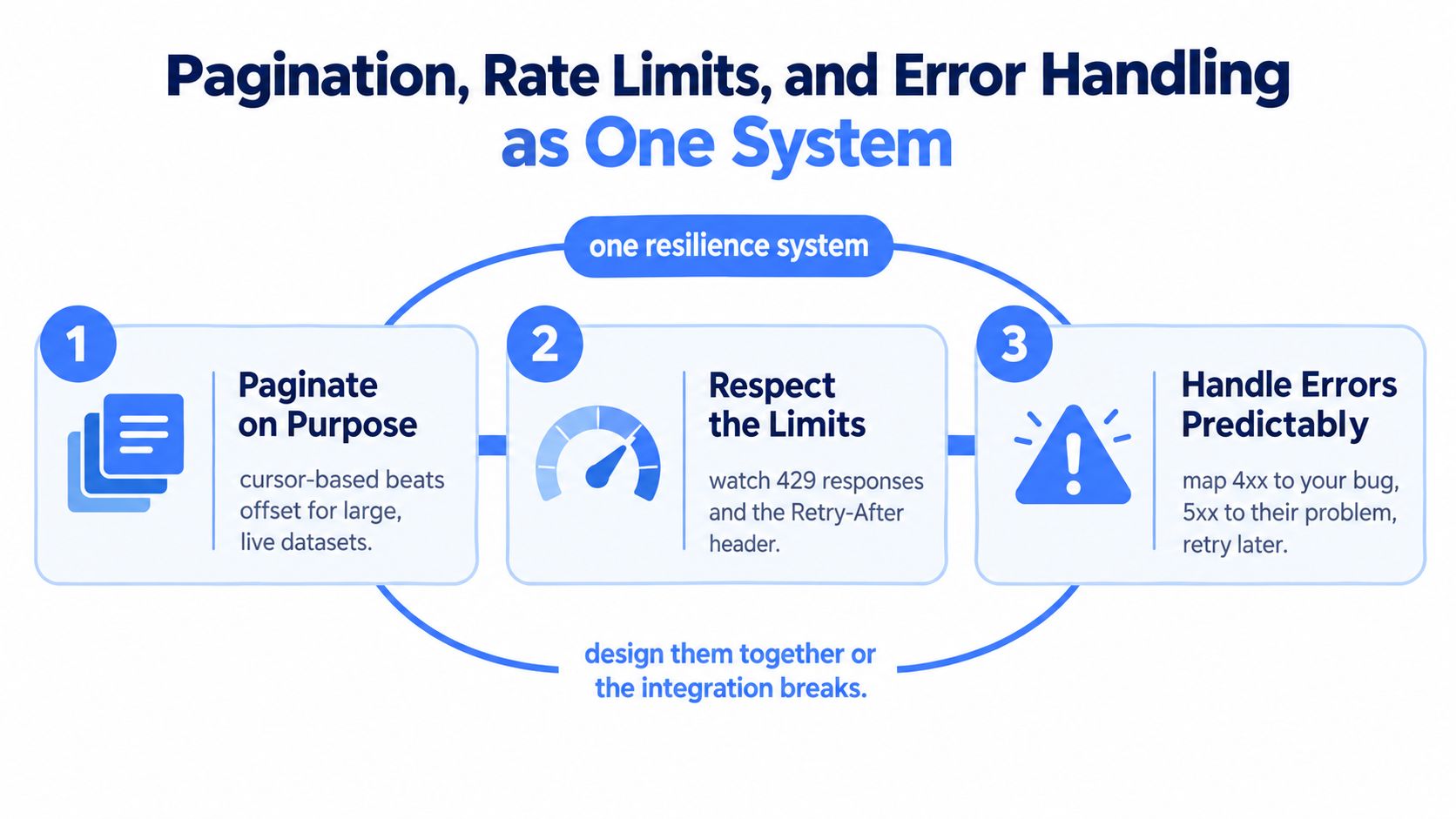
A data pipeline can appear healthy while dropping records. A page cursor expires, the provider slows requests, or an error gets retried forever. Broken integrations rarely fail because of one giant mistake. They fail because pagination, rate limits, and error handling were designed in isolation, then collide under load. The same failure can leave an AI pipeline with incomplete context, duplicated inputs, or misleading output.
Pagination is part of the contract
Offset pagination is easy to implement, but it becomes brittle when records change during a long crawl. A new record can shift later offsets, causing duplicates or skipped results. Cursor pagination usually fits live datasets better because the cursor gives the client a stable point from which to continue. That matters for comments, messages, and records that keep changing.
Resumption also belongs in the design. If a job stops halfway through a large result set and starts again from page one, it wastes calls and may process the same records twice. Store enough progress to resume deliberately, and make the pagination strategy explicit in the integration contract.
Rate limits need respectful clients
A rate limit is an enforcement mechanism, and your client should treat it that way. When the server asks you to slow down, back off rather than turning a small spike into a larger outage. Headers such as Retry-After and X-RateLimit-Remaining give the caller information for adjusting request volume instead of retrying blindly.
Captapi's rate limit guidance offers a practical reference for clients that must stay within quotas without becoming sluggish. The same principles apply to dashboard polling and batched data pipelines.
Errors are categories, not surprises
A 4xx response usually indicates a malformed, incomplete, or unauthorized request. Correct the request or credentials before sending it again. A 5xx response indicates an upstream problem, so the client can consider a later attempt, subject to retry policy and the provider's guidance.
A simple rule keeps the three concerns aligned:
- Fix 4xx locally before retrying.
- Treat 5xx as transient unless the provider says otherwise.
- Honor rate-limit headers instead of assuming the server can absorb more traffic.
Together, these controls turn a sequence of requests into an operating system for the integration. The caller advances through data carefully, reduces pressure when asked, and stops spending effort on errors it cannot repair. That discipline matters even more in AI pipelines, where one missing page can affect every downstream result.
Retries, Idempotency, Caching, and Circuit Breakers
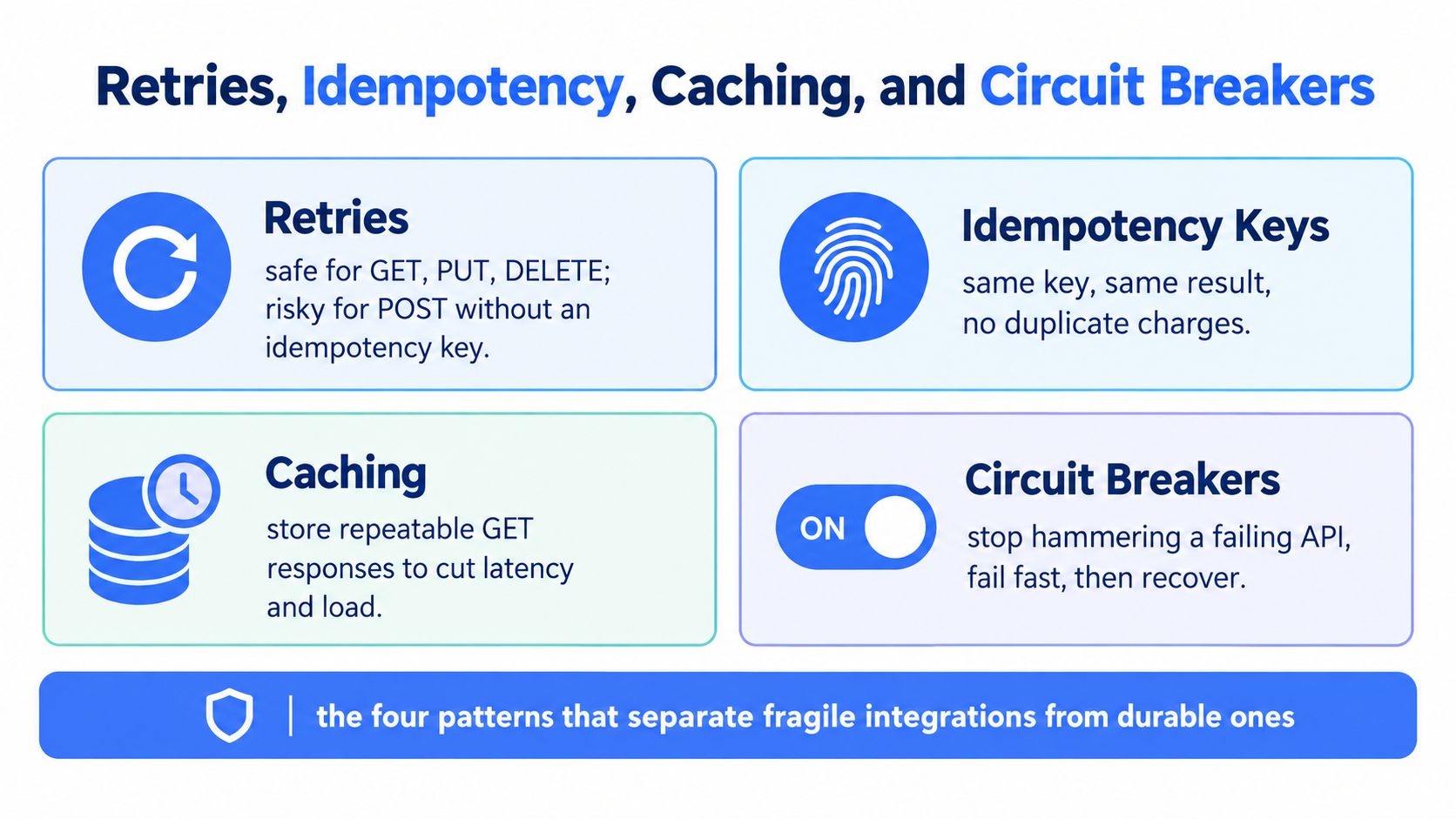
Durable integrations use a small set of patterns together, not one at a time. Retries help with transient failures, idempotency protects you from duplicate writes, caching reduces repeated work, and circuit breakers stop a failing upstream from dragging everything else down.
Retry only what's safe
Reliable API integration requires bounded retries with exponential backoff and jitter, and only for idempotent operations Google's idempotency guidance. That means GET, PUT, and DELETE can usually be retried safely under HTTP semantics, but POST can create duplicates if the server already committed the request before the timeout hit.
For non-idempotent calls, use an Idempotency-Key. The server should persist that key with the request body hash, response status, and response payload, then replay the original result if the same key shows up again. If the key is reused with a different payload, reject it.
Practical rule: if a timeout can happen after the server has already done the work, your client needs an idempotency key.
Cache the repeatable part
Caching is a latency tool, but it's also a correctness choice. It works best for repeated reads that don't change often, and it gets risky when the underlying data shifts quickly. If you cache transcript metadata or summaries, you reduce cost and repeated upstream calls. If you cache fast-moving engagement data too long, your users will trust stale numbers.
A decent cache strategy starts with keys built from every response-affecting parameter and respects authentication boundaries. Then you decide how fresh the data must be before it becomes misleading. That trade-off is part engineering, part product judgment.
Circuit breakers keep outages small
A circuit breaker is what stops your app from repeatedly punching a dead upstream. Instead of hammering the provider with doomed requests, you fail fast for a while, then probe again when the system has a chance to recover. That protects both sides, especially during partial outages when a naive retry loop would multiply the pain.
When you wire all four patterns together, you get a loop that degrades gracefully. Retries handle the noise, idempotency prevents duplicate side effects, caching absorbs repeat reads, and circuit breakers prevent a bad dependency from becoming your outage.
Security, Governance, and the Hidden Risks of a Working Integration
A working integration can still be unsafe. In fact, it can be more dangerous than a broken one if nobody is watching what data flows through it, who can access it, or how permissions drift over time.
Recent industry research reported 99% of surveyed organizations experienced an API security issue in the previous 12 months, while only 10% had an API posture-governance strategy. The same report called out exploitable vulnerabilities, sensitive-data exposure, and authentication weaknesses as the most common problems API security research summary.
What good governance actually means
Good governance starts with an accurate inventory. You need to know which APIs exist, which data they return, and which systems depend on them. From there, test object-level authorization, minimize sensitive data in responses, and monitor for schema or permission changes that could open a path you didn't intend.
A basic control loop looks like this:
- Maintain an API inventory so shadow endpoints don't drift.
- Classify returned data to avoid exposing more than the caller needs.
- Enforce least privilege on every token and integration user.
- Test object-level authorization instead of trusting route-level checks alone.
- Watch for schema changes that alter what a client can infer or store.
That's the part many tutorials skip. They show how to connect. They don't show how to keep the connection from becoming a liability six months later.
AI makes the governance problem sharper
AI workflows raise the stakes because a model can transform inputs, select endpoints, or trigger actions without a human looking at each step. If the workflow retries aggressively, caches stale results, or leaks unvalidated outputs into downstream systems, the integration doesn't just fail, it amplifies failure.
Practical defenses include spend budgets, anomaly detection, human approval for high-impact actions, and output validation before anything sensitive gets written or sent onward. The core idea is simple. If the client can think, plan, or act, you need governance that assumes the client might also misbehave.
Testing, Monitoring, and Shipping With a Deployment Checklist
Testing an API integration is not just “does it return 200.” It's contract testing, sandbox verification, retry behavior, alerting, and post-deploy visibility. If you skip those pieces, the first real outage becomes your test suite.
What to test before launch
Start with the contract. Verify the request and response shape against the provider's docs, then run the same flow in a sandbox or staging environment. Add synthetic probes that call the integration on a schedule so you know when the dependency changes even if no user reports it yet.
Your dashboard should include p50, p95, and p99 latency, error rate, retry amplification, cache hit ratio, and upstream call count. Those numbers tell you whether the integration is merely working or behaving well under load. Fast median latency with ugly tail latency is usually a sign that the retry or cache strategy needs attention.
A deployment checklist that keeps surprises down
- Document the contract so future changes don't become archaeology.
- Alert on auth failures before users start filing tickets.
- Set quota alarms so limit issues show up early.
- Monitor schema changes to catch provider drift.
- Keep a kill switch ready for bad upstream behavior.
- Write the rollback path down before the launch, not during it.
The newer wrinkle is AI-agent traffic. Industry data showed 25% of organizations had already faced AI-driven attacks targeting APIs or large language models, while 55% reported an API security breach in the preceding year, even though 85% expressed confidence in their security capabilities AI-driven API security data. That gap is a reminder that confidence doesn't replace observability.
If your integration is headed into production, Captapi gives teams a REST API, SDKs, a CLI, an n8n node, and an MCP server for AI agents, which makes it a practical fit for pipelines that need social data without stitching together multiple access methods. If you're building something that has to stay reliable after launch, visit Captapi and check how its API fits the workflow you're shipping.